
Farmers across Punjab often face delays and uncertainty when waiting for their Kisan Card application to be processed, not knowing whether their loan has been approved or if their documents need correction. The Kisan Card check online system, accessible through the 8171 Kisan Card portal, provides a simple and instant way to track your application status using just your CNIC number.
Key Takeaways
- Two Ways to Check Status: You can check your Kisan Card status either by sending your CNIC to 8070 via SMS or by visiting the official 8171 web portal for a detailed online status update.
- 8171 is for Status Checking: The 8171 code is primarily used to check eligibility and payment status for various government programs, including the Kisan Card, through a unified web portal.
- Real-Time Status Updates: After sending your CNIC to 8070, you will receive an instant SMS reply showing whether your application is Approved, Pending, Under Verification, or Rejected.
- Phase 3 Loan Limit Increase: Under Phase 3 of the Kisan Card program, eligible farmers can now receive up to Rs. 300,000 in interest-free loans, a significant increase from the previous limit.
- Read More: Agriculture e-Credit Scheme (8070 Kisan Card Apply Now)
- Read More: Punjab Farmers Wheat Subsidy (Apply Online)
- Read More: CM Punjab Livestock Card Scheme (Register & Apply)
- Read More: CM Punjab Loan Scheme Online Apply
Kisan Card Check Online | 8171 Kisan Card

Table Of Contents
What is the Kisan Card and the 8171 Portal?

The Kisan Card is a government-backed digital financial tool that provides interest-free loans and direct subsidies to eligible farmers across Punjab, enabling them to purchase fertilizers, seeds, pesticides, and other agricultural inputs from authorized dealers. The 8171 web portal serves as the primary digital channel for citizens to check their eligibility and status for various social welfare programs, including the Kisan Card, using just their CNIC number.
How the Kisan Card Works as a Financial Tool

The Kisan Card functions like a debit card, allowing farmers to access their allocated loan funds directly without intermediaries. Each registered farmer receives a smart Kisan Card connected to their Bank of Punjab account, enabling instant access to funds and subsidies. The payments are made through the card at authorized dealers, ensuring transparency and eliminating the role of middlemen.
- Direct Benefit Transfer: Subsidies are transferred directly to the farmer’s linked account, minimizing leakage.
- Financial Inclusion: The card brings unbanked farmers into the formal financial system.
- Transparency: The 8171 portal allows farmers to track their status and payments in real-time.
- Convenience: Funds can be accessed via ATMs or used for point-of-sale purchases.
What is the 8171 Web Portal?
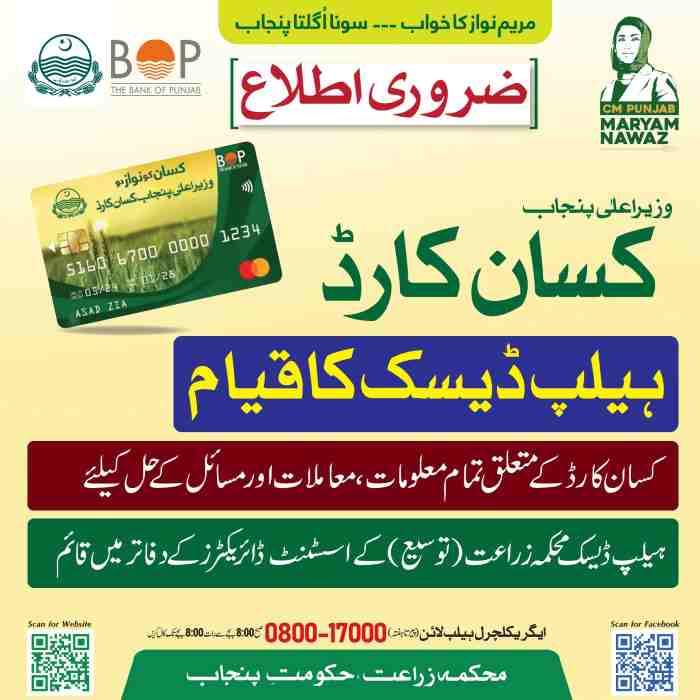
The 8171 portal and its associated SMS service are the primary digital channels established by the Government of Pakistan for citizens to check their eligibility and status for various social welfare programs, including the Kisan Card. The purpose of the 8171 CNIC check is to provide a unified, accessible platform for beneficiaries to verify their enrollment and payment details using just their Computerized National Identity Card number.
Key Features of the Kisan Card Program
- Zero Markup Loans: The program provides interest-free loans to eligible farmers.
- Subsidized Inputs: Farmers receive subsidies on fertilizers, pesticides, and certified seeds.
- Digital Verification: The system uses NADRA and PLRA databases for secure verification.
- Easy Access: Farmers can use the card at authorized dealers and Bank of Punjab ATMs.
- Repayment Flexibility: Flexible installment plans are available for up to one year.
Kisan Card Check Online by CNIC: Complete Step-by-Step Guide

Farmers can check their Kisan Card registration and loan status easily using multiple methods. The fastest method is through SMS, where you type your CNIC number and send it to 8070 to receive an instant reply with your registration and loan details.
Method 1: Kisan Card Check Online via 8171 Web Portal
The online process via the 8171 web portal is the most detailed method for checking your Kisan Card status. Follow these simple steps to verify your enrollment in the program:
- Step 1 – Open Your Browser: Use Chrome, Firefox, or any mobile browser on your smartphone or computer.
- Step 2 – Go to the Official Portal: Navigate to the official 8171 web portal or the Punjab Agriculture Department website.
- Step 3 – Locate the Status Check Section: Find the “Kisan Card Status Check” or “Check Eligibility” option on the homepage.
- Step 4 – Enter Your CNIC Number: Type your 13-digit CNIC number without dashes (e.g., 3520112345678).
- Step 5 – Provide Your Registered Mobile Number: Enter the mobile number you used during Kisan Card registration.
- Step 6 – Complete the Security Verification: Enter the CAPTCHA code displayed on the screen.
- Step 7 – Submit the Request: Click on the “Check Status” or “Submit” button.
- Step 8 – View Your Status: The portal will display your current application status, whether it is Approved, Rejected, Pending, or Under Verification.
Method 2: Kisan Card Status Check via SMS to 8070
The SMS method is the fastest and most accessible option for farmers without internet access. It does not require a smartphone or data connection, only a basic mobile phone.
- Step 1 – Open the Messaging App: Go to the SMS application on your mobile phone.
- Step 2 – Enter the Correct Format: Type your 13-digit CNIC number without spaces or dashes. Some sources also suggest adding “PKC” before the CNIC number.
- Step 3 – Send to 8070: Send the message to the shortcode 8070.
- Step 4 – Wait for the Reply: You will receive an instant SMS reply with your registration and loan details within a few minutes.
- Step 5 – Read Your Status: The response will show whether your application is Approved, Pending, Under Verification, or Rejected.
Understanding Your Status Message

After sending your CNIC to 8070, you will receive one of several possible response messages. Understanding these messages helps you know what action to take next.
- “Application Approved”: Your application has been approved. You will receive instructions to collect your Kisan Card from the nearest Bank of Punjab branch.
- “Under Verification”: Your application is still being processed through NADRA, PLRA, and PMD verification stages. No action is needed.
- “Pending”: Your application has been received but verification has not yet started. This typically occurs during high-volume application periods.
- “Rejected”: Your application has been rejected due to incorrect CNIC information, land record not updated in PLRA database, SIM card not registered on your CNIC, or previous loan default with banks.
- “No Record Found”: The system does not have any application associated with your CNIC. You may need to register first by sending “PKC space CNIC” to 8070.
Common Reasons Why Kisan Card Applications Get Rejected

Some applications are rejected due to incorrect information or incomplete verification. Understanding these reasons can help applicants correct their records and apply again.
- Incorrect CNIC Information: Your CNIC number may have been entered incorrectly during registration.
- Land Record Not Updated in PLRA Database: Your land ownership must be digitally recorded in the PLRA system.
- SIM Card Not Registered on Applicant’s CNIC: The mobile SIM used for registration must be registered in your name.
- Previous Loan Default with Banks: Active bank defaulters are disqualified from the program.
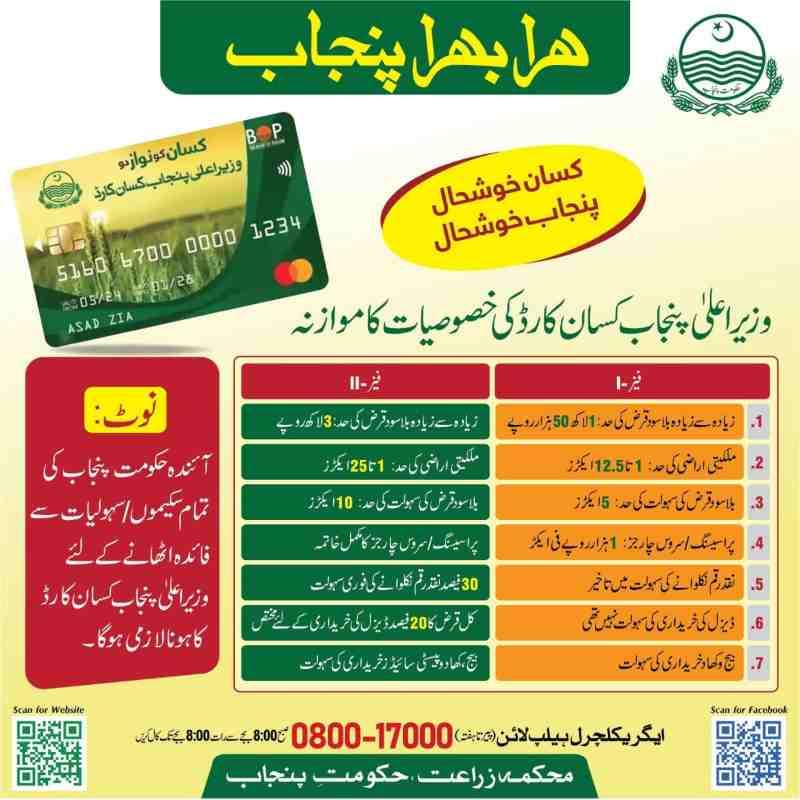
- Land Ownership Exceeds Limit: Farmers owning more than 12.5 acres (or 25 acres in Phase 3) are not eligible.
Kisan Card Eligibility Criteria for Punjab Farmers
To benefit from the Kisan Card program, farmers must meet specific eligibility criteria set by the Government of Punjab. The program is specially designed for genuine farmers who are actively engaged in agriculture.
Basic Eligibility Requirements
You must meet the following conditions to apply for the Kisan Card or check your status online:
- Punjab Residency: You must be a permanent resident of Punjab province.
- Land Ownership or Lease: You must own or lease agricultural land for cultivation.
- Valid CNIC: Your CNIC must be valid and linked to your mobile number.
- Active Farming: You must be actively engaged in farming, either in crops or livestock.
- SIM in Your Name: The SIM card used for registration must be registered in your CNIC name.
- No Active Bank Default: You must not be a defaulter of previous agricultural loans.
Land Ownership and Acreage Limits
The program primarily targets small and medium landowners. Here is the breakdown of the specific land requirements:
- Phase 1 & 2: Farmers owning between 1 to 12.5 acres of agricultural land are eligible.
- Phase 3 Expansion: Eligibility has been extended to farmers with up to 25 acres of land in select districts.
- Leased Land: Tenant farmers can also apply, provided they possess a legal lease agreement verified by the PLRA.
- Land Record Verification: Your land must be digitally recorded in the Punjab Land Record Authority database.
How to Register for the Kisan Card (If You Haven’t Applied Yet)
If you have not yet applied for the Kisan Card and want to check your status later, you must first complete the registration process. There are three ways to register for the Kisan Card.
Method 1: Online Registration via Portal
- Visit the official BOP Kisan Portal or the Punjab Agriculture Department website.
- Click on “New Registration.”
- Enter your Name, CNIC, and Mobile Number.
- Verify with the OTP sent to your phone.
- Create a password and log in to your account to complete the application.
Method 2: Registration at Agriculture Office or BOP Branch
- Visit the nearest Agriculture Department Extension Office or Bank of Punjab branch.
- Carry your original CNIC, land ownership documents, and a passport-size photo.
- Fill out the Kisan Card registration form.
- Complete biometric verification through NADRA devices.
- Receive SMS confirmation once approved.
Method 3: Registration via SMS to 8070
- Open the messaging app on your mobile phone.
- Type “PKC space CNIC Number” (e.g., PKC 3520112345678).
- Send this SMS to 8070.
- You will receive an instant reply with eligibility status or instructions for further registration.
How to Check Kisan Card Balance and Loan Details
Once you have received your Kisan Card and it has been activated, you can check your available balance and loan details using multiple methods.
Balance Check via SMS to 8070
Send your CNIC number to 8070 with the keyword “BAL” to receive your current available balance.
- Balance Request Format: Send “BAL space CNIC number” to 8070.
- Response Time: Balance information is returned within 30 seconds.
- Information Provided: Current available balance, total loan amount, and season expiry date.
- No Charges: Balance check SMS is completely free for all mobile networks.
Balance Check via 8171 Web Portal
- Visit the official 8171 web portal or the BOP Kisan Portal.
- Enter your 13-digit CNIC number with dashes.
- Provide your registered mobile number.
- Click on Login to access your dashboard.
- View details such as card approval, subsidy disbursement, or loan updates.
Balance Check at Bank of Punjab ATMs
- Insert your Kisan Card into any Bank of Punjab ATM.
- Enter your 4-digit PIN when prompted.
- Select “Balance Inquiry” from the main menu.
- Your current available balance appears on screen.
- Choose to print a receipt or view on screen.
Kisan Card Phase 3 Updates and Loan Limit Increase
The Kisan Card program has entered Phase 3, which has made the system more transparent, efficient, and farmer-friendly. Earlier phases focused on building the foundation, but this new phase expands the benefits to a wider farmer community.
Increased Loan Limit to Rs. 300,000
Under the revised scheme, registered Kisan Card holders can now borrow up to Rs. 300,000 per crop season at subsidized or zero-interest rates, depending on their eligibility category. This increase in the CM Punjab Kisan Card loan limit is a gamechanger for farmers, especially those with larger landholdings.
- Phase 1 Loan Limit: Up to Rs. 150,000 per farmer per season.
- Phase 3 Loan Limit: Up to Rs. 300,000 per farmer per season.
- Per-Acre Rate: Rs. 30,000 per acre for eligible land.
- Maximum Coverage: 5 acres for Phase 1; expanded coverage for Phase 3.
Phase 3 Winner List and Rewards
The Punjab Government has officially released the Kisan Card Phase 3 Winner List. Thousands of hardworking farmers who maintained good payment records are being rewarded with brand-new tractors, Umrah tickets, fertilizer vouchers, and cashback offers.
- Tractor Rewards: Brand-new subsidized tractors for lucky draw winners.
- Umrah Tickets: Religious travel rewards for farmers with clean repayment histories.
- Fertilizer Vouchers: Discounted or free fertilizer for timely payers.
- Cashback Offers: Percentage of loan amount returned as cashback for early repayment.
Phase 3 Application Statistics
The program has garnered significant interest, with 687,623 applications submitted through the 8171 and Rabta App from three key divisions in South Punjab: Multan, DG Khan, and Bahawalpur. This demonstrates the widespread adoption and trust in the Kisan Card initiative among Punjab’s farming community.
Kisan Card Helpline Number and Support Channels
If you encounter any issues while checking your Kisan Card status online or via SMS, or if you have questions about your application, multiple support channels are available to assist you.
Punjab Agriculture Department Helpline
- Primary Helpline: 0800-17000 (toll-free from all networks)
- Operating Hours: 8:00 AM to 8:00 PM daily (including Sundays and public holidays)
- Services Available: Application status, eligibility questions, dealer verification, complaint registration
- Information Required: Have your CNIC number ready before calling
Bank of Punjab Helpline for Card-Specific Issues
- BOP Helpline: 042-111-333-267
- Availability: 24 hours a day, 7 days a week
- Services: Card blocking, PIN reset, transaction disputes, ATM problems, card delivery status
District Agriculture Department Facilitation Centers
In-person support is available at agriculture department offices across Punjab.
- District Headquarters: Each district has a main Agriculture Department office.
- Tehsil Offices: Most tehsils have designated agriculture facilitation centers.
- Mobile Service Vans: Government vans visit villages on scheduled dates.
- Services Available: Application assistance, status checking, document verification.
- No Fees: All facilitation center services are completely free.
Understanding the 8171 Code: Kisan Card vs. Other Government Programs
The 8171 code is sometimes confused with other government programs, particularly the Benazir Income Support Program (BISP). It is important to understand the distinction to ensure you are using the correct channel for your Kisan Card status check.
8171 for BISP and Ehsaas Programs
The 8171 portal was originally established for the Benazir Income Support Program and Ehsaas assistance programs to help beneficiaries verify their payments and eligibility. BISP 8171 allows eligible people to receive their Rs. 13,500 payment every three months.
8171 for Kisan Card Status Checking
The same 8171 web portal has been expanded to serve as a unified digital channel for citizens to check their eligibility and status for various social welfare programs, including the Kisan Card. The purpose of the 8171 CNIC check is to provide a unified, accessible platform for beneficiaries to verify their enrollment and payment details using just their CNIC number.
Key Distinction: 8070 vs. 8171
- 8070: This is the primary SMS shortcode for Kisan Card registration and status checking. Farmers send “PKC space CNIC” to 8070 to apply and check their status.
- 8171: This is the web portal used for checking eligibility and status for multiple government programs, including the Kisan Card, through an online interface.
- Both are Valid: Both 8070 (SMS) and 8171 (web portal) can be used to check your Kisan Card status. The SMS method is faster for basic status, while the web portal provides more detailed information.
Frequently Asked Questions (FAQ)
Q1: How can I check my Kisan Card status online by CNIC?
Visit the official 8171 web portal or the Punjab Agriculture Department website, enter your 13-digit CNIC number without dashes, provide your registered mobile number, and click on “Check Status” to view your application status instantly.
Q2: What is the 8171 Kisan Card portal?
The 8171 web portal is a unified digital platform established by the Government of Pakistan for citizens to check their eligibility and status for various social welfare programs, including the Kisan Card, using just their CNIC number.
Q3: How do I check my Kisan Card status via SMS?
Open the messaging app on your mobile phone, type your 13-digit CNIC number (or “PKC space CNIC” in some cases), and send it to 8070. You will receive an instant SMS reply with your registration and loan details.
Q4: What are the eligibility criteria for the CM Punjab Kisan Card?
You must own 1 to 12.5 acres of PLRA-verified land (or up to 25 acres in Phase 3), be a Punjab resident, have a SIM registered in your name, and not be a bank defaulter.
Q5: How much interest-free loan can I get through the Kisan Card?
Under Phase 3, eligible farmers can receive up to Rs. 300,000 in interest-free loans per crop season, compared to Rs. 150,000 in Phase 1.
Q6: Why is my Kisan Card application showing “Rejected”?
Common reasons for rejection include incorrect CNIC information, land record not updated in PLRA database, SIM card not registered on your CNIC, previous loan default with banks, or land ownership exceeding the eligible limit.
Q7: How long does it take to receive the Kisan Card after applying?
Typically 7 to 21 working days, depending on the speed of verification through NADRA, PMD, and PLRA databases.
Q8: Can I check my Kisan Card balance online?
Yes, you can check your balance by sending your CNIC to 8070 with the keyword “BAL,” visiting the 8171 web portal, or using any Bank of Punjab ATM.
Q9: What is the Kisan Card helpline number?
The Punjab Agriculture Department helpline is 0800-17000 (toll-free, 8 AM to 8 PM). The Bank of Punjab helpline for card-specific issues is 042-111-333-267 (24/7).
Q10: What is the difference between 8070 and 8171 for Kisan Card?
8070 is the SMS shortcode for registration and status checking via text message. 8171 is the web portal for online status checking. Both can be used to check your Kisan Card status.

Add a Comment