
Many people search for “bike registration check by CNIC Punjab” expecting to enter a CNIC number and see all registered bikes. However, the official MTMIS Punjab portal does not allow direct CNIC-based public searches to protect owner privacy and prevent misuse of personal data.
What you are going to learn from this guide:
- Why the official portal blocks CNIC-based public searches
- Step-by-step bike registration verification using the registration number
- How to use SMS service 8785 for instant bike checks
- Complete process to download e-registration cards and smart cards
- Step-by-step guide for PAK-ID app biometric verification
- How to transfer bike ownership online and offline
- Latest registration fees, token tax rates, and transfer charges
- Security tips to avoid fraud when buying a used bike
- Troubleshooting common errors on the MTMIS portal
- Future developments including CNIC-based vehicle number retention
Key Takeaways
- No Direct CNIC Search: The public MTMIS portal does not allow checking bike registration by CNIC alone. You must use the registration number for online verification.
- Biometric Verification Now at Home: The PAK-ID app enables fingerprint and face ID authentication for ownership transfers without visiting any office.
- Three Official Verification Methods: Use the MTMIS web portal, send SMS to 8785, or visit an Excise office in person for complete records.
- Smart Card Available as Digital Download: E-registration cards can be downloaded as PDF files using the registration and chassis number, eliminating the need to carry physical documents.
- Transfer Finalized in 48 Hours: Once biometric verification and payment are completed through the new digital system, ownership transfer is finalized within two days.
- Read More: Motorcycle Registration Check Online Punjab (Check by CNIC)
- Read More: Public Holidays In Pakistan (1 January to 31 December)
- Read More: How To Check PTA Tax On Mobile | PTA online check
Bike Registration Check By CNIC Punjab – Official Portal
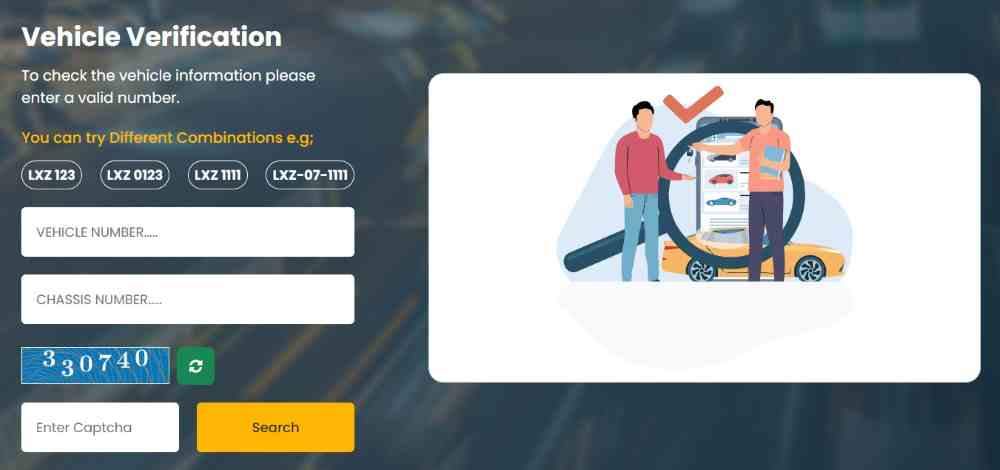
Table Of Contents
Why Can’t You Perform a Direct Bike Registration Check by CNIC Punjab?
The Punjab Excise and Taxation Department intentionally restricts direct CNIC-based public searches on the MTMIS portal to protect sensitive owner information from misuse and identity theft.
Is it legal to check bike registration details using only a CNIC number in Punjab?
No, it is not permitted for the general public due to strict data protection laws enforced by the Punjab government. The legal framework prioritizes individual privacy over open access to personal identification records.
What are the official privacy laws preventing CNIC-based public searches?
The Prevention of Electronic Crimes Act and the Punjab Data Protection framework explicitly prohibit unauthorized access to personal data. The Excise department complies with these regulations by limiting public searches to vehicle registration numbers only.
How does the Punjab government protect vehicle owner data?
The government safeguards data through three layers of protection: first, requiring the registration number as a mandatory search key; second, limiting displayed information to essential vehicle details; and third, reserving full CNIC-linked records for law enforcement and official verification only.
What is the difference between public search and official verification?
Public search allows anyone with a bike’s plate number to view basic ownership and tax status. Official verification, by contrast, requires presenting your original CNIC in person at an Excise office to access complete records including all vehicles registered under a specific identity.
When is a CNIC required for bike registration matters in Punjab?
A CNIC becomes mandatory in five specific scenarios. First, manual verification at an Excise office when online checks fail. Second, biometric verification for ownership transfers at NADRA e-Sahulat centers. Third, police verification to check a bike’s criminal record at a Police Khidmat Markaz. Fourth, applying for a duplicate registration card when the original is lost or damaged. Fifth, registering a new bike or transferring ownership from a seller.
What is the Official Process for Bike Registration Check on MTMIS Punjab Portal?
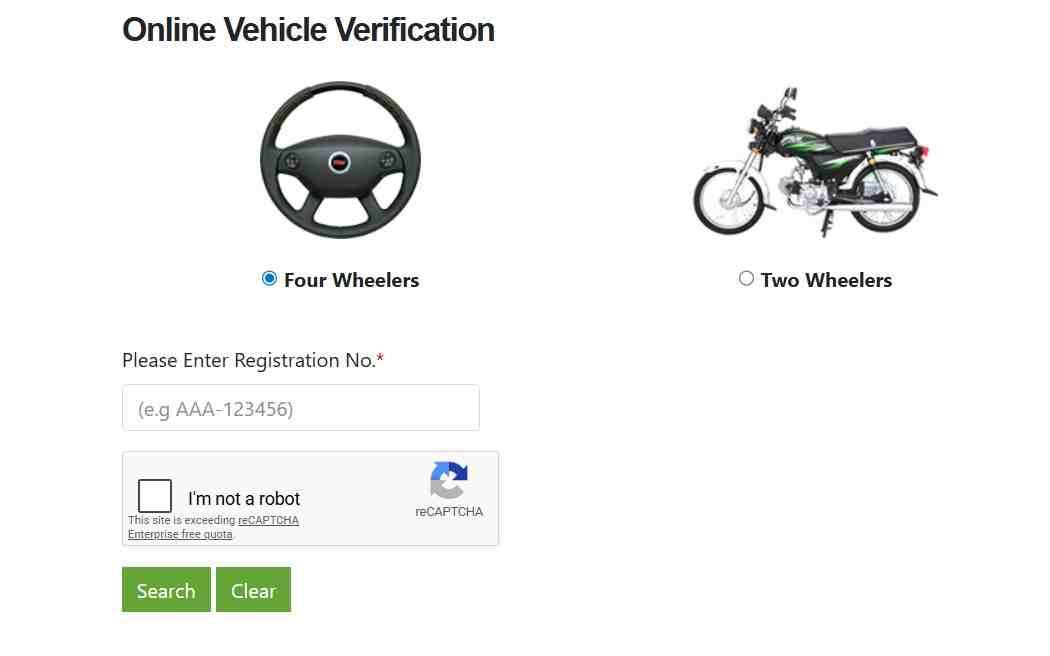
The MTMIS (Motor Transport Management Information System) portal provides free, real-time bike registration verification using only the vehicle’s registration number, completing the entire process in under two minutes.
How to check bike registration online using the registration number?
While you cannot directly use a CNIC for this check, the process using the registration number is straightforward and completely free. You only need the bike’s number plate digits exactly as they appear.
What is the correct URL for MTMIS Punjab vehicle verification?
The official government website is mtmis.excise.punjab.gov.pk. Always verify you are on the legitimate site before entering any vehicle details to avoid phishing attempts.
What is the step-by-step guide to entering the registration number correctly?
Open your web browser and navigate to the official MTMIS Punjab website. On the homepage, locate the vehicle verification tool. Enter your bike’s full registration number exactly as it appears on the number plate. Common format examples include LEA-20-1234, ABC-1234, or LEA 1234. Complete the CAPTCHA verification to confirm you are a human user. Click the search button to retrieve all vehicle records.
Key Information about registration number formats:
- Include hyphens or spaces exactly as on the plate
- Try different combinations if the first attempt fails
- Remove any special characters that may cause errors
- Ensure you have not accidentally added extra spaces
- The system recognizes both old and new plate formats
What to do if CAPTCHA verification fails repeatedly?
Refresh the CAPTCHA image if the characters appear unclear. Ensure you are entering the text exactly as shown, paying attention to case sensitivity. Disable any VPN or proxy services that might trigger security flags. Try using a different web browser or device. Clear your browser cache and cookies before attempting again.
What details are displayed after a successful bike registration check?
Complete vehicle information revealed after search:
- Owner’s full name and father’s name
- Complete chassis number (17-digit unique identifier)
- Engine number stamped on the engine casing
- Bike make, model, and manufacturing year
- Vehicle color and fuel type
- Registration date and registration authority
- Token tax payment status with last payment date
- Smart card issuance status
- Any outstanding dues or penalties
- “Open letter” status indicating incomplete transfer
How to interpret the “Application Current Status” field?
The status field indicates the bike’s legal standing. A “Valid” status means the registration is active and all taxes are paid. “Expired” means the registration period has lapsed. “Under Process” indicates a pending application with the Excise department. “Open Letter” is the most critical warning, meaning the bike has been sold but not formally transferred, leaving the original owner legally responsible for any fines or violations.
How to Perform Bike Registration Check by CNIC Punjab via SMS?
The Punjab government provides an SMS-based verification service that works on any mobile phone without requiring internet access, delivering basic vehicle information within seconds.
What is the SMS code 8785 for bike verification in Punjab?
The toll-free short code 8785 is the official Punjab Excise department SMS verification number. Send a properly formatted registration number to this code to receive instant bike details directly on your phone screen.
What is the exact format for sending a registration number via SMS?
Open your phone’s default messaging application. Type the bike’s complete registration number exactly as it appears on the number plate. Do not add any extra text, spaces, or punctuation marks. Send the message to the number 8785. The system automatically processes your request and returns a reply within five to ten seconds.
What information will you receive in the SMS reply?
The SMS response typically includes three essential pieces of information: the registered owner’s name, the vehicle make and model, and the token tax payment status. For basic verification purposes, this information is usually sufficient to confirm ownership.
Why might you not receive a reply after sending an SMS to 8785?
The service occasionally experiences technical downtime due to high traffic volumes or system maintenance. Some users have reported no response despite multiple attempts during peak hours. In such cases, use the online MTMIS web portal as a reliable backup verification method.
What is the cost of using the SMS verification service?
The Excise department does not charge any fee for the SMS verification service. However, your mobile network operator may apply standard SMS charges according to your prepaid or postpaid package. These charges typically range from PKR 0.50 to PKR 1.50 per message.
How to Use the Excise and Taxation Punjab Mobile App for Bike Registration Check?
Several mobile applications claim to offer bike registration verification services, but only government-approved apps provide authentic and reliable data.
What is the official Excise & Taxation Punjab mobile app called?
The Punjab Excise department does not maintain an official standalone mobile app for public verification. The primary government-backed mobile solution is the PAK-ID app developed by NADRA in partnership with the Punjab Information Technology Board for biometric verification purposes.
Is there a government-authenticated app for bike registration verification?
No government-authenticated mobile app exists specifically for bike registration public searches. The MTMIS web portal and SMS service to 8785 remain the only official methods for public verification. Third-party apps claiming to offer this service may display outdated or incorrect data.
What are the risks of using third-party verification apps?
Third-party apps pose significant security and accuracy risks. They are not affiliated with any government department and may misuse your personal data. The information displayed may be outdated, incomplete, or entirely fabricated. These apps have no legal liability for any errors or omissions. Always verify critical information through the official MTMIS portal or SMS service.
What are the key features of the PAK-ID app for overseas Pakistanis?
Unique features of the PAK-ID app for vehicle matters:
- Biometric verification using fingerprint or facial recognition
- Fully online ownership transfer without visiting embassies
- Elimination of attested affidavits and power of attorney
- Global accessibility from anywhere in the world
- Integration with NADRA’s central identity database
- Real-time verification status updates
- Secure digital identity authentication
How to download and install the PAK-ID app?
Download the PAK-ID app from NADRA’s official website or your device’s authorized app store. For Android users, find it on the Google Play Store. For iOS users, locate it on the Apple App Store. Install the application, register your account using your CNIC number, and follow the biometric setup prompts using your phone’s camera for facial recognition or fingerprint sensor.
What Bike Registration Details Can You Verify Using Your CNIC Offline?
While online CNIC-based searches are not available to the public, the Excise department provides offline verification services for legitimate owners who need complete records.
Why do you need to visit an Excise office for CNIC-based verification?
The Excise department restricts CNIC-based data to in-person requests only. If online verification fails or you need a complete record of all vehicles registered under your name, you must visit an Excise and Taxation office with your original CNIC. This requirement prevents unauthorized access to personal vehicle records.
What documents should you bring for manual verification at an Excise office?
Bring your original CNIC as the primary identification document. If available, bring the bike’s registration book or smart card. Include any relevant sale documents or transfer papers. The officer will verify your identity against NADRA records and provide the requested vehicle information.
How to find the nearest Excise and Taxation office in your city?
Excise offices are located in all major Punjab cities including Lahore, Rawalpindi, Faisalabad, Multan, Gujranwala, Sialkot, Bahawalpur, and Sargodha. Visit the official Excise department website to access the complete list of office addresses, contact numbers, and working hours. Most offices operate from Monday through Friday, 9 AM to 5 PM.
What is the difference between manual verification and police verification?
Manual verification at an Excise office checks registration status, ownership history, and tax payment records. Police verification at a Police Khidmat Markaz, by contrast, checks whether the bike has a criminal record or is reported stolen. Police verification requires copies of both your CNIC and the owner’s CNIC, along with the bike’s registration documents.
How to Check All Vehicles Registered Under Your CNIC in Punjab?
Many citizens need to know how many vehicles are registered under their name, especially when buying or selling multiple bikes over time.
Can you see the complete list of bikes owned by a person using their CNIC?
The public MTMIS portal does not allow this due to strict privacy restrictions. However, government officials and law enforcement personnel have authorized access to CNIC-linked vehicle databases for legitimate official purposes.
What is the procedure for citizens to request their own vehicle ownership records?
You must submit a formal written application at the Excise and Taxation Department office. Attach a copy of your original CNIC. The officer will verify your identity and process your request. The department typically provides the complete list of vehicles registered under your name within three to five working days.
How do law enforcement agencies use CNIC for vehicle verification?
Police and traffic officers can use your CNIC during traffic stops or accident investigations to instantly retrieve all vehicles registered under your name. This capability helps law enforcement identify stolen vehicles, unpaid fines, and ownership disputes without requiring registration numbers.
Can you authorize someone else to check your bike registration using your CNIC?
Yes, you can authorize a family member or representative to perform verification on your behalf. Provide a written authorization letter clearly stating the representative’s name and CNIC number. Attach a copy of your CNIC and the representative’s CNIC. The authorized person must present all documents at the Excise office to access your vehicle records.
What is the Complete Guide to Bike Registration in Punjab Using CNIC?
Registering a new bike in Punjab requires specific documents and fees, with the CNIC serving as the central identification document throughout the process.
What documents are required for new bike registration in Punjab?
Complete document checklist for new bike registration:
- Original sales certificate issued by the authorized dealer
- Original sales invoice showing paid amount and GST
- Copy of your valid CNIC (attested)
- Completed application Form F
- Payment receipt for registration fee
- Payment receipt for token tax
- Payment receipt for number plate fee
What is Form F and why is it important for registration?
Form F is the official application for vehicle registration prescribed under the Motor Vehicles Ordinance. This form must be completed with accurate vehicle and owner information and submitted to the Excise and Taxation Department. The department uses Form F to create the permanent registration record in the MTMIS database.
What is the registration fee structure for different motorcycle engine capacities?
Registration fees for motorcycles (all amounts in PKR):
- Motorcycles up to 70cc: PKR 1,000
- Motorcycles 71cc to 100cc: PKR 1,500
- Motorcycles 101cc to 125cc: PKR 2,000
- Motorcycles 126cc to 150cc: PKR 2,500
- Motorcycles above 150cc: 2% of the vehicle’s value
How to register a bike purchased from someone who never registered it?
If the original purchaser sold the bike before completing registration, you need additional documentation. Collect the original sales certificate from the dealer. Obtain the original sales invoice. Secure the T.O. (Transfer Order) Form documenting the sale between the original purchaser and the seller. Attach documents showing the chain of sale. Include copies of both your CNIC and the original purchaser’s CNIC.
What are the special requirements for registering an imported bike?
Imported bikes require a more extensive documentation package. Submit the application Form F with all vehicle details. Provide a copy of your CNIC. Attach the Import Permission certificate issued by Customs Authorities. Include the duplicate copy of the Goods Declaration (GD) showing payment of all taxes and duties. Attach the original invoice from the manufacturer or seller. Provide the Bill of Lading document. Include payment receipts for all applicable fees and taxes.
How Does Biometric Verification Using CNIC Work for Bike Registration?
Biometric verification has transformed vehicle registration and transfer processes by replacing physical signatures with secure digital authentication.
What is biometric verification and why is it mandatory?
Biometric verification uses your unique physical characteristics, specifically fingerprints or facial features, to confirm your identity. This process prevents fraudulent registrations and ownership transfers by ensuring the actual owner is physically present and consenting. Biometric data is matched against NADRA’s central database in real time.
How to perform biometric verification at a NADRA e-Sahulat center?
Visit any authorized NADRA e-Sahulat center or e-facility location. Bring your original CNIC for identification. The center operator will guide you to a biometric verification terminal. Place your thumb or finger on the scanner. The system will capture your fingerprint and instantly verify it against NADRA’s database. For facial recognition, look directly at the camera. The verification confirmation appears within seconds.
How to complete biometric verification online from home using PAK-ID?
Download the PAK-ID app from your device’s authorized app store. Log in using your CNIC number and registered mobile number. Navigate to the vehicle services section. Enter your vehicle registration number and other required details. Follow the biometric prompts on your screen. For facial recognition, position your face within the on-screen frame. For fingerprint verification, use your device’s fingerprint sensor. The system processes your verification and returns confirmation within minutes.
How does Face ID authentication benefit senior citizens?
Face ID authentication is particularly beneficial for senior citizens whose thumb impressions may have faded or changed due to age. Unlike fingerprint scanners that may fail with worn prints, facial recognition works reliably regardless of fingerprint condition. Senior citizens can complete the entire verification process from home without traveling to NADRA centers or Excise offices.
What is the timeline for biometric verification approval?
After completing the biometric verification through the PAK-ID app, approval typically arrives via email or app notification within minutes. Once the system confirms successful verification, the vehicle transfer or registration process moves to the final stage. The entire ownership transfer is finalized within 48 hours of completing both biometric verification and payment.
How to Transfer Bike Ownership in Punjab Using CNIC?
Transferring bike ownership requires coordination between buyer and seller, with the CNIC serving as the primary identification document for both parties.
What documents are required for bike ownership transfer in Punjab?
Required documents for ownership transfer:
- Original registration book or smart card
- CNIC copies of both buyer and seller (attested)
- Biometric verification completion for both parties
- Sales agreement or sale deed
- Proof of paid token taxes up to the transfer date
- Completed transfer application form
- Payment receipt for transfer fee
What is the transfer fee for motorcycles in Punjab?
The transfer fee structure has been updated. For motorcycles and scooters, the fee ranges from PKR 150 to PKR 500 depending on engine capacity and registration age. Motorcycles transferred within ten years of registration incur a fee of PKR 1,500, with a 10 percent rebate applied for each financial year since registration.
How to transfer bike ownership online using the ePay Punjab system?
Download the ePay Punjab app from your device’s app store or visit epay.punjab.gov.pk using your web browser. Create an account using your CNIC and mobile number. Navigate to the Excise and Taxation Department section. Select “Transfer of Ownership for Motor Vehicle” from the available services. Enter the bike registration number. Verify the current owner’s information displayed by the system. Enter the buyer’s complete details including CNIC. Generate the challan for transfer fee payment. Complete payment using bank transfer, mobile wallet, or ATM. Receive confirmation and wait for transfer finalization.
What is the offline process for bike ownership transfer?
Visit the nearest Excise and Taxation office with all required documents. Submit your application at the designated counter. The officer will verify all documents and check for any outstanding dues. Pay the generated challan at the authorized bank counter. Complete the verification procedure including any physical inspection if required. Wait for transfer confirmation, which typically arrives within seven working days.
How long does the ownership transfer process take?
After completing payment and biometric verification through the new digital system, the transfer is finalized within 48 hours. For offline applications submitted at Excise offices, the process typically takes five to seven working days. Express services are not available for ownership transfers.
What happens if the original registration book is lost?
If the original registration book or smart card is lost, you must first file a police report at your nearest police station. Submit an application for a duplicate registration certificate at the Excise office. Attach the police report, a copy of your CNIC, and updated token tax certificate. Pay the duplicate certificate fee of PKR 500 for motorcycles and cars. The duplicate certificate will be issued after verification.
What is the E-Registration Card (Smart Card) and How to Download It Using Vehicle Details?
The e-registration card is a digital version of the physical smart card that can be stored on your mobile phone, eliminating the need to carry physical documents.
What is the difference between a physical smart card and an e-registration card?
The physical smart card is a plastic card issued by the Excise department containing a microchip and QR code. The e-registration card is a PDF file containing identical information, digitally signed and legally valid. The e-registration card cannot be lost or damaged because it exists digitally. Both formats carry equal legal authority for police verification.
How to download your bike’s e-registration card online?
Step-by-step e-registration card download process:
- Visit the official Excise department website at
excise.punjab.gov.pk - Click the “E-registration Card” option in the main menu bar
- Enter your vehicle’s complete registration number
- Enter your vehicle’s chassis number (17 digits)
- Complete the security verification
- Click the search button
- Your e-registration card will appear on screen
- Click the download button to save as PDF
- Store the PDF on your mobile phone for easy access
What information is printed on the Punjab vehicle registration smart card?
The smart card includes the owner’s full name, CNIC number, father’s name, cell phone number, complete chassis number, engine number, registered address, registration date, vehicle maker, model name, manufacturing year, vehicle color, and a scannable QR code that links directly to the MTMIS database.
How to check your smart card delivery status online?
Open the e-registration card portal at vrcentpunjab.com. Enter your vehicle registration number in the first field. Enter your chassis number in the second field. Click the search button. The system will display your smart card status, indicating whether the card has been printed, dispatched, delivered to the Excise office, or is ready for collection.
Is the e-registration card legally valid for traffic police verification?
Yes, the digital e-registration card contains identical information to physical smart cards. The QR code on the digital card can be scanned by traffic police to verify authenticity directly against the MTMIS database. The e-registration card is fully acceptable for all legal purposes including police verification and traffic stops.
What is the fee for a duplicate smart card if the original is damaged or lost?
The fee for a duplicate registration certificate is PKR 500 for motorcycles and cars. For heavy transport vehicles, rickshaws, and other commercial vehicles, the fee is also PKR 500. This fee applies regardless of whether the original was lost, stolen, or damaged.
How to Check Bike Registration by Chassis Number in Punjab?
The chassis number serves as a unique identifier for every bike, allowing registration lookup even when the number plate is unknown.
Can you find a bike’s registration number using only the chassis number?
Yes, the MTMIS Lahore system allows you to find the registration number by entering the vehicle’s 17-character chassis number. This feature is particularly useful when the number plate is missing or unreadable.
What is the step-by-step process for chassis number verification?
Visit the Punjab Excise and Taxation Department website. Navigate to the vehicle verification section. Select the “Chassis Number Verification” option from the available search methods. Enter the complete 17-digit chassis number exactly as it appears on the bike frame. Complete the CAPTCHA verification. Click search. The system will display the associated registration number if the bike is registered in Punjab.
Where can you find the chassis number on a motorcycle?
The chassis number is typically stamped on the bike’s frame near the steering head, visible when you turn the handlebars fully to one side. Additional locations include under the seat, on the left side of the engine casing, or on a metal plate riveted to the frame. The chassis number is also printed on the registration book and smart card.
What should you do if the chassis number is not recognized by the system?
Ensure you are entering the number exactly as it appears without any spaces, dashes, or special characters. Verify that the bike is actually registered in Punjab, not in another province. If the bike was recently registered, allow two to three working days for database updates. If problems persist, visit an Excise office with your documents for manual verification.
How to Check Bike Token Tax and Financial Status Using CNIC?
Token tax represents the annual road tax paid to the government, and verifying its status is essential before purchasing any used bike.
How to verify token tax payment status online using the registration number?
After performing a bike registration check on the MTMIS portal, scroll down the results page. The system will display the token tax payment status section. This section shows whether the tax is paid or unpaid, the last payment date, the amount paid, and the next due date. Red indicators show unpaid or overdue status.
What happens if token tax is unpaid on a bike you want to purchase?
Unpaid token tax creates significant legal and financial problems for the new owner. The bike cannot be legally transferred until all dues are cleared. The unpaid amount accrues penalties and late fees over time. The original owner remains legally responsible until the transfer is complete. Always verify token tax payment before completing any purchase.
How to calculate token tax for different motorcycle engine capacities?
Token tax rates by engine capacity (all amounts in PKR):
- Up to 70cc: PKR 1,000 annually
- 71cc to 100cc: PKR 1,500 annually
- 101cc to 125cc: PKR 2,000 annually
- 126cc to 150cc: PKR 2,500 annually
- Above 150cc: 2% of vehicle value annually
How to pay token tax online in Punjab?
You can pay token tax online through the ePay Punjab system. Visit epay.punjab.gov.pk or use the ePay Punjab mobile app. Navigate to Excise and Taxation services. Select “Token Tax Payment” from the menu. Enter your bike registration number. The system will display the due amount. Generate a payment challan. Complete payment using bank transfer, mobile wallet (Easypaisa or JazzCash), ATM card, or credit card. Download the payment receipt for your records.
How to check a bike’s complete financial history including previous owner dues?
The MTMIS portal displays only the current tax status for the present owner. To verify historical payments and ensure no outstanding dues from previous owners, you must request a complete financial record from the Excise office. Visit the office with the bike’s registration number and your CNIC. The department can provide a complete payment history report.
What is the “In-Process” Status and How to Track It Using CNIC?
When you submit any application to the Excise department, the status shows as “In-Process” until officials complete their review.
What does “In-Process” mean in bike registration status?
“In-Process” indicates that your registration application has been submitted to the Excise department and is currently being reviewed by officials. The application has not yet been approved or rejected. The department is verifying your documents, checking for outstanding dues, and completing required validations.
How to track your bike registration application status online?
Visit the official MTMIS application tracking page at mtmis.excise.punjab.gov.pk/tracking. Enter your application number provided at the time of submission. Enter your bike’s chassis number for additional verification. Complete the CAPTCHA security check. Click the search button. The system will display your current application status, including any remarks or additional requirements.
How to use your CNIC to check application status if you lost the application number?
You cannot track application status using CNIC alone on the public portal. You must visit the Excise office where you submitted the application. Bring your original CNIC for identification. Provide the submission date and vehicle details. The officer will retrieve your application number and provide the current status.
What are the common reasons for application rejection and how to resolve them?
Applications are commonly rejected for five reasons. First, mismatched documents where names or numbers do not align across papers. Second, incomplete information with missing signatures or fields. Third, unpaid token taxes or other government dues. Fourth, biometric verification failures due to poor fingerprint quality. Fifth, discrepancies between physical and recorded chassis numbers. Visit the Excise office with all original documents to understand and correct the specific issue.
What is the Security and Fraud Prevention Guide for Bike Registration Verification?
Used bike purchases carry significant fraud risks. Following a systematic verification process protects you from financial loss and legal complications.
How to identify a stolen bike using CNIC and registration verification?
The MTMIS portal does not directly indicate stolen status due to data restrictions. You must visit a Police Khidmat Markaz with copies of your CNIC and the owner’s CNIC. Submit the bike’s registration number and chassis number. The police will check the bike against their stolen vehicle database. This verification is strongly recommended before completing any used bike purchase.
How to verify that the bike’s engine number matches official records?
After performing a registration check on the MTMIS portal, note the displayed engine number. Physically locate the engine number stamped on the bike’s engine casing. Compare the two numbers character by character. Any mismatch, even a single digit difference, indicates potential fraud, document tampering, or engine replacement without proper authorization.
What are the red flags to watch for when buying a used bike?
Critical red flags indicating potential fraud:
- Seller cannot produce original CNIC during the transaction
- Registration papers show signs of tampering or forgery
- Chassis or engine numbers don’t match MTMIS records
- Seller demands cash payment without proper documentation
- Token tax status shows unpaid or overdue
- Status shows “Open Letter” indicating incomplete transfer
- Price is significantly below market value
- Seller refuses to provide original documents for verification
How to safely use third-party bike verification apps without compromising your CNIC?
Never enter your CNIC into any unofficial app or website claiming to offer verification services. Third-party apps are not affiliated with any government department and may collect and misuse your personal data. Stick to the official MTMIS web portal and SMS service for all verification needs. If an app asks for your CNIC, close it immediately.
What is the procedure if your CNIC is used fraudulently for bike registration?
If you discover a bike registered under your CNIC that you did not authorize, act immediately. File a formal complaint at your nearest Excise and Taxation office. Provide evidence that you did not authorize the registration, including your CNIC and sworn affidavit. Also file a complaint at your local police station. The Excise department will investigate and remove the fraudulent entry from their database.
What is the Troubleshooting Guide for Bike Registration Check by CNIC Punjab?
Technical issues can prevent successful verification. This troubleshooting guide addresses the most common problems and their solutions.
Why is my CNIC not showing my registered bike online?
The public MTMIS portal does not support CNIC-based searches. You must use your bike’s registration number instead. If you need a complete list of your own vehicles, you must visit an Excise office with your original CNIC. The public portal simply cannot perform this type of search by design.
What to do if the MTMIS portal shows “No Record Found” for a valid registration number?
Try three different formats of the same registration number. First, enter it exactly as printed on the plate including hyphens. Second, remove all hyphens and spaces. Third, add or remove leading zeros. If the bike was recently registered, allow two to three working days for database updates from the Excise department. If problems persist after multiple attempts, contact Excise support or visit an office.
How to resolve CAPTCHA errors that prevent searching?
Refresh the CAPTCHA image if the characters are unclear or distorted. Ensure you are entering characters exactly as shown, paying close attention to case sensitivity as some CAPTCHAs are case-sensitive. Disable any VPN or proxy services that may trigger security blocks. Try using a different web browser such as Chrome, Firefox, or Edge. Clear your browser cache and cookies completely before attempting again.
What to do if the SMS service to 8785 does not return any details?
The SMS service occasionally experiences technical downtime during peak usage hours or scheduled maintenance. Wait five minutes and try sending the registration number again in a different format. If the service remains unresponsive, use the online MTMIS web portal as your primary verification method. For urgent verifications, visit an Excise office for manual assistance.
Who to contact for CNIC-related registration issues in Punjab?
Contact the Excise and Taxation Department through their official helpline numbers. Visit your nearest Excise office with your original CNIC and relevant documents. Office addresses, contact numbers, and working hours are available on the official Excise department website. The department recommends visiting in person for any CNIC-related registration issues rather than relying on phone support.
What is the Fee Structure for Bike Registration and Related Services in Punjab?
Understanding the complete fee structure helps you budget accurately for registration, transfer, and related services.
What are the new bike registration fees for motorcycles?
Complete new registration fee structure:
- Motorcycles up to 70cc: PKR 1,000
- Motorcycles 71cc to 100cc: PKR 1,500
- Motorcycles 101cc to 125cc: PKR 2,000
- Motorcycles 126cc to 150cc: PKR 2,500
- Motorcycles above 150cc: 2% of the vehicle’s value
What are the fees for other vehicle categories?
Trucks, tractors, buses, rickshaws, and taxis pay 1 percent of the vehicle’s value. Road rollers, rigs, forklifts, combined harvesters, excavators, and sewerage cleaning plants pay PKR 300 each regardless of value. Cars not exceeding 1000cc pay 1 percent of value. Cars exceeding 1000cc but not more than 2000cc pay 2 percent. Cars exceeding 2000cc pay 4 percent of vehicle value.
What is the transfer fee for motorcycles in Punjab?
The updated transfer fee structure applies different rates. For motorcycles transferred within ten years of registration, the fee is PKR 1,500 with a 10 percent rebate applied for each financial year since registration. The minimum transfer fee for older motorcycles ranges from PKR 150 to PKR 500. The standard motorcycle transfer fee has been increased to PKR 605.
What is the fee for a duplicate registration certificate if the original is lost or damaged?
The fee for a duplicate registration certificate is PKR 500 for motorcycles and cars. This same fee applies to heavy transport vehicles, rickshaws, and all other vehicle categories. The duplicate certificate fee does not include any additional charges for processing or delivery.
Is there any fee for checking bike registration online?
No, both the MTMIS online portal and the SMS verification service are completely free to use. The Excise department does not charge any fee for public access to vehicle verification services. Your mobile network operator may charge standard SMS rates for messages sent to 8785, but the Excise department receives no portion of these charges.
What are the Future Developments in Bike Registration by CNIC in Punjab?
The Punjab government continues to modernize vehicle registration systems with several significant developments planned or recently launched.
What new features are expected in the MTMIS Punjab system?
The government is actively working on integrating provincial vehicle data at the national level. This integration will create a unified database across all four provinces. All relevant departmental data is being linked with NADRA to further strengthen digital verification and governance frameworks. These improvements will reduce fraud and simplify cross-province vehicle transfers.
How will biometric verification expand to other provinces?
The Director General of Excise has announced that online verification of vehicle owners will expand across all four provinces. The successful PAK-ID app model from Punjab will be replicated in Sindh, Khyber Pakhtunkhwa, and Balochistan. Integration of provincial vehicle data at the national level will allow seamless verification regardless of where the vehicle was originally registered.
What is the CNIC-based vehicle registration and transfer system recently launched?
Punjab has introduced a revolutionary system under which motorcycles and vehicles will be registered and transferred on the owner’s CNIC instead of the chassis number. This fundamental change allows citizens to retain their vehicle number and use it on a new vehicle. The system eliminates the need to change number plates when buying new vehicles.
How will this new system benefit citizens when buying a used vehicle?
When purchasing a used vehicle under the new system, a new number will be issued for a small fee. For motorcycles, this fee is PKR 1,000. For cars, the fee ranges from PKR 1,000 to PKR 6,000 depending on engine capacity. Citizens can retain a number for up to two years without purchasing a new vehicle, allowing time to find the right replacement.
Will direct CNIC-based public searches ever be available?
Given current privacy laws and data protection frameworks, direct public CNIC-based searches are unlikely to be introduced. The government’s focus remains on secure, registration-number-based verification with CNIC reserved for in-person official services. The new systems will continue to protect individual privacy while improving convenience for legitimate owners.
Glossary of Key Terms for Bike Registration Check by CNIC Punjab
Understanding key terminology helps you navigate the registration system with confidence.
MTMIS: Motor Transport Management Information System, the central vehicle registration database managed by the Punjab Information Technology Board for the Excise department.
CNIC: Computerized National Identity Card issued by NADRA, the primary identification document for all Pakistani citizens.
Excise and Taxation Department: The government authority responsible for vehicle registration, tax collection, and enforcement across Punjab province.
Form F: The official application form prescribed under the Motor Vehicles Ordinance for vehicle registration and ownership transfer.
Token Tax: An annual road tax paid on registered vehicles, with rates determined by engine capacity and vehicle category.
Chassis Number: A unique 17-character identification number stamped on the vehicle’s frame, used to track the vehicle throughout its lifecycle.
Biometric Verification: Identity confirmation using fingerprints or facial recognition through NADRA’s central database system.
E-Registration Card: A digital version of the physical registration smart card that can be downloaded as a PDF and stored on a mobile phone.
Open Letter Status: A database status indicating a vehicle has been sold but not formally transferred, leaving the original owner legally responsible.
PAK-ID: NADRA’s mobile application for identity services including biometric verification for vehicle registration and transfers.
T.O. Form: Transfer Order Form used for documenting the legal sale and transfer of vehicle ownership between parties.
NADRA: National Database and Registration Authority, the government agency responsible for maintaining citizen identification records.
PITB: Punjab Information Technology Board, the technology partner managing the MTMIS system and digital infrastructure.
ePay Punjab: The official online payment portal for government fees, challans, and taxes including vehicle registration and token tax.
Khidmat Markaz: Police service centers where citizens can access various services including vehicle criminal record checks.
Conclusion: Mastering Bike Registration Check by CNIC Punjab
The bike registration check by CNIC Punjab system serves as a powerful tool for verifying vehicle authenticity, but it requires understanding its specific limitations and proper usage methods.
What is the key takeaway about bike registration check by CNIC Punjab?
While you cannot directly search by CNIC online through the public portal, the official MTMIS portal and SMS service make bike registration verification quick, free, and reliable using the registration number. The PAK-ID app has revolutionized biometric verification, allowing complete ownership transfers from home.
What are the three official methods for bike registration verification?
First, use the MTMIS online portal at mtmis.excise.punjab.gov.pk for complete vehicle details including owner name, chassis number, engine number, and tax status. Second, send the registration number to 8785 via SMS for basic owner and tax information. Third, visit an Excise office with your original CNIC for manual verification or complete vehicle records.
Why is bike registration verification essential before any purchase?
Verification protects you from three major risks. First, buying stolen bikes that will be confiscated by police. Second, inheriting hidden taxes or fines from the previous owner. Third, falling victim to fake documents or identity fraud. Verification confirms the seller is the real owner and all records match before you pay any money.
What is the final recommendation for buyers and sellers?
Always verify registration through official channels before completing any transaction. Meet sellers in public, safe locations. Request original CNIC and registration papers at the start of negotiations. Match chassis and engine numbers with MTMIS records before paying. Never make cash payments without proper documentation and a signed transfer agreement.
How can you stay updated with the latest changes in the system?
Regularly check the official Excise and Taxation Department website for announcements. Follow government news channels for updates on new features like the PAK-ID app and CNIC-based registration systems. The digital transformation continues rapidly, with new services and improvements launched frequently.
Disclaimer: This guide provides general information about bike registration verification processes in Punjab. Government policies, fees, and procedures may change without prior notice. Always verify current requirements directly with the Excise and Taxation Department before taking any action based on this information.
Frequently Asked Questions (FAQs)
Q1: Can I check bike registration by CNIC Punjab online for free?
No, the public MTMIS portal does not allow direct CNIC-based searches. You must use the bike’s registration number for online verification. However, both the MTMIS portal and SMS service to 8785 are completely free to use.
Q2: How to find all vehicles registered under my CNIC in Punjab?
You cannot perform this search online due to privacy restrictions. You must visit your nearest Excise and Taxation Department office with your original CNIC and submit a formal application to request your complete vehicle ownership records.
Q3: Is there a mobile app to check bike registration by CNIC in Punjab?
No government-authenticated app allows CNIC-based bike registration checks. The official methods are the MTMIS web portal and SMS service to 8785. The PAK-ID app handles biometric verification but not public registration searches.
Q4: How to check bike registration by chassis number on MTMIS Punjab?
Visit the MTMIS Punjab website, select the chassis number verification option, enter the complete 17-digit chassis number, complete CAPTCHA, and click search. The system will display the associated registration number if found.
Q5: What information is required to check bike registration on the official portal?
You only need the bike’s complete registration number exactly as it appears on the number plate. No CNIC or other personal information is required for public verification searches.
Q6: How to verify bike ownership if I only have the owner’s CNIC?
You cannot perform this verification online. You must visit an Excise office with the owner’s CNIC copy and a valid reason for the request, such as a pending legal matter or authorized representation.
Q7: Why does the MTMIS Punjab portal only ask for a registration number?
The portal uses registration numbers exclusively to protect owner privacy. Allowing CNIC-based searches would enable anyone to look up any citizen’s vehicle records, which violates data protection laws.
Q8: Can I check if a bike is transferred to my CNIC after purchase?
Yes, perform a standard registration check using the bike’s number. If the transfer is complete, the MTMIS portal will display your name as the registered owner. The process typically takes 48 hours to seven days.
Q9: How to check pending traffic fines on a bike using CNIC?
The MTMIS portal does not display e-challan or traffic fine information through CNIC searches. You can check fines using the registration number on the official ePay Punjab system.
Q10: What should I do if my CNIC is not showing my registered bike online?
The public portal will never show your bike using CNIC alone. Use the registration number instead. If you need a complete list of your vehicles, visit an Excise office with your original CNIC.

Add a Comment