
The definitive way to perform a Motorcycle Registration Check Online Punjab (Check by CNIC) is through the official MTMIS Punjab portal (mtmis.excise.punjab.gov.pk) using your vehicle’s registration number, while your CNIC unlocks related services like smart card tracking, ePay Punjab access, and biometric transfers via the new PAK-ID app.
What you’ll learn from this guide:
- How to verify any motorcycle’s ownership, token tax, and engine details using the official MTMIS portal.
- The exact steps to use your CNIC for ePay Punjab, SMS services, and the Maryam Ki Dastak doorstep program.
- How to complete a biometric ownership transfer from home using the new PAK-ID app.
- Troubleshooting tips for when your bike doesn’t show up in the system or records mismatch.
- How to check for pending challans and verify a used motorcycle before buying.
Key Takeaways
- CNIC vs. Registration Number: You cannot directly check another person’s bike registration by entering their CNIC on the public portal, but you can use your own CNIC to access all vehicles registered in your name via ePay Punjab.
- PAK-ID Revolution: The new PAK-ID app eliminates physical office visits for ownership transfers, using Face ID and biometrics to complete the process from home within 48 hours.
- Zero Fee Registration: All motorcycle registration and transfer fees in Punjab have been abolished, and registered owners can now claim a monthly fuel subsidy.
- SMS Backup: If you lack internet, simply send the bike’s number plate to 8785 to receive owner and tax details instantly.
- Smart Card Tracking: Use your CNIC via SMS to 668 or the web portal to check the delivery status of your registration smart card.
- Read More: Public Holidays In Pakistan (1 January to 31 December)
- Read More: How To Check PTA Tax On Mobile | PTA online check
- Read More: How To Check Imei Number (For Free All Mobiles)
Motorcycle Registration Check Online Punjab (Check by CNIC)
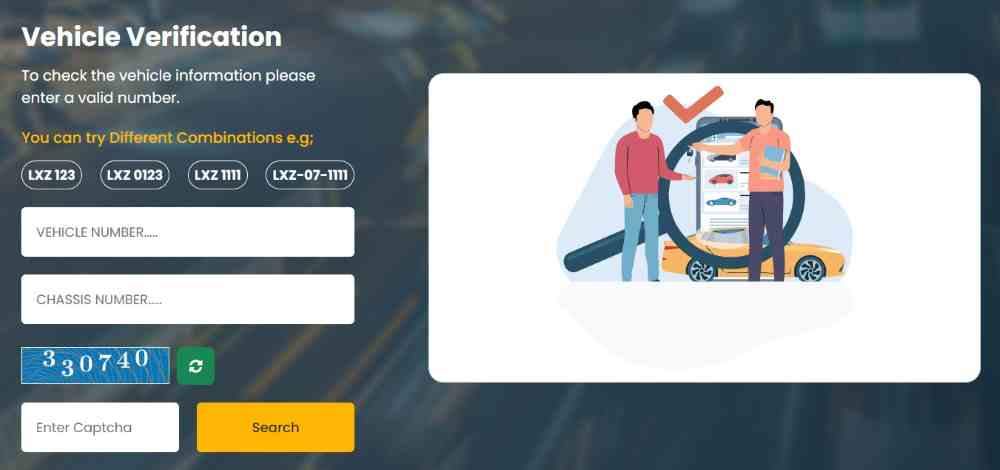
Table Of Contents
Why You Need to Check Motorcycle Registration Online in Punjab

The Motorcycle Registration Check Online Punjab (Check by CNIC) system serves as a critical shield against fraud, legal penalties, and financial loss. It is the digital bridge connecting you to the official records of the Excise, Taxation & Narcotics Control Department.
What is Motorcycle Registration Verification and Why Does It Matter?
Motorcycle registration verification is the act of confirming a bike’s legal standing against the government database. This matters because it instantly validates ownership, tax compliance, and the vehicle’s identity. Without this check, you risk riding a stolen bike or one with forged documents.
Can an Unverified Motorcycle Registration Lead to Legal Penalties in Punjab?
Yes. Operating a motorcycle with unverified or mismatched registration exposes you to traffic police challans, vehicle impoundment, and potential criminal charges if the bike is flagged as stolen. The verification check is your legal proof of status.
How Does a Motorcycle Registration Check Protect You When Buying a Used Bike?
When buying a used bike, the registration check reveals the registered owner’s name and father’s name, matching it against the seller’s CNIC. It exposes hidden liens, unpaid token taxes, and whether the engine and chassis numbers have been tampered with. This one step prevents you from inheriting someone else’s legal troubles.
What Financial Risks Does a Registration Check Help You Avoid?
The check uncovers pending token tax dues and unpaid traffic challans attached to the registration number. If you buy a bike without clearing these, the Excise department holds you responsible for the outstanding amounts. The verification report shows red flags for any unpaid financial obligations.
How Does Registration Verification Support the Government’s Digital Punjab Initiative?
The online verification system is a pillar of Punjab’s digital transformation, reducing corruption by eliminating middlemen and creating a transparent, real-time ownership database. It empowers citizens, law enforcement, and financial institutions to access accurate vehicle data instantly.
What Happens If You Skip Verification and Later Discover Issues?
Discovering a chassis number mismatch or a stolen vehicle report after purchase leaves you with no legal recourse against the seller. The bike can be confiscated, and you may face financial loss without any ability to transfer ownership.
Understanding the Core Entity: MTMIS Punjab Vehicle Verification System
The Motor Transport Management Information System (MTMIS) is the central database for all vehicle records in Punjab. Understanding this system is the first step to mastering the Motorcycle Registration Check Online Punjab (Check by CNIC) process.
What is MTMIS Punjab and How Does It Work for Motorcycle Verification?
MTMIS Punjab is the official online portal of the Excise, Taxation & Narcotics Control Department that digitizes every vehicle registration. For motorcycle verification, the system allows you to enter a registration number to retrieve real-time owner details, vehicle specifications, and tax history.
What Information Does the MTMIS Database Store for Each Motorcycle?
The MTMIS database stores a comprehensive data set for each motorcycle:
- Owner Identity: Full name, father’s name, and CNIC number.
- Vehicle Specs: Make, model, color, year of manufacture, engine number, and chassis number.
- Registration Details: Registration date, issuing city, and registration number.
- Financial Records: Complete token tax payment history, including due dates and amounts.
- Legal Status: Any pending e-challans, fines, or legal holds on the vehicle.
- Document Status: Smart card issuance and delivery tracking.
Which Government Department Operates the Motorcycle Registration System in Punjab?
The Excise, Taxation & Narcotics Control Department, Government of Punjab, operates the entire vehicle registration and verification framework through its MTMIS portal, mobile applications (ePay Punjab), and the new PAK-ID biometric platform.
How Often Is the MTMIS Database Updated with New Registrations?
New registrations typically appear in the MTMIS database within 3 to 7 business days after the Excise office processes the application. During peak registration seasons, this may extend to 10 to 14 days. Smart card linkage to CNICs may take an additional 5 days.
Is the MTMIS Punjab Verification System Available 24/7 for Public Use?
Yes. The MTMIS portal operates 24 hours a day, 7 days a week. Citizens can perform vehicle verification checks at any time from any device with an internet connection, without the need to visit a government office.
Can MTMIS Punjab Be Accessed from Mobile Phones and Tablets?
Yes. The MTMIS portal is fully mobile-responsive and can be accessed from any smartphone or tablet browser. Additionally, dedicated mobile apps like ePay Punjab and the E-Challan Check app provide alternative, app-based access points for verification.
Can I Check My Motorcycle Registration Online in Punjab Using Only My CNIC?
This is the most common question among bike owners. The answer requires a clear distinction between the public portal’s privacy features and the authorized services available to you as the owner.
The Truth: Direct CNIC-Based Registration Check on MTMIS Portal
The standard MTMIS vehicle verification tool requires the motorcycle registration number, not the CNIC, as the primary search parameter. This design choice protects owner privacy by preventing unrestricted public access to personal identity information. However, your CNIC is essential for related services like smart card tracking, biometric verification, and ownership transfer.
Which Official Website Allows Bike Registration Checks by CNIC in Punjab?
While the primary MTMIS portal (mtmis.excise.punjab.gov.pk) does not offer direct CNIC-based registration lookup, the Excise & Taxation Punjab Online Vehicle Verification System (mtmispunjab.net.pk) allows you to “check with your CNIC number and find out if your smart card is dispatched for delivery.” Additionally, the ePay Punjab app, once logged in with your CNIC, shows all vehicles registered in your name.
Is There a Mobile App to Verify Bike Ownership with a CNIC in Punjab?
Yes. The E-Challan Check app allows users to verify vehicle registration, ownership records, and driving license status by simply entering a vehicle number or CNIC with no login required. The ePay Punjab app also requires CNIC for registration and tax payments, giving you access to your complete vehicle portfolio.
Is There an SMS Service to Check Bike Details Using a CNIC Number?
For smart card status, you can type your CNIC number and send it via SMS to 668 to receive delivery status updates. However, for basic registration details like owner name and tax status, the standard SMS service requires sending the motorcycle’s registration number to 8785.
Can I Check My Bike’s Fitness Certificate Status with My CNIC?
Currently, the fitness certificate status is accessed primarily using the registration number. However, your CNIC-linked profile in the Excise department’s internal systems contains this information, accessible through authorized channels or by visiting an Excise office.
How Can I Find Out How Many Motorcycles Are Registered Under My CNIC?
To discover all vehicles registered under your CNIC, you must visit your local Excise and Taxation office with your original CNIC and request a complete vehicle ownership report. This feature is not publicly available online to protect privacy, but the ePay Punjab app does show your own registered vehicles after login.
Step-by-Step Guide: Motorcycle Registration Check Online Punjab via MTMIS Portal
This section provides a detailed, actionable walkthrough for the primary verification method using the official MTMIS website.
How to Access the Official MTMIS Punjab Website
Open your web browser and navigate to the official URL: https://mtmis.excise.punjab.gov.pk. Always verify that you are on the legitimate government site by checking for the Punjab government domain and SSL certificate before entering any information to avoid phishing scams.
Where Is the Vehicle Verification Tool on the MTMIS Homepage?
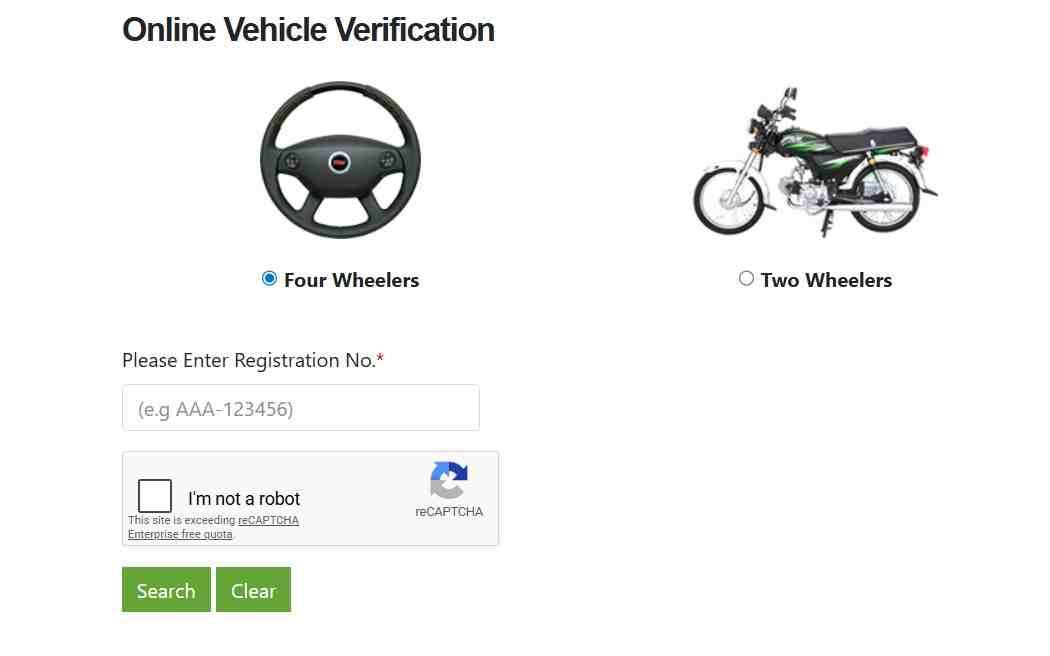
On the first page of the website, you will see the Vehicle Verification tool prominently displayed. This is the main search interface for checking registration details of any motorcycle or car registered in Punjab. It is usually located in the center or top-right section of the page.
How to Enter Your Motorcycle Registration Number Correctly
Select the Vehicle Verification option, then enter the full registration number exactly as it appears on your bike’s number plate. The format is typically: LEA-20-1234. Ensure correct spacing and hyphen placement, as the system is case-sensitive and format-specific. An incorrect format will return a “No Record Found” error.
Do I Need to Enter the Chassis Number for a Basic Registration Check?
For a basic registration check, the registration number alone is sufficient. However, for enhanced verification—such as confirming a smart card status or accessing detailed historical records—the system may also request the chassis number. This two-factor authentication adds a layer of security.
How to Solve the Captcha and Submit Your Query
After entering your registration number, complete the CAPTCHA security check by typing the displayed characters exactly as shown, paying attention to case sensitivity. Then click the “Search” or “Submit” button to query the database. The system will process your request and display results within seconds.
What Information Will Be Displayed After a Successful Search?
The results page displays a comprehensive set of data:
- Owner Details: Name and father’s name of the registered owner.
- Vehicle Specifications: Make, model, color, year, engine number, and chassis number.
- Registration Info: Registration date and issuing city.
- Financial Status: Token tax payment status (paid/unpaid) and last payment date.
- Legal Status: Any pending e-challans or fines attached to the registration.
How to Interpret Token Tax Status Colors (Red vs Green)
On the MTMIS results page, a green status indicates that the token tax is paid and up to date. A red status indicates pending dues. If the status is red, the vehicle cannot be legally transferred until all outstanding taxes are cleared. The seller is responsible for clearing these dues before sale.
Can I Download or Print the Verification Report for My Records?
Yes. Most browsers allow you to print the verification page directly or take a screenshot for your records. For official purposes, such as court or bank submissions, you may need to request a formal verification certificate from the Excise department.
What Does the “Biometric Status” Field Mean on MTMIS Results?
The biometric status field indicates whether the registered owner has completed biometric verification for the vehicle. As of the latest updates, biometric verification is mandatory for ownership transfers and can now be completed remotely using the PAK-ID app. A pending status means the vehicle cannot be transferred.
Why Does the MTMIS Punjab Portal Ask for a Registration Number Instead of a CNIC?
The MTMIS portal prioritizes the registration number to balance public accessibility with privacy protection. Allowing unrestricted CNIC-based searches would expose personal identity information to anyone with internet access, creating significant privacy risks. Your CNIC is a private identifier, while the registration number is a public vehicle identifier.
Alternative Method 1: Motorcycle Registration Check via ePay Punjab Mobile App
The ePay Punjab app is the official digital payment aggregator for government transactions, and it doubles as a powerful tool for vehicle verification.
What Is the ePay Punjab App and How Does It Relate to Motorcycle Registration?
ePay Punjab is Pakistan’s first public-to-government (P2G) digital payment aggregator. For motorcycle owners, it enables token tax payment, registration fee payment, vehicle transfer fee payment, and—crucially—verification of registration details without visiting an excise office. It acts as a one-stop shop for all vehicle-related financial and verification needs.
How to Download and Install the Official ePay Punjab App
The app is available on both major platforms:
- Android: Google Play Store
- iOS: Apple App Store
Search for “ePay Punjab” and download the official app published by the Government of Punjab. Avoid third-party or unofficial versions that may compromise your data security.
How to Register on ePay Punjab Using Your CNIC
Open the app, click “Register,” and fill in the following details:
- CNIC number
- Mobile number
- Email address
- Create a password
Verify your account using the OTP sent to your email or phone. Your CNIC serves as your primary identifier throughout the app, linking you to all your registered vehicles.
Can You Check Motorcycle Registration Details Directly Inside ePay Punjab?
Yes. After logging in, navigate to the Excise & Taxation section, select “Vehicle Verification,” and enter your motorcycle registration number to view ownership and tax details. The app also displays your payment history for token tax and transfer fees, making it easy to track your compliance record.
How to Pay Token Tax Through ePay Punjab After Verification
After verifying your registration, you can pay token tax directly through the app. The system generates a unique 17-digit PSID number. You can then complete payment through any of the following channels:
- Mobile banking apps
- Internet banking
- ATM
- Over-the-counter at partner banks
The payment is reflected in the MTMIS database almost instantly.
Can You Download a Digital Registration Card (E-Registration Card) Using the App?
Yes. The ePay Punjab app and the associated MTMIS system allow you to download a digital version of your registration card, known as the E-Registration Card. This digital card can be stored on your phone and presented when needed, serving as a valid proof of registration.
Is There a Fee for Using ePay Punjab for Motorcycle Registration Checks?
No. Checking registration details on ePay Punjab is completely free. Fees apply only when you initiate transactions such as tax payments or ownership transfers. The government provides the verification service at no cost to encourage transparency.
Does the ePay Punjab App Work Without an Internet Connection?
No. The ePay Punjab app requires an active internet connection to access the central database and display real-time information. For offline scenarios, use the SMS service described in the next section.
Alternative Method 2: Motorcycle Registration Check via SMS (8785 Service)
For users without reliable internet access, the SMS service provides a quick, no-frills verification option using only a basic mobile phone.
What Is the 8785 SMS Service for Motorcycle Registration in Punjab?
The 8785 SMS service is an official Punjab Excise Department shortcode that allows citizens to verify vehicle registration details using only a basic mobile phone. This service is ideal for rural areas, emergency verification needs, or situations where internet is unavailable.
How to Send an SMS to Check Bike Registration Details
Follow these simple steps:
- Open your phone’s messaging app.
- Type your motorcycle registration number exactly as it appears on the plate (e.g., LEA-20-1234).
- Send this message to 8785.
Standard SMS charges apply based on your mobile carrier’s rates. No special registration or login is required.
What Information Will You Receive via SMS Reply?
You will receive a reply SMS containing the following information:
- Owner’s name
- Motorcycle make and model
- Registration status (valid or expired)
- Token tax payment status (paid or unpaid)
The SMS response does not include engine or chassis numbers due to space limitations. For those details, use the web portal.
Is the 8785 SMS Service Available 24/7?
Yes. The SMS service operates 24 hours a day, 7 days a week. Response times typically range from a few seconds to one minute depending on network congestion. The system processes requests automatically without human intervention.
Can You Check Smart Card Delivery Status via SMS Using CNIC?
Yes. For smart card delivery status, type your CNIC number and send it via SMS to 668. You will receive a reply indicating whether your smart card has been printed, dispatched, or delivered. This is a separate service from the 8785 registration check.
What Are the SMS Character Format Requirements for Registration Numbers?
The registration number must be entered exactly as it appears, including hyphens and spaces. Examples:
- Correct: LEA-20-1234
- Incorrect: LEA201234 or lea-20-1234
Case sensitivity is generally not an issue, but the exact spacing and hyphen placement matter significantly.
How Much Does Each SMS Verification Cost?
Each SMS sent to 8785 costs the standard SMS rate charged by your mobile network operator. The Excise Department does not impose any additional fee for the verification service. Rates vary by carrier and plan.
Why Did You Not Receive a Reply After Sending an SMS to 8785?
Possible reasons include:
- Incorrect registration number format (check hyphens and spaces)
- Network congestion or temporary service outage
- The motorcycle is not registered in Punjab (try the relevant province’s service)
- Your mobile carrier is blocking shortcode traffic
- The registration is too new and not yet in the database
Try again after verifying the number format, or use the web portal as an alternative.
Government Doorstep Service: Maryam Ki Dastak for Motorcycle Registration
The Maryam ki Dastak initiative brings government services to citizens’ doorsteps, including motorcycle registration and verification assistance, eliminating the need for office visits.
What Is Maryam Ki Dastak and How Can It Help with Motorcycle Registration?
Maryam Ki Dastak is a doorstep service initiative by the Punjab government that allows citizens to complete vehicle-related tasks without visiting an excise office. Through this platform, you can book a government-approved facilitator who visits your home to assist with new vehicle registration, transfer of ownership, and token tax payment.
What Motorcycle-Related Services Does Maryam Ki Dastak Provide?
The service includes a comprehensive suite of motorcycle-related offerings:
- New motorcycle registration assistance
- Ownership transfer facilitation (including biometric requirements)
- Token tax payment collection
- Delivery of registration certificates and smart cards directly to your home
- Assistance with document preparation and submission
How to Access Maryam Ki Dastak Services (App, Helpline, Web Portal)
You can access the service through three convenient channels:
- Mobile App: Download the “Maryam Ki Dastak” app from Google Play Store or Apple App Store.
- Helpline: Dial 1202 to book an appointment by phone.
- Web Portal: Visit the official web portal at https://mkb.punjab.gov.pk.
Choose the channel that is most convenient for you.
Can Maryam Ki Dastak Help You Check Registration by CNIC?
While the primary purpose of Maryam Ki Dastak is to facilitate new registrations and transfers, the trained facilitator can assist you in verifying existing registration details using your CNIC as part of their service. They can also help you understand the records and identify any discrepancies.
How to Register on the Maryam Ki Dastak App Using Your CNIC
Follow these steps:
- Download the app from the official app store.
- Open it and register using your CNIC number and mobile phone number.
- Provide your full name and complete address.
- Choose the motorcycle-related service you require.
- Pick a date and time for the facilitator’s visit.
- Upload scanned copies of required documents.
Once submitted, a facilitator will contact you to confirm the appointment.
What Documents Are Needed for Maryam Ki Dastak Motorcycle Services?
For most services, you will need the following documents:
- Original CNIC
- Passport-size photographs
- Proof of address (utility bill or similar)
- Existing vehicle documents (for transfers or renewals)
The app will specify the exact document requirements for each service type, so check before your appointment.
What Happens After You Book a Maryam Ki Dastak Service?
The process unfolds as follows:
- A trained Dastak facilitator visits your home at your chosen time.
- They help fill out the required forms accurately.
- They collect any applicable fees and issue a receipt.
- They submit your application to the Excise department on your behalf.
- After processing, your registration certificate or smart card is delivered directly to your doorstep.
The entire process is designed to be hassle-free and transparent.
Is There a Government Fee for Maryam Ki Dastak Doorstep Services?
The service itself may involve a nominal facilitation fee. However, as part of a major relief package, the Punjab government has announced the complete abolition of motorcycle registration and transfer fees. This provides significant financial relief to bike owners. Check the app for the latest fee structure.
How to Check Motorcycle Smart Card Status Using CNIC in Punjab
The smart card is the official registration document for your motorcycle. Tracking its delivery status is a common need for new owners, and your CNIC is the key to this information.
What Is the Vehicle Smart Card and Why Do You Need It?
The vehicle smart card is the official computerized registration certificate issued by the Excise and Taxation Department. It contains a QR code for quick verification and serves as legal proof of ownership. Driving without a smart card can result in fines from traffic police.
How to Check Smart Card Status Online Using Your CNIC
Follow these steps:
- Visit the Excise & Taxation Punjab Online Vehicle Verification System (mtmispunjab.net.pk).
- Navigate to the “Smart Card Status Check” section.
- Enter your CNIC number.
- Click “Submit” or “Search.”
The system will display whether your smart card is printed, dispatched, or delivered.
Can You Track Smart Card Delivery via SMS Using CNIC?
Yes. This is the simplest method:
- Open your phone’s messaging app.
- Type your CNIC number.
- Send it via SMS to 668.
You will receive an automated reply with your smart card’s current delivery status.
How to Track Smart Card Status on the MTMIS Portal Using Registration Number
If you prefer to use your registration number instead of CNIC:
- On the MTMIS Punjab website, click on “E-Registration Card” or “Application Tracking.”
- Enter your vehicle’s registration number and chassis number.
- Click “Submit” to view the card status.
This method is useful if you are checking the status of a vehicle not registered in your name.
What Do Different Smart Card Status Messages Mean?
- Processing: Your application is being reviewed by the Excise department.
- Printed: The smart card has been manufactured and is ready for dispatch.
- Dispatched: The card has been sent to your designated Excise office or courier.
- Delivered: The card has been received at your local office or your home (if doorstep service was used).
- Hold: There is an issue with your application that requires your attention or additional documentation.
How Long Does It Take to Receive a Smart Card After Registration?
Standard processing time for a smart card is 15 to 30 working days from the date of registration. Delays can occur during peak seasons (July-September) when vehicle registration volumes are highest. Using the tracking methods above will give you real-time updates.
Can You Download a Digital Smart Card (E-Registration Card) Online?
Yes. Through the MTMIS portal, you can download an E-Registration Card—a digital version of your registration certificate. Simply enter your vehicle’s registration and chassis number, and the system will generate a downloadable PDF. This digital card is legally valid for most purposes.
What Should You Do If Your Smart Card Status Shows “Delivered” But You Haven’t Received It?
If the status shows “Delivered” but you have not received the card, follow these steps:
- Visit your local Excise and Taxation office with your original CNIC and registration application receipt.
- Request a tracking inquiry.
- The office can trace the card’s location.
- If the card was lost in transit, you can apply for a duplicate.
Act quickly to avoid any legal complications from not having the physical card.
How to Verify Engine and Chassis Numbers Through Your CNIC
Cross-verifying engine and chassis numbers is critical when buying a used motorcycle or confirming that your own records are correct. These numbers are the unique fingerprints of your bike.
Why Is Verifying Engine and Chassis Numbers Critical for Motorcycle Buyers?
Engine and chassis numbers are unique identifiers for every motorcycle. Criminals often alter these numbers on stolen bikes to hide their origin. If the numbers on the physical motorcycle do not match the MTMIS database, the bike is either stolen or illegally registered. This verification is your primary defense against buying stolen property.
Can You Verify Engine and Chassis Numbers by Entering Your CNIC?
While the primary MTMIS portal does not support CNIC-based engine/chassis lookup, the Excise department’s internal systems can perform this search. For public access, you must enter the registration number. Once you do, the system displays the engine and chassis numbers for direct comparison with the physical bike.
How to Perform a Chassis Number Verification on MTMIS Punjab
Follow these steps:
- Visit the MTMIS Punjab website.
- Locate the vehicle verification section.
- Select the “Chassis Number Verification” option.
- Enter the chassis number of the motorcycle you wish to verify.
- Click “Search.”
The system will return the registration number and owner details associated with that chassis.
Can You Check a Motorcycle Registration Using Only the Chassis Number?
Yes. The MTMIS system allows you to search by chassis number instead of the registration number. This is particularly useful if you have a bike without visible number plates, if the registration number is unreadable, or if you suspect the number plate is fake.
How to Verify That Engine and Chassis Numbers Match Government Records
Follow this three-step process:
- Locate the numbers on the bike: The engine number is usually stamped on the engine block. The chassis number is typically on the frame, often near the steering column or under the seat.
- Perform an MTMIS check: Use the registration number to pull up the official record.
- Compare: The numbers displayed online must match the physical numbers exactly. Any discrepancy—even a single digit—is a major red flag.
What Should You Do If the MTMIS Shows Wrong Engine or Chassis Numbers for Your Bike?
If you discover a mismatch, take immediate action:
- Do not attempt to sell or transfer the bike.
- Visit your local Excise and Taxation office.
- Bring your original CNIC, registration book, and the motorcycle itself for physical inspection.
- File a correction request.
- Pay any applicable amendment fees.
The department will investigate and update the database if the error is on their end.
Can a Dealer Check Your Motorcycle Registration Status Using Your CNIC?
Dealers with authorized access to Excise department systems may be able to verify registration using your CNIC. However, for public transactions, they will typically request your registration number. Legitimate dealers will always prioritize the registration number for verification.
Biometric Verification for Motorcycle Registration and Transfer in Punjab (Latest Update)
Biometric verification is now mandatory for motorcycle ownership transfers. This section covers the revolutionary PAK-ID app that eliminates the need for physical office visits.
What Is Biometric Verification and Why Is It Required for Motorcycle Registration?
Biometric verification uses fingerprint and facial recognition technology to confirm that the person conducting a vehicle transaction is the legitimate owner. This prevents identity fraud, fake transfers, and unauthorized ownership changes. It adds a critical layer of security to the vehicle registration system.
What Is the New PAK-ID App for Online Biometric Vehicle Verification?
The Punjab Excise and Taxation Department launched the PAK-ID mobile app as a digital platform enabling biometric verification of vehicle ownership for registration and transfer through a fully online system. Developed in partnership with NADRA and the Punjab Information Technology Board (PITB), the app allows users in Pakistan and abroad to confirm ownership and process transfers via facial recognition and biometric authentication. It eliminates the need for embassy visits, affidavits, and power of attorney documents.
Is Biometric Verification Required to Check Registration Details by CNIC?
No. Biometric verification is not required simply to check registration details. It is mandatory only for ownership transfers, new registrations, and certain other transactions that change the legal status of the vehicle. Viewing registration data remains a simple, non-biometric process.
How Does the PAK-ID App Work for Motorcycle Ownership Transfer?
The process is streamlined for both buyer and seller:
- Both the seller and the buyer log in to the PAK-ID app.
- They select “Vehicle Verification.”
- Each party completes their biometric and Face ID verification.
- Once both parties complete verification and payment is made, the ownership transfer is finalized.
- The entire process is completed within 48 hours.
Can You Complete Biometric Verification from Home Without Visiting an Excise Office?
Yes. The PAK-ID app allows you to complete biometric verification and Face ID authentication from your home using your mobile phone. This is particularly beneficial for senior citizens whose thumb impressions may have faded over time, and for individuals with mobility issues.
Is Face ID Verification Available for Senior Citizens with Faded Thumbprints?
Yes. The Face ID feature was specifically designed to accommodate senior citizens and individuals whose thumbprints are no longer readable. This inclusive approach ensures that no citizen is excluded from digital services. The system uses advanced facial recognition technology to verify identity.
How Long Does Biometric Verification Take to Process on the PAK-ID App?
Once both parties complete their biometric verification and payment, the ownership transfer is finalized within 48 hours. The actual biometric capture process takes only a few minutes per person. The system is designed for speed and efficiency.
Is There a Fee for Using the PAK-ID Biometric Verification Service?
Biometric verification itself is free. However, transfer fees may apply depending on the vehicle type and engine capacity. As part of the recent relief package, motorcycle transfer fees have been completely waived. Always check the app for the most current fee information.
Can Overseas Pakistanis Use the PAK-ID App for Vehicle Transfers?
Yes. The PAK-ID app is a game-changer for overseas Pakistanis. It eliminates the need for embassy visits, affidavits, and power of attorney documents, allowing overseas Pakistanis to complete vehicle transfers remotely using biometric and Face ID verification from anywhere in the world.
Checking Motorcycle Token Tax Status Using CNIC Online
Token tax is an annual tax that must be paid to keep your motorcycle legally on the road. This section explains how to check and pay token tax using your registration details and CNIC.
What Is Motorcycle Token Tax and When Is It Due in Punjab?
Token tax is an annual vehicle tax levied by the Punjab Excise and Taxation Department. It is due every year on or before the registration anniversary date of your motorcycle. Failure to pay on time results in penalties and legal consequences. The tax amount varies based on engine capacity.
How to Check Token Tax Status Using Your Motorcycle Registration Number
This is the most direct method:
- On the MTMIS Punjab portal, enter your motorcycle registration number.
- Submit the query.
- The results page will display the token tax payment status (paid/unpaid).
- It will also show the last payment date and the amount paid.
This information is updated in real-time.
Can You Check Pending Token Tax Dues Using Your CNIC?
While the standard MTMIS portal requires the registration number for tax status checks, your CNIC-linked account on ePay Punjab allows you to view all taxes associated with vehicles registered under your name. This provides a consolidated view of your compliance across all your bikes.
How to Pay Motorcycle Token Tax Online Using ePay Punjab
Follow these steps:
- Log in to the ePay Punjab app or website.
- Navigate to Excise & Taxation → Token Tax.
- Enter your motorcycle registration number.
- Generate a 17-digit PSID number.
- Complete payment through mobile banking, internet banking, ATM, or over-the-counter at partner banks.
The payment is processed instantly, and the status updates in the MTMIS database.
What Are the Penalties for Late Token Tax Payment in Punjab?
Late payment of token tax incurs a penalty of approximately 10-20% of the original tax amount, depending on how long the payment is overdue. Continued non-payment can result in:
- Vehicle impoundment
- Legal action
- Inability to transfer ownership
- Accumulation of additional fines
Pay on time to avoid these consequences.
How to Download Token Tax Challans and Payment Receipts
After paying token tax through ePay Punjab, you can download the payment receipt directly from the app. For payments made through other channels:
- Log in to the MTMIS portal.
- Navigate to your vehicle’s details.
- Look for the “Payment History” or “Tax Receipts” section.
- Download or print the relevant document.
Keep these receipts as proof of payment.
Does Token Tax Status Affect Motorcycle Registration Validity?
Yes. An unpaid token tax effectively renders your registration invalid in the eyes of law enforcement. Traffic police can issue challans, and your vehicle may be impounded until all dues are cleared. Additionally, you cannot transfer ownership of a bike with pending token tax.
Can You Check Token Tax Status for Multiple Motorcycles Under One CNIC?
Through the ePay Punjab app after logging in with your CNIC, you can view and manage token tax for all vehicles registered under your name. This provides a comprehensive dashboard of your compliance status. For individual checks on other people’s bikes, you will need each registration number separately.
Troubleshooting: Why Your Motorcycle Is Not Showing Up Under Your CNIC
This section addresses the most common error scenarios and provides actionable solutions for when your bike’s records seem to have disappeared.
Why Does the MTMIS Show “No Record Found” When You Enter Your Registration Number?
Common causes for this frustrating error include:
- Incorrect entry: The registration number was entered with wrong spacing or missing hyphens.
- Wrong province: The motorcycle is registered in another province (Sindh, KP, Balochistan, or Islamabad).
- New registration: The registration is so new that it has not yet propagated through the database.
- Database error: There is a temporary technical issue with the MTMIS system.
Double-check the format and try again later.
Why Is My Motorcycle Not Showing Up Under My CNIC in the Online Records?
The most common reason is that the Excise department’s public-facing portal does not support CNIC-based registration lookup for privacy reasons. Use your registration number instead. If your registration number also fails, your CNIC may not be correctly linked to the vehicle in the database, requiring a manual correction.
What Should You Do If the MTMIS Shows the Wrong CNIC for Your Bike?
This is a serious data error that requires immediate correction. Do not ignore it. Follow these steps:
- Visit your local Excise and Taxation office.
- Bring your original CNIC.
- Bring your registration book.
- Bring the motorcycle itself for physical inspection if required.
- Submit a correction application to have the database updated to reflect your correct CNIC.
The process may take a few days.
How to Fix CNIC Mismatch Issues in the Motorcycle Registration Database
Follow this structured approach:
- Confirm the error: Obtain a copy of your registration book to see which CNIC is recorded.
- Draft an application: Write a formal application to the Excise & Taxation Officer explaining the discrepancy.
- Attach evidence: Attach a readable copy of your correct CNIC.
- Submit: Submit the application at your local Excise office.
- Follow up: Check back after 5-7 days to confirm the correction has been processed.
How Long Does It Take for a New Registration to Appear Under Your CNIC Online?
New registrations typically appear in the MTMIS database within 3 to 7 business days after the Excise office completes processing. However, the CNIC linkage may take 10 to 14 days to fully propagate through all systems. Be patient and check again after two weeks.
Can an Expired CNIC Prevent You from Seeing Your Motorcycle Registration Online?
If your CNIC has expired, the system may not display your vehicle records when you attempt CNIC-based searches. Update your CNIC through NADRA immediately. Allow 5-10 days for the update to reflect across all government databases, including the Excise department’s systems.
How to Update Your CNIC Records in the Motorcycle Registration Database
Follow these steps:
- Visit your local Excise office with your new, updated CNIC.
- Bring your registration book.
- Request a record update to link the new CNIC to your vehicle.
- For PAK-ID app users, updating your CNIC in the NADRA database automatically syncs with the Excise system after a few days.
Keeping your records current is essential for all future transactions.
What to Do If Your Bike Is Registered but MTMIS Shows Incorrect Owner Details
This often happens when ownership was transferred manually without proper digital updates. To resolve this:
- Visit the Excise office.
- Bring all transfer documents.
- Bring your CNIC.
- Bring the previous owner’s CNIC (if available).
- Request a manual database correction.
The department will investigate and update the records accordingly.
Verifying a Used Motorcycle Before Purchase Using Owner’s CNIC
Buying a used motorcycle requires thorough due diligence. This section provides a step-by-step verification checklist to protect your investment.
How to Verify a Used Motorcycle’s Owner Name with Their CNIC
Follow this critical step:
- Ask the seller to show their original CNIC.
- Using the motorcycle’s registration number, perform an MTMIS check.
- Compare the owner name displayed online with the name on the seller’s CNIC.
They must match exactly. Any discrepancy—even a spelling difference—is a red flag.
Can You Verify a Used Motorcycle’s Registration Without the Original Documents?
Yes. The MTMIS online verification system allows you to check registration details using only the motorcycle’s registration number. However, for legal transfer, you will need the original documents. Never rely solely on the online check for purchase; always demand physical documents.
How Do You Verify a Bike’s Engine and Chassis Numbers Match Government Records
Follow this three-step process:
- Locate the engine and chassis numbers on the physical motorcycle.
- Perform an MTMIS check using the registration number.
- Compare the online numbers with the physical numbers.
Any discrepancy indicates potential fraud. Walk away from the deal immediately.
How to Check for Pending Traffic Challans on a Used Motorcycle Before Purchase
Follow these steps:
- On the MTMIS portal, the vehicle details page displays any pending e-challans or fines attached to the registration number.
- Alternatively, use the PSCA e-challan portal (echallan.psca.gop.pk) and enter the registration number.
- If any challans are pending, the seller must clear them before you complete the purchase.
Inheriting someone else’s fines is a costly mistake.
Can You Check If a Motorcycle Is Stolen Using the Owner’s CNIC?
While the public MTMIS portal does not explicitly label vehicles as “stolen,” cross-referencing the owner’s CNIC with the registration details can reveal inconsistencies. For a definitive stolen vehicle check, you must contact the Excise department or your local police. A physical inspection of the bike is also recommended.
What Documents Should You Request from the Seller Alongside Their CNIC?
Request the following documents before making any payment:
- Original registration book (smart card)
- Original CNIC of the seller
- Token tax payment receipts for the current year
- Proof of last transfer (if applicable)
- A signed transfer of ownership agreement
Never accept photocopies as substitutes for originals.
How to Perform a Comprehensive Pre-Purchase Motorcycle Verification Checklist
Use this checklist before handing over any money:
- Verify registration on MTMIS using registration number.
- Compare MTMIS owner name with seller’s CNIC.
- Compare MTMIS engine and chassis numbers with physical bike.
- Check token tax payment status (must be green/paid).
- Check for pending e-challans.
- Verify that the seller’s CNIC is valid and not expired.
- Request all original documents before making payment.
- If possible, complete the transfer through the PAK-ID app on the spot.
What Red Flags to Look for When Verifying a Used Motorcycle Registration
Be extremely cautious if you encounter any of these red flags:
- MTMIS owner name does not match seller’s CNIC.
- Engine or chassis numbers are altered, scratched, or mismatched.
- Token tax status is red (unpaid).
- The seller cannot produce original documents.
- The registration number format seems incorrect or unusual.
- The seller refuses to complete the transfer through official channels.
If you see any of these signs, walk away from the deal.
Legal and Security Aspects of Motorcycle Registration Verification
Understanding your legal rights and security obligations when dealing with registration data is essential for compliance and protection.
Do You Need Your Original CNIC to Verify a Bike at the Excise Office?
Yes. For in-person verification at an Excise office, you must present your original CNIC along with any vehicle documents. Photocopies are not accepted for identity verification. The office will scan or record your original CNIC for official purposes.
Is Biometric Verification Required for Checking Registration Details by CNIC?
No. Biometric verification is only required for transactions that change ownership or registration status, not for simply viewing registration details. Checking registration data remains a simple, non-biometric process accessible to all citizens.
Can You Verify a Punjab Bike’s Registration in Sindh Using a CNIC?
No. Vehicle registration databases are provincial. To verify a Punjab-registered motorcycle, you must use the Punjab MTMIS portal. The Sindh Excise portal will not have Punjab records. However, national-level integration is being developed for the future, which would allow cross-province verification.
Can You See the Previous Owner’s CNIC Details on the MTMIS Portal?
No. For privacy reasons, the MTMIS portal displays only the current owner’s name and father’s name. CNIC numbers are not displayed to the public. Previous owner information is not available through the public portal. This protects the identity of past owners.
Is It Legal to Check Someone Else’s Motorcycle Registration Using Their CNIC?
If you have a legitimate reason (e.g., purchasing the bike) and the owner has consented, it is generally acceptable. However, using someone’s CNIC without their permission to access their vehicle records may violate privacy laws. Always obtain explicit consent.
What Security Measures Does the MTMIS Portal Have to Protect Your Data?
The MTMIS portal uses several security measures:
- CAPTCHA verification to prevent automated scraping
- SSL encryption for secure data transmission
- Session timeouts to log out inactive users
- Rate limiting to prevent brute-force attacks
However, the information displayed is considered public record for registered vehicles.
Can the Traffic Police Check Your Motorcycle Registration Using Your CNIC?
Yes. Traffic police have access to the Excise department’s internal systems and can verify your registration using your CNIC, registration number, or number plate during roadside checks. This allows them to quickly confirm ownership, tax status, and any outstanding challans.
Comparison with Other Provinces: Punjab Motorcycle Registration Check vs Sindh, KP, Islamabad
Understanding how Punjab’s system compares to other provinces helps users who travel or relocate across provincial borders.
How Does Punjab Motorcycle Registration Verification Differ from Sindh?
Punjab uses MTMIS Punjab (mtmis.excise.punjab.gov.pk) with SMS service to 8785. Sindh has its own Excise portal and uses SMS to 9984 for vehicle verification. The two databases are not integrated, meaning a Punjab-registered bike cannot be verified on the Sindh portal. You must use the Punjab system.
Can You Check a Punjab-Registered Motorcycle on the Islamabad MTMIS Portal?
No. Islamabad has its own MTMIS portal (mtmis.islamabad.gov.pk) for vehicles registered in the federal territory. Punjab-registered vehicles must be checked on the Punjab MTMIS portal. The two systems are separate and do not share data.
How Does KP’s Motorcycle Registration Check Compare to Punjab?
Khyber Pakhtunkhwa operates its own vehicle verification system separate from Punjab. While both provinces offer online verification, the portals and SMS shortcodes are different. A Punjab registration cannot be verified on the KP system. You must use the portal corresponding to the province of registration.
Is There a National Database for Motorcycle Registration Across All Provinces?
Currently, no fully integrated national vehicle registration database exists. Each province maintains its own records. However, the Punjab government has announced plans to work with NADRA to eventually integrate provincial vehicle data at the national level. This would allow cross-province verification in the future.
What Happens If You Buy a Motorcycle in Punjab but Move to Another Province?
You must transfer the registration to the new province. The process involves:
- Obtaining a No Objection Certificate (NOC) from the Punjab Excise department.
- Paying any outstanding taxes or fees.
- Taking the NOC and original documents to the new province’s Excise department.
- Registering the bike in the new province with their respective Excise department.
Failure to do so can result in fines and legal issues.
Frequently Asked Questions About Motorcycle Registration Check Online Punjab
Can I check my motorcycle registration online in Punjab using only my CNIC?
Yes, through alternative channels. While the primary MTMIS portal requires your registration number, the ePay Punjab app allows CNIC-based access to your registered vehicles, and the SMS service to 668 provides smart card status via CNIC.
Which official website allows bike registration checks by CNIC in Punjab?
The Excise & Taxation Punjab Online Vehicle Verification System (mtmispunjab.net.pk) allows you to check with your CNIC number and find out if your smart card is dispatched for delivery.
Is there a mobile app to verify bike ownership with a CNIC in Punjab?
Yes. The E-Challan Check app and ePay Punjab app both allow verification using CNIC.
Why does the MTMIS Punjab portal ask for a registration number instead of a CNIC?
The portal prioritizes registration numbers to protect owner privacy. Allowing unrestricted CNIC-based searches would expose personal identity information to anyone with internet access.
How can I find out how many motorcycles are registered under my CNIC?
You must visit your local Excise and Taxation office with your original CNIC to request a complete vehicle ownership report. This feature is not publicly available online for privacy reasons.
Do I need my original CNIC to verify a bike at the Excise office?
Yes. For in-person verification, you must present your original CNIC along with any vehicle documents. Photocopies are not accepted.
Can I check the token tax status of my bike using my CNIC online?
Yes, through the ePay Punjab app after logging in with your CNIC. For public checks on other bikes, the registration number is required.
Is biometric verification required to check registration details by CNIC?
No. Biometric verification is only required for ownership transfers and certain other transactions, not for viewing registration details.
How do I verify a used motorcycle’s owner name with their CNIC?
Ask the seller to show their original CNIC. Then perform an MTMIS check using the bike’s registration number. Compare the owner name displayed online with the name on the seller’s CNIC. They must match exactly.
Is there an SMS service to check bike details using a CNIC number?
For smart card status, send your CNIC via SMS to 668. For registration details, the standard SMS service requires sending the registration number to 8785 instead.
Can I track my bike’s smart card delivery status with my CNIC?
Yes. Send your CNIC number via SMS to 668, or visit the Excise & Taxation Punjab Online Vehicle Verification System and enter your CNIC in the smart card status section.
Why is my motorcycle not showing up under my CNIC in the online records?
The public portal prioritizes registration numbers over CNICs for privacy reasons. Use your registration number instead. If that also fails, your CNIC may not be correctly linked to the vehicle, requiring an Excise office visit.
How can I verify a bike’s engine and chassis numbers through my CNIC?
While the primary MTMIS portal requires the registration number to display engine and chassis numbers, the Excise department’s internal systems can perform CNIC-based lookups. For public access, use the registration number.
Is it possible to check a Punjab bike’s registration in Sindh using a CNIC?
No. Provincial databases are separate. Use the Punjab MTMIS portal for Punjab-registered vehicles. National integration is planned for the future.
What documents are needed alongside a CNIC for manual verification in Punjab?
You will need the original registration book (smart card) and, for certain transactions, token tax payment receipts, proof of address, and the motorcycle itself for physical inspection.
Can I use the ePay Punjab app to check registration by CNIC?
Yes. After registering on ePay Punjab with your CNIC, you can access and manage all vehicles registered under your name, including registration and tax status.
Does the Punjab Excise Department charge a fee for checking registration by CNIC?
No. All online verification services provided through the MTMIS portal, ePay Punjab app, and SMS services are completely free. Fees apply only for transactions like tax payments or ownership transfers.
How can I update my CNIC records in the motorcycle registration database?
Visit your local Excise and Taxation office with your new CNIC and registration book to request a database update. For PAK-ID app users, CNIC updates from NADRA automatically sync after a few days.
Can I check if a motorcycle is stolen using the owner’s CNIC?
While the public MTMIS portal does not explicitly label stolen vehicles, cross-referencing the owner’s CNIC with registration details can reveal inconsistencies. For a definitive stolen vehicle check, contact the Excise department or local police.
How do I verify a bike registration if I have the owner’s CNIC but not the file?
You cannot perform a public verification using only the owner’s CNIC without the registration number. You must obtain the registration number from the owner or from the number plate. With the registration number, you can then verify the owner details on MTMIS.
Is the “Maryam Ki Dastak” service available for CNIC-based registration checks?
Yes. Maryam Ki Dastak facilitators can assist you in verifying registration details using your CNIC as part of their doorstep service package.
How long does it take for a new registration to appear under a CNIC online?
New registrations typically appear in the MTMIS database within 3-7 business days. However, the CNIC linkage may take 10-14 days to fully propagate through all systems.
Can I verify commercial motorcycle registration in Punjab by CNIC?
The same rules apply for commercial motorcycles as for private bikes. The primary verification method requires the registration number, while your CNIC can be used for smart card tracking and tax payments.
What should I do if the MTMIS shows the wrong CNIC for my bike?
Visit your local Excise office with your original CNIC, registration book, and the motorcycle itself. Submit a correction application to have the database updated.
Can I download a digital registration card using my CNIC?
Yes. Through the MTMIS portal’s “E-Registration Card” feature, you can download a digital version of your registration card by entering your vehicle’s registration and chassis number. Your CNIC is used for verification within the Excise system.
How can I check my bike’s fitness certificate status with my CNIC?
The fitness certificate status is typically accessed using the registration number. However, your CNIC-linked profile in the Excise department’s internal systems contains this information.
Is there a helpline to call for registration verification via CNIC?
Yes. You can call the Excise and Taxation Department helpline at 0800-08786 for assistance with vehicle verification. Maryam Ki Dastak helpline 1202 is also available for doorstep service inquiries.
Can I see the previous owner’s CNIC details on the MTMIS portal?
No. For privacy reasons, the MTMIS portal displays only the current owner’s name and father’s name. Previous owner information and CNIC numbers are not available to the public.
How do I check for pending traffic challans on my bike using my CNIC?
Use the PSCA e-challan portal (echallan.psca.gop.pk) and enter your vehicle registration number. Alternatively, the E-Challan Check app allows verification using your vehicle number or CNIC.
Can a dealer check my motorcycle registration status using my CNIC?
Dealers with authorized access to Excise department systems may be able to verify registration using your CNIC. However, for public transactions, they will typically request your registration number.

Add a Comment