
Imagine your phone is stolen, and you have no way to prove it’s yours. Or you buy a used phone online, only to discover it’s blacklisted and useless on any network. These nightmares are avoidable with one critical piece of information: your IMEI number. This guide delivers every possible method to locate your International Mobile Equipment Identity (IMEI) number across any device, working, broken, lost, or stolen, and shows you exactly how to decode its secrets using free tools and official databases, ensuring you never get scammed and always stay protected.
Key Takeaways
- Universal Code Works Everywhere: Dialing *#06# instantly displays your IMEI on any phone, tablet, or cellular device, regardless of brand or network.
- Physical Copies Are Lifesavers: Your IMEI is printed on the SIM tray, original box, and sometimes under the battery—snap photos and store them safely offline.
- Free Checks Prevent Costly Mistakes: Free online tools and carrier services reveal blacklist status, warranty coverage, and iCloud lock before you buy a used device.
- IMEI Links to Your Accounts: Google Dashboard and Apple iCloud store your IMEI, allowing recovery even if the phone is inaccessible.
- Regional Databases Matter: Countries like Pakistan (DIRBS) and India (CEIR) operate official portals where you can verify compliance and block stolen phones instantly.
- Read More: PTA Approved Check | PTA Tax Calculator
- Read More: PTA Mobile Tax List | PTA Mobile Tax Check Online
- Read More: PTA Tax Check Online | PTA Tax Check By IMEI
How To Check IMEI Number (For Free All Mobiles)
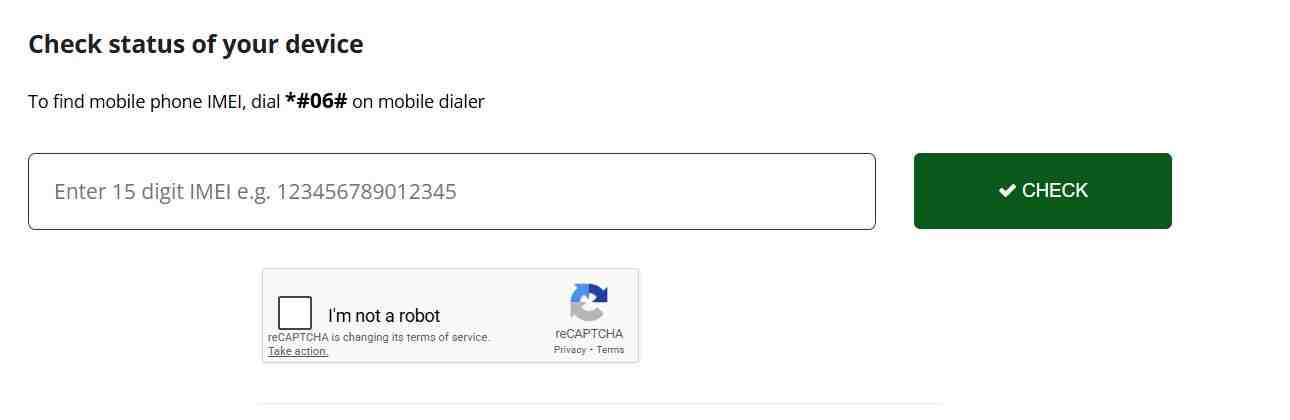
Table Of Contents
What Is an IMEI Number and Why Does It Matter for Your Mobile?
The International Mobile Equipment Identity (IMEI) is a 15-digit numeric fingerprint assigned to every mobile device during manufacturing. Unlike a SIM card which identifies your phone number, or a serial number which tracks internal components, the IMEI identifies the physical hardware itself. Think of it as your phone’s passport—unique, permanent, and globally recognized by every carrier and network operator.
What is the exact definition of an IMEI number?
The IMEI is a unique 15-digit code comprising several fields: the first eight digits represent the Type Allocation Code (TAC), identifying the manufacturer and model; the next six digits are the serial number unique to that specific unit; and the final digit is a check digit for validation. This structure ensures no two devices on earth share the same IMEI. Dual SIM phones receive two IMEI numbers—one for each SIM slot—both equally important.
How is an IMEI different from a Serial Number (SN) or a SIM card number (ICCID)?
The IMEI tracks the device hardware globally, while the serial number is manufacturer-specific for internal tracking. The ICCID identifies the physical SIM card, which you can swap between phones. Carriers block service based on IMEI when a phone is reported stolen; swapping SIMs does not bypass this block. Understanding this distinction helps when filing police reports or checking device history.
Why is it crucial to check your IMEI number before buying a used phone?
Secondhand phone purchases carry hidden risks. A device may appear perfect but could be blacklisted due to non-payment, reported stolen, or still linked to the previous owner’s iCloud account. Running an IMEI check before handing over cash reveals these issues instantly. You avoid buying a brick—a phone that cannot make calls, access data, or be activated on any network.
Can the IMEI number tell you if your phone is original or a counterfeit?
Yes. Counterfeit phones often use fake, duplicated, or invalid IMEI numbers. Checking the IMEI against manufacturer databases reveals the correct model, brand, and specifications. If the IMEI returns a different model than what you hold, or returns no match at all, the device is likely fake. Official IMEI checkers expose these discrepancies immediately.
How do police and carriers use the IMEI to find stolen phones?
When you report a stolen phone with its IMEI, carriers add that number to a global blacklist. The device cannot register on any network, rendering it useless for calls or data. Police can track the phone’s last known location through network triangulation using the IMEI. This dual action—blocking and tracking—makes IMEI reporting essential for theft recovery.
Understanding IMEI structure: What does the 15-digit code actually reveal?
- Digits 1–8 (TAC): Identify the manufacturer, model, and country of origin.
- Digits 9–14 (Serial Number): Unique to your specific device within that model batch.
- Digit 15 (Check Digit): Validates the entire number using the Luhn algorithm, preventing input errors.
Does every mobile device have an IMEI number?
Every device with cellular connectivity has an IMEI: smartphones, tablets, smartwatches with LTE, cellular laptops, and even some car systems. Wi-Fi-only devices do not have IMEI numbers because they lack mobile network hardware. If you own a cellular iPad or Android tablet, it carries at least one IMEI just like a phone.
The Universal Method: How to Check IMEI Number Using the Dial Code (*#06#)
The fastest and most reliable method to retrieve your IMEI works on every mobile phone ever made, regardless of brand, model, or operating system. This universal code bypasses menus, settings, and even the need for a working screen.
What is the universal dial code to check IMEI on any mobile phone?
Open your phone’s dialer app, type *#06#, and the IMEI number instantly appears on screen. You do not need to press the call button—the system recognizes the code immediately. This method works on iPhones, Android devices, feature phones, and even old Nokia bricks. It is the single most important code to memorize.
Does dialing *#06# work on all mobile networks and carriers?
Yes. The code is part of the GSM standard, not a carrier feature. It functions on every network globally, including Verizon, AT&T, T-Mobile, Vodafone, Airtel, Jio, and all others. Network type—4G, 5G, LTE—does not affect its operation.
Step-by-step: How to use the dial pad to display your IMEI instantly.
- Locate the Phone or Dialer app on your home screen.
- Open the keypad as if you were about to dial a number.
- Type *#06# exactly as shown. Do not add any extra digits.
- Within one second, a pop-up window displays your 15-digit IMEI.
- Screenshot this screen or write the number down immediately.
What happens when you dial *#06# on a dual SIM phone?
The screen displays two IMEI numbers: one labeled IMEI 1 for the first SIM slot, and IMEI 2 for the second slot. Both numbers are equally important. If you ever need to report the phone stolen, provide both IMEIs to your carrier and police.
Does the *#06# trick work on tablets and cellular iPads?
Yes, but with a caveat: tablets often lack a phone dialer app. If your cellular tablet has a dialer, the code works. If not, you must use the settings menu method described later. However, many modern cellular tablets include a hidden dialer accessible through third-party apps, making the code usable.
My phone dialer isn’t working. What are the alternatives to the code?
If your dialer is frozen, the screen is broken, or you cannot access the keypad, use the settings menu, physical inspection, or account-based methods detailed below. The dial code is fastest but not the only option.
How to Check IMEI Number on Android (Samsung, Google, Xiaomi, OnePlus)
Android manufacturers place the IMEI in predictable locations within the system settings, though menu names vary slightly by brand. This section covers all major Android variants.
How to find IMEI in Android Settings (Android versions 11 through 14+).
- Open the Settings app (gear icon).
- Scroll down and tap “About phone” or “About device.”
- Look for “Status,” “Phone identity,” or “IMEI information.”
- Tap to view both IMEI numbers, serial number, and other identifiers.
- On newer Android versions, the IMEI appears directly under “About phone” without extra menus.
How to check IMEI number on Samsung Galaxy devices specifically.
Samsung places IMEI information under Settings > About phone > Status information. You will see both IMEI numbers displayed, along with the serial number and hardware version. Samsung also provides this data in the Samsung Members app under Support > Phone diagnostics.
Where is the IMEI number located on a Samsung Galaxy S24 or S23?
Beyond settings, Samsung prints the IMEI on the back of the device in microscopic text near the bottom. Use a magnifying glass or camera zoom to read it. The SIM tray on newer Galaxy models also contains engraved IMEI digits.
How to find IMEI on Android phones with non-removable batteries.
Modern sealed phones hide the IMEI on the SIM tray, the back panel, or inside the settings. Check the SIM tray first—remove it and look for tiny engraved numbers. If absent, rely on settings or the original box.
How to check IMEI number on Android tablets (Samsung Tab, Lenovo, etc.).
Navigate to Settings > About tablet > Status. The IMEI appears here if the tablet has cellular capabilities. Wi-Fi-only tablets will not show IMEI information.
Using the Samsung Members app to view your IMEI and serial number.
Open Samsung Members, tap the Support tab, select “Phone diagnostics,” then “Phone status.” The IMEI and serial number appear alongside battery health and network status. This method works even if your screen is partially damaged but touch still functions.
Can I find my IMEI through my Google account?
Yes. Visit android.com/find and sign in with the Google account linked to your phone. Select the device, click the info (i) icon, and the IMEI displays. This works even if the phone is lost or turned off, as long as it was previously associated with your account.
How to Check IMEI Number on iPhone (iOS 18 and Later)
Apple maintains strict control over device identification, placing IMEI information in consistent, easy-to-find locations across all iOS versions. Whether your iPhone works perfectly or is locked, these methods retrieve the number.
How do I find the IMEI number on a locked iPhone?
If your iPhone is locked to a carrier or you forgot the passcode, use the SIM tray method: eject the tray and look for the IMEI engraved on the top side. Alternatively, connect the iPhone to a computer with iTunes or Finder—the device information screen displays the IMEI even if the phone is locked.
Where is the IMEI number located in iPhone Settings?
Open Settings > General > About. Scroll down past the legal notices until you see “IMEI.” Tap and hold the number to copy it to your clipboard for pasting into forms or notes. This menu also displays the serial number, ICCID, and MEID.
How to check IMEI number on an iPad (Wi-Fi + Cellular models).
Navigate to Settings > General > About. Scroll to the bottom for the IMEI. Cellular iPad models always have an IMEI; Wi-Fi-only iPads do not. If you see no IMEI entry, your iPad lacks cellular hardware.
Finding the IMEI on the SIM tray: Which iPhone models have it engraved?
Starting with the iPhone 6 and continuing through the iPhone 15 series, Apple engraves the IMEI on the SIM tray. The engraving is tiny but readable with good light. Always verify that the SIM tray IMEI matches the one in Settings to detect replacement parts.
How to find IMEI on the back of older iPhone models.
iPhone 5, 5s, and SE (first generation) have the IMEI laser-etched on the back case near the bottom. Later models removed this due to antenna design changes. If you own a pre-iPhone 6 device, check the back before the SIM tray.
If my iPhone won’t turn on, how do I get the IMEI from a Mac or PC?
Connect the iPhone to a computer with a USB cable. Open Finder on macOS Catalina or later, or iTunes on Windows or older macOS. Select the device when it appears. The summary page displays the IMEI number prominently. This method works even if the screen is black.
How to check IMEI on a MacBook or laptop with cellular connectivity.
MacBooks with cellular modems (rare) store IMEI in System Settings > General > About. Click the “System Report” button, then navigate to Network > Modem. The IMEI appears in the modem details section.
How to Find IMEI Number Without Turning the Phone On
When your phone is broken, water-damaged, or has a dead battery, digital methods fail. Physical inspection provides the answer through several hardware locations.
Where is the IMEI number located on the SIM card tray?
Many modern smartphones—both iPhone and Android—engrave the IMEI on the SIM tray itself. Remove the tray using the ejector tool, hold it under bright light, and look for tiny numbers etched into the plastic or metal. This is often the only physical location on sealed devices.
How to find IMEI printed on the back of the device.
Some manufacturers print the IMEI on the back panel near the regulatory information. Google Pixel devices place it on the bottom edge of the back. Samsung Galaxy S series moved it to the back glass starting with the S21. Use a magnifying glass to read the fine print.
For older models: How to check IMEI under the battery on a phone with a removable back.
If your phone has a removable back cover and battery, power off, remove the cover, lift the battery, and look for a white or silver sticker underneath. The IMEI is printed alongside the model number and FCC ID. This method works for older Samsung, LG, and Nokia devices.
Can I check my IMEI if my phone won’t turn on using the original box?
Yes. Every phone sold in its original packaging includes a barcode sticker on the box. This sticker displays the IMEI, serial number, and model number. If you kept the box, you have a permanent record regardless of phone condition.
How to read the IMEI from the barcode on the original packaging.
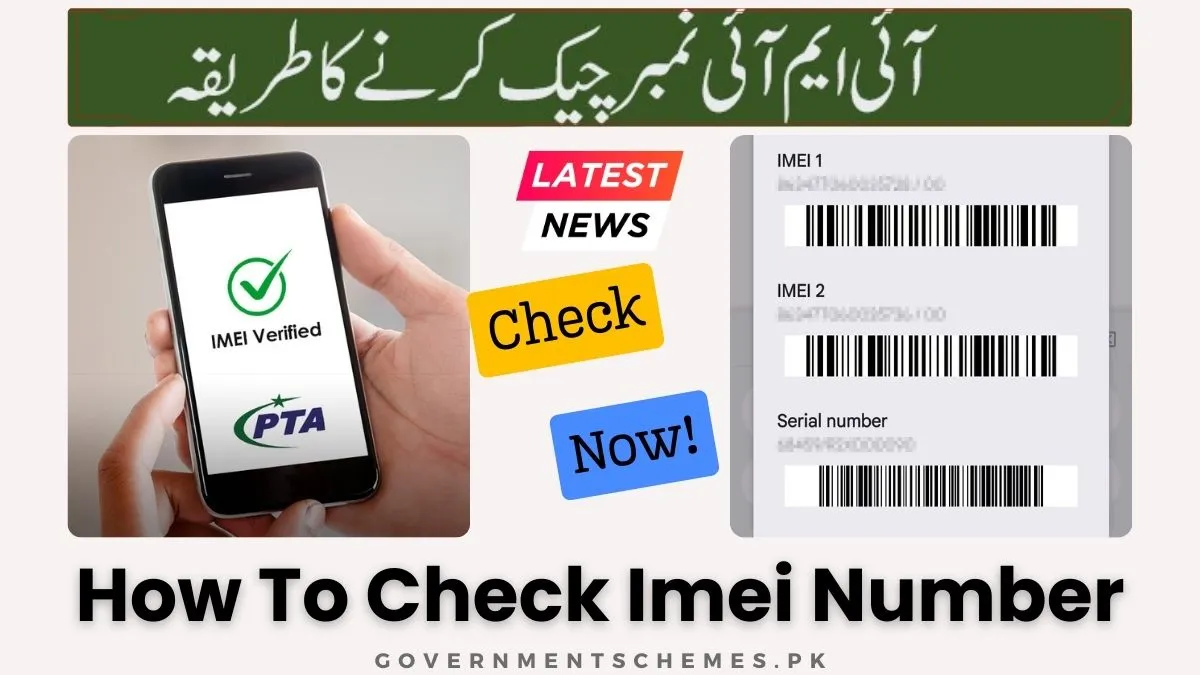
The barcode sticker typically contains multiple numbers. Look for “IMEI 1” and “IMEI 2” printed below the barcode. The numbers are 15 digits long. Take a photo of this sticker and store it in a secure cloud folder for future emergencies.
How to Find Your IMEI Number if You Lost Your Phone
Losing your phone is stressful, but your IMEI can still be recovered through accounts and paperwork, enabling you to report it properly and increase recovery chances.
How do I find my IMEI if I lost my phone?
Use online accounts linked to the device. Google and Apple store IMEI information in their device dashboards. Check android.com/find for Android or iCloud.com/find for iPhone. Sign in with the credentials used on the lost phone, locate the device entry, and view its details.
How to find your IMEI using Google’s Find My Device.
Visit android.com/find on any computer or phone. Sign in with the Google account that was active on your lost device. Select the missing phone from the list at the top. Click the information icon (i) or the gear icon—the IMEI displays alongside the phone number and battery level.
How to find your IMEI using Apple’s iCloud.
Go to iCloud.com/find and sign in with your Apple ID. Click “All Devices” at the top, select your lost iPhone or iPad. The device information panel shows the IMEI number. You may need to click “Remove from Account” or “Lost Mode” options to reveal it.
Can I find my IMEI number on my Google Dashboard or Apple ID account page?
Yes. On Google Dashboard (myaccount.google.com/dashboard), scroll to “Your devices,” click on the lost phone, and expand details to see the IMEI. For Apple, visit appleid.apple.com, sign in, go to the Devices section, select your iPhone, and the IMEI appears.
Where to find IMEI on your carrier’s bill or account portal.
Log in to your wireless carrier account online. Look for “My Devices,” “Device details,” or “Account usage.” Click on the specific phone line—the IMEI is listed along with the phone model and SIM card number. Paper bills also include IMEI numbers in the device summary section.
If the phone is stolen, should I just check the IMEI or report it to the police?
Do both immediately. First, retrieve the IMEI using one of the methods above. Second, file a police report and provide them with the IMEI. Third, contact your carrier to blacklist the IMEI so the phone cannot be used. Quick action prevents thieves from selling or using your device.
How to Check IMEI Status: Blacklist, Warranty, and Carrier Lock for Free
Once you have your IMEI, the real power begins. Free online tools and carrier services unlock a wealth of information about any device’s past, present, and future usability.
How can I check if my IMEI is blacklisted for free?
Use trusted free IMEI checkers like IMEI.info, IMEI24.com, or Swappa’s IMEI checker. Enter your 15-digit IMEI, complete any captcha, and review the report. These tools access global databases to tell you if the device is reported lost, stolen, or involved in fraud. A clean result means the phone is safe to use or buy.
How to check your phone’s warranty using the IMEI.
Apple provides official warranty status at checkcoverage.apple.com. Enter the IMEI to see purchase date, phone model, and remaining warranty coverage. Samsung offers similar status at samsung.com/us/support/checkwarranty. For other brands, use IMEI.info which pulls manufacturer data where available.
How do I check my phone’s activation date using the IMEI?
The activation date often appears in warranty check results. For iPhones, the coverage check shows the “Purchase Date” which typically matches activation. For Android, IMEI24.com provides a “First activation date” in its detailed reports. This helps verify seller claims about phone age.
Is there a way to check if my phone is carrier locked using the IMEI?
Yes. Several free tools now include carrier lock status. Dr.Fone Online Unlock’s free check reveals whether the phone is SIM-locked to a specific carrier. You can also contact your carrier and ask them to check the IMEI’s lock status directly.
How to check iPhone iCloud activation lock status for free using IMEI.
Apple provides an official iCloud Activation Lock status page at iCloud.com/activationlock. Enter the IMEI to see if Find My iPhone is enabled and if the device is linked to an Apple ID. This is critical before buying a used iPhone—if activation lock is on and the seller cannot disable it, walk away.
How to check if an iPhone is unlocked using the IMEI.
Use IMEI.info’s paid report or Dr.Fone’s free check for comprehensive unlock status. These reports show whether the iPhone is factory unlocked or locked to a specific carrier. Alternatively, insert another carrier’s SIM card—if it works, the phone is unlocked.
Can I check my phone’s purchase date by IMEI?
Yes. Warranty checks often reveal the original purchase date. Apple’s coverage page shows this date. IMEI24.com provides purchase date estimates based on activation records. This information helps determine if the phone is still under manufacturer warranty.
How to find out the country of origin for your iPhone or Samsung using IMEI.
The first eight digits (TAC) encode the country where the device was manufactured and originally intended for sale. IMEI.info’s TAC database decodes this, showing the “Origin” or “Region” of the device. Useful for verifying imported phones.
Top Free Online IMEI Checkers and Apps (2026 Update)
The internet offers dozens of IMEI checking tools, but not all are created equal. Based on extensive testing, these platforms deliver the most accurate, secure, and comprehensive results for free.
Is it safe to share my IMEI number with online checkers?
Yes, with precautions. Only use established, reputable sites with HTTPS security. Avoid sites that ask for personal information beyond the IMEI. The IMEI alone cannot be used to hack your phone or steal your identity—it is simply an identifier. However, treat it as private information and avoid posting it publicly.
IMEI.info Review: How to use the global TAC database for free specs.
IMEI.info hosts one of the largest TAC databases worldwide. Enter your IMEI, and within seconds you see full phone specifications, brand, model, release date, network bands, and basic blacklist status. The free version includes ads but provides excellent technical data. Great for verifying phone specs before purchase.
Swappa IMEI Checker: Best for US resale and clean status.
Swappa integrates directly with the GSMA global registry, offering instant blacklist and activation checks. This tool is trusted by US buyers and sellers. It shows whether the phone is financed, reported stolen, or blocked. No registration required—just enter IMEI and click “Check.”
Dr.Fone Online Unlock: Comprehensive free reports with 20+ data points.
Dr.Fone’s IMEI checker stands out for depth. The free report includes blacklist status, carrier lock, warranty coverage, iCloud lock, MDM lock (for corporate devices), and Knox status for Samsung. It covers global devices and requires no login. Results appear in under 60 seconds with no ads.
IMEI24.com: How to use it for fast warranty and iCloud info.
IMEI24 offers a clean interface focused on warranty, purchase date, and basic blacklist. Enter the IMEI, and the site pulls data from multiple sources. The free version shows essential info; paid unlocks deeper carrier and iCloud details. Excellent for quick checks.
Mobile Apps: Is the “IMEI Number Checker & MyDevice Info” app legit?
Google Play hosts several IMEI checker apps. “IMEI Number Checker: Find MyDevice Info” is a legitimate offline tool that displays your device’s IMEI, serial number, battery stats, and hardware info without sending data online. It does not check blacklists but safely retrieves your own device information.
GSMA Device Check: What is it and why do professionals use it?
The GSMA Device Check is a paid service used by carriers, insurers, and large resellers. It accesses the official global IMEI database with maximum accuracy. While not free for consumers, its existence validates the data that free tools rely on. If a free tool says “clean,” it likely matches GSMA records.
How to Check IMEI Number for Regional Compliance (PTA, DIRBS, and Others)
Many countries operate national databases to combat phone theft and ensure tax compliance. If you live in or buy from these regions, use official government portals.
How to check IMEI number in Pakistan for PTA approval.
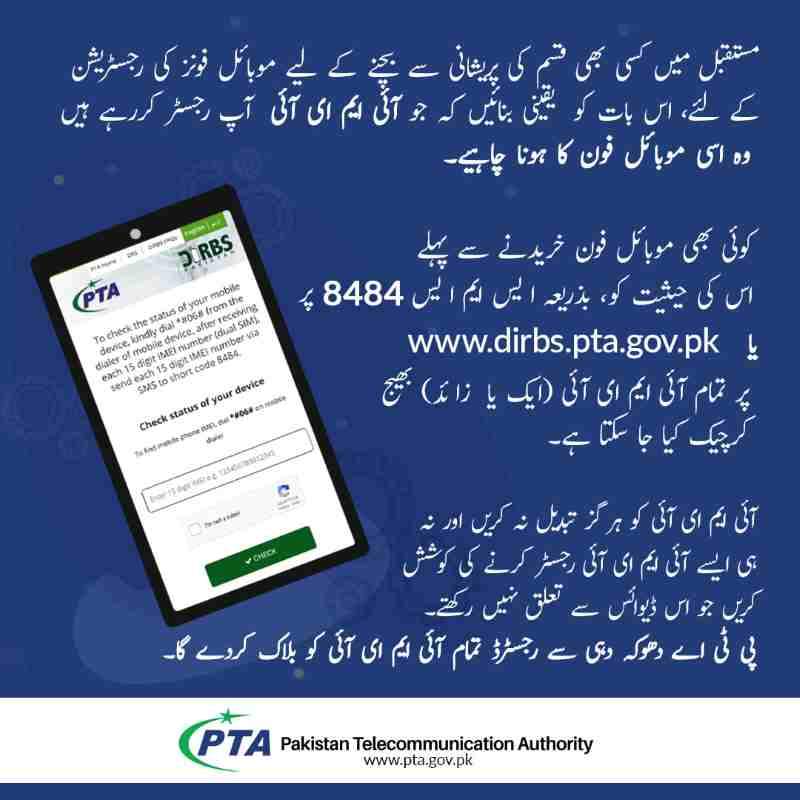
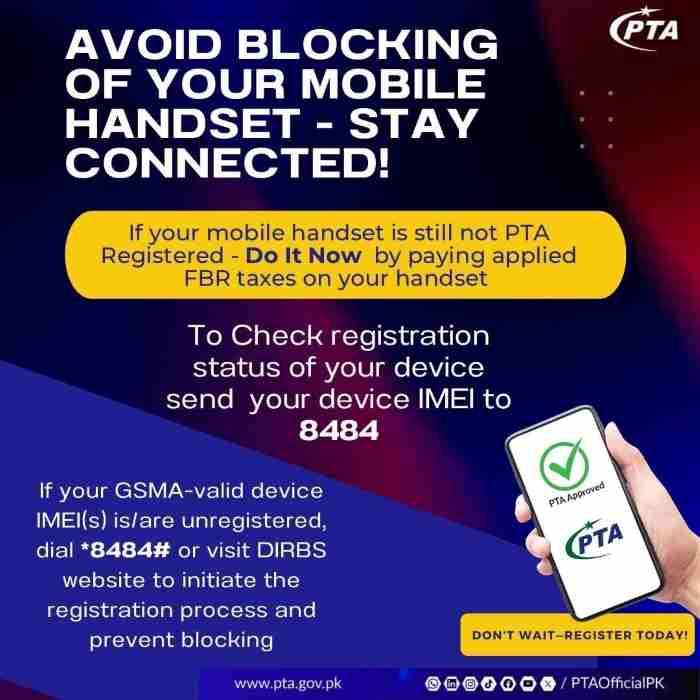
Pakistan’s telecom authority requires all imported phones to be registered and taxes paid. Use the official DIRBS portal at dirbs.pta.gov.pk. Enter your IMEI to see if the device is approved, blocked, or requires tax payment. This check is mandatory before purchasing any phone in Pakistan.
PTA IMEI check online: Step-by-step guide via SMS (8484) and website.
- Website: Visit dirbs.pta.gov.pk, enter your 15-digit IMEI, complete the captcha, and click “Check.”
- SMS: From any mobile, type your IMEI number and send it to 8484. You receive an immediate reply with approval status.
- Mobile App: Download the “Device Verification & Registration” app from official app stores for on-the-go checks.
What is DIRBS IMEI check and why is it important?
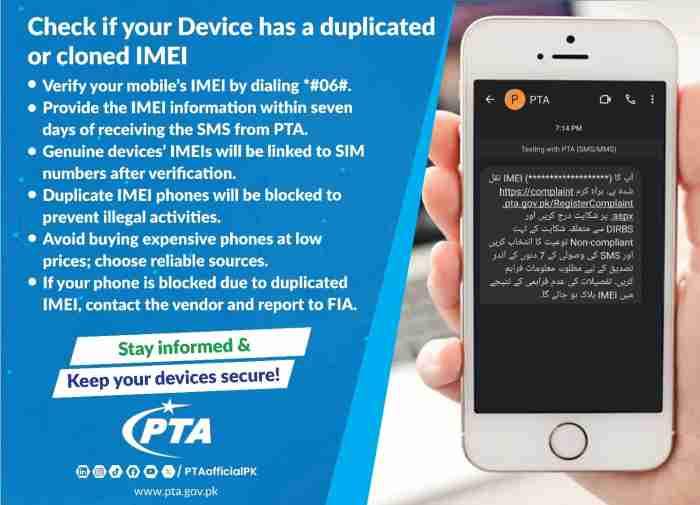
DIRBS (Device Identification Registration & Blocking System) is Pakistan’s centralized database for mobile devices. It blocks non-compliant and stolen phones from network access. Checking DIRBS before buying ensures you don’t purchase a device that will stop working after 60 days due to unpaid taxes.
How to check PTA tax status and payment by IMEI number.
The DIRBS portal shows pending tax amounts if the phone was imported but not registered. You can pay directly through the portal using banking options. Once paid, the phone becomes permanently compliant and safe from future blocking.
How to verify and restore a mobile device in Pakistan if it is cloned.
If your phone shows as “cloned” or “stolen” in error, visit the DIRBS portal, file a complaint with supporting documents (original invoice, passport, travel history), and request restoration. The process takes a few days and restores full network access.
How to check if a phone is PTA approved before buying on OLX or Daraz.
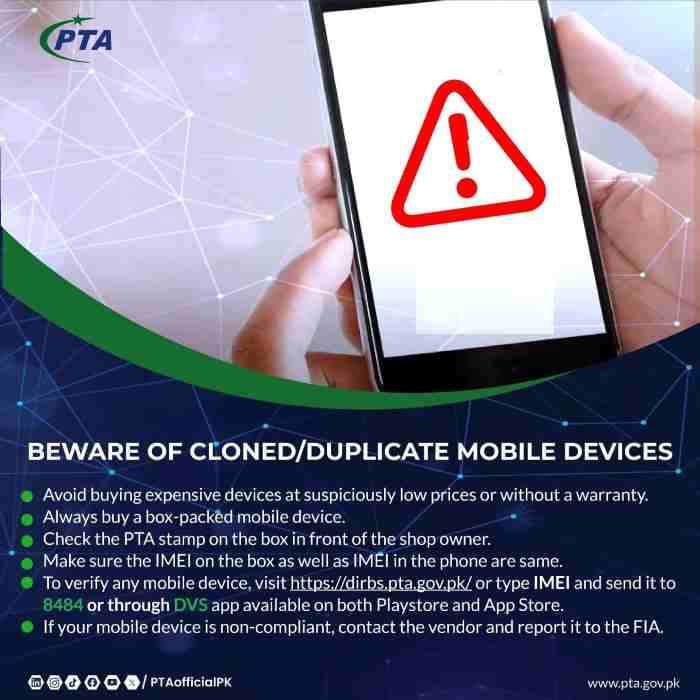
Ask the seller for the IMEI number before meeting. Run it through the DIRBS website. If the result shows “Non-Compliant” or “Tax Required,” negotiate the price down to cover taxes, or walk away. Always verify in person that the IMEI on the box matches the phone’s dial code result.
Advanced IMEI Troubleshooting and Technical Queries
Beyond basic checks, understanding IMEI nuances helps you diagnose problems and handle edge cases confidently.
How do I find the IMEI 2 for a dual SIM phone?
Dial *#06#—both numbers display simultaneously. In settings, look for “IMEI information” or “SIM status.” The second IMEI is usually labeled IMEI 2 or SIM 2. Keep both recorded; some carriers require both for blacklisting.
Why is my IMEI showing as “0”, “null”, or “Invalid”?
This indicates a serious baseband or firmware issue. The phone’s modem cannot communicate with the operating system. Causes include failed software updates, corrupted firmware, or hardware damage. The phone will likely not make calls or connect to networks. Seek professional repair.
Can an IMEI number be changed or hidden?
Legally, no. IMEI alteration is a criminal offense in most countries, punishable by fines or imprisonment. The GSMA strictly controls IMEI allocation. Devices with altered IMEIs are permanently blocked from networks. If you encounter software that claims to “change IMEI,” it is illegal and dangerous.
What is the difference between IMEI and MEID?
MEID (Mobile Equipment Identifier) is the CDMA equivalent of IMEI, used by older Verizon and Sprint networks. Modern phones support both: they display IMEI for GSM use and MEID for CDMA compatibility. When checking compatibility, use whichever number your carrier requires.
How to check IMEI on a Motorola, Nokia, or older feature phone.
Feature phones without touchscreens still support *#06#. Dial it, and the number appears on the monochrome screen. For extremely old phones, check under the battery or on the box label. The process is identical to smartphones.
Does resetting the phone to factory settings delete the IMEI?
No. Factory resets wipe user data and apps but never touch the IMEI. The IMEI is hardcoded into the phone’s firmware and modem chip. Only hardware damage or illegal tampering can change it. Your IMEI remains intact through any software reset.
How to check the IMEI of a stolen phone if you have the police report.
If you are law enforcement or have a legitimate need, contact the GSMA or national telecom authority with the police report number. They can query the IMEI’s status in global databases. Individual consumers cannot access this data without proper authorization.
Frequently Asked Questions
How do I check my IMEI number for free on all mobiles?
Dial *#06# on any phone’s keypad. The IMEI displays instantly without pressing call. This works on every brand, every network, and every operating system—completely free.
Can I check my IMEI number online using my phone number?
No. IMEI is tied to the device hardware, not your phone number. However, carriers may link IMEI to your account. Log in to your carrier account online, view your device details, and find the IMEI listed there.
How do I find the IMEI number on a Samsung Galaxy A series?
Open Settings > About phone > Status information. The IMEI displays there. Alternatively, dial *#06# or check the SIM tray for engraved numbers. The back panel also contains microscopic IMEI text near the bottom.
Is *#06# working on every network?
Yes. The code is part of the GSM standard, not a carrier feature. It works globally on all networks including Verizon, AT&T, T-Mobile, Airtel, Jio, Vodafone, and PTA-compliant networks.
How do I check my IMEI without a SIM card?
Dial *#06#—it works without a SIM. The phone’s modem responds regardless of network connectivity. You can also find it in Settings or on the physical device (SIM tray, back, box).
Can I find my IMEI through my Gmail or iCloud?
Yes. For Android, visit android.com/find and select your device. For iPhone, visit iCloud.com/find and click your device. Both show the IMEI in device details, even if the phone is lost.
How do I know if my phone is original using the IMEI?
Check the IMEI on IMEI.info or the manufacturer’s warranty page. If the returned model, brand, and specs match your phone, it is genuine. If the IMEI returns a different model or no data, the phone is likely counterfeit.
What is the best free IMEI checker app?
For offline use, “IMEI Number Checker: Find MyDevice Info” on Google Play safely displays your own device data. For online blacklist checks, use Dr.Fone Online Unlock or IMEI.info via mobile browser—they require no app installation and work instantly.
Conclusion
Your IMEI number is more than a string of digits—it is your phone’s identity, your proof of ownership, and your primary tool for recovery if disaster strikes. Memorize the universal code *#06#. Photograph your SIM tray and box sticker. Store those images in a secure cloud folder separate from your phone. Before buying any used device, run the IMEI through a free checker to avoid costly mistakes. And if the worst happens, report that IMEI to your carrier and police immediately. These simple steps transform a 15-digit code into powerful protection for your digital life.
Disclaimer: This guide is for informational purposes only. IMEI checking tools and procedures may vary by country and carrier. Always verify information with official sources before making purchasing decisions or filing reports. The author assumes no responsibility for misuse of IMEI data or reliance on third-party checker accuracy.
Frequently Asked Questions
How can I check if my phone is blacklisted for free?
Use Dr.Fone Online Unlock, IMEI.info, or Swappa IMEI Checker. Enter your 15-digit IMEI, and the free report shows blacklist status instantly.
Does *#06# work on iPhones?
Yes. Open the Phone app, go to the keypad, type *#06#, and the IMEI displays immediately. No call button needed.
Where is the IMEI number on an iPhone without a SIM card?
Check Settings > General > About, or look on the SIM tray itself. If neither works, connect to a computer and view in Finder or iTunes.
Can I track my phone using the IMEI number?
Not directly. Carriers and police can track using IMEI with proper authority, but public tracking apps require GPS and account access (Find My Device or Find My iPhone).
What should I do if my IMEI shows as “invalid”?
Try redialing *#06# carefully. If it persists, the phone may have baseband damage. Contact the manufacturer or a repair shop for diagnosis.
How many IMEI numbers does a dual SIM phone have?
Two—one for each SIM slot. Both appear when you dial *#06#. Keep both numbers recorded for insurance and police reports.
Is it legal to check someone else’s IMEI?
Only with their permission. Checking a phone you intend to buy is standard practice. Using IMEI checkers to harass or track others is illegal.
How do I check PTA approval for a phone in Pakistan?
Visit dirbs.pta.gov.pk, enter the IMEI, and click Check. Or SMS the IMEI to 8484 from any mobile. The response confirms approval status.

Add a Comment