
PESCO online bill check by 14-digit reference number simplifies accessing your electricity dues for Peshawar and Khyber Pakhtunkhwa residents. This digital service allows quick viewing, downloading, and payment of WAPDA bills without visiting offices. It covers everything from bill verification to rate calculations, ensuring efficient energy management.
Here are the main learnings from this article:
- ⚡ How to instantly check and download PESCO bills using reference numbers or CNIC.
- 💡 Understanding bill components, current tariffs, and ways to calculate electricity costs.
- 📱 Exploring online payment apps, auto-pay options, and security tips for seamless transactions.
- 🔍 Alternative methods for bill history, usage tracking, and related services like HAZECO.
- 🛡️ Tips to lower bills, troubleshoot issues, and stay updated on Pakistan’s electricity ecosystem.
- Read More: MEPCO Online Bill Check by 14 Digit Reference Number
- Read More: EOBI Pension Check Login – Step-by-Step Guide To Check
- Read More: LESCO Online Bill Check By 14 Digit Reference Number
Introduction to PESCO and Online Bill Management
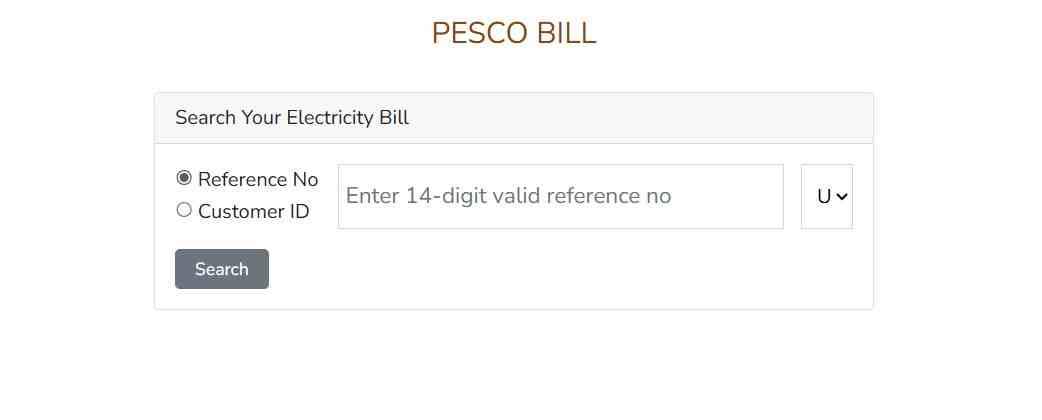
Table Of Contents
Understanding PESCO’s Role in Pakistan’s Electricity Supply
What is the Full Form of PESCO?
PESCO stands for Peshawar Electric Supply Company, a key distributor of electricity in Khyber Pakhtunkhwa province. As part of WAPDA’s network, it serves millions by managing power distribution, billing, and infrastructure. This entity ensures reliable supply while promoting digital tools for consumer convenience.
- 📌 PESCO handles over 3.8 million connections across urban and rural areas.
- 🔌 It integrates renewable sources like solar net metering to modernize the grid.
- 🌍 Collaborates with NEPRA for tariff regulations and energy efficiency initiatives.
How Does PESCO Serve Customers in KPK?
PESCO delivers electricity to residential, commercial, and industrial users in KPK, focusing on minimizing load shedding through smart meters and online services. It offers complaint portals, new connection applications, and bill management to enhance user experience. Recent advancements include dividing into entities like HAZECO for better efficiency.
- 🏠 Residential services include slab-based tariffs for fair pricing.
- 🏭 Industrial support via dedicated feeders and tariff incentives.
- 📈 Performance monitored by NEPRA for transparency and improvements.
Key Differences Between PESCO and Other WAPDA Entities Like LESCO and IESCO
PESCO operates in northern Pakistan, unlike LESCO in Lahore or IESCO in Islamabad, each with region-specific challenges like terrain affecting supply. PESCO emphasizes rural electrification, while others focus on urban density. All share WAPDA’s online bill systems but differ in tariffs and apps.
- ⚖️ PESCO’s tariffs adjust for KPK’s climate, differing from Punjab’s LESCO rates.
- 📍 Geographic coverage: PESCO in Peshawar, LESCO in central Punjab.
- 🔧 Service portals vary, but all support reference number-based checks.
Importance of Online Bill Checking for Peshawar Residents
Why Choose PESCO Online Bill Check by 14-Digit Reference Number?
PESCO online bill check by 14-digit reference number provides instant access to dues, avoiding physical queues. It’s secure, free, and available 24/7 via official portals, helping Peshawar users manage finances efficiently. This method ensures accuracy in tracking consumption and payments.
- ⏱️ Saves time with real-time bill views.
- 💰 Prevents late fees by timely notifications.
- 🌐 Accessible globally for expatriates.
Benefits of Digital Bill Management in Pakistan
Digital bill management reduces paper waste, offers payment flexibility, and integrates with banking apps. In Pakistan, it aligns with NEECA’s energy conservation goals, allowing users to monitor usage patterns. Tools like bill calculators promote informed consumption.
- 📉 Lowers administrative costs for utilities.
- 🔒 Enhances data security with encrypted portals.
- 📱 Mobile compatibility for on-the-go access.
How Online Tools Help Avoid Late Payments
Online tools send reminders via SMS or email, enabling auto-payments and history reviews. They detect discrepancies early, ensuring compliance with due dates. For PESCO users, this means fewer disconnections and better credit management.
- 🔔 Alerts for upcoming bills.
- 📅 Calendar integrations for scheduling.
- 🔄 Easy reconciliation of past payments.
Step-by-Step Guide to PESCO Online Bill Check
Accessing the Official PESCO Website
Where to Find the PESCO Online Bill View Portal?
The PESCO online bill view portal is accessible through the official PESCO website or PITC’s bill checker. Search for “PESCO web bill” to reach the dedicated page for entering details. This portal supports multiple languages for broader accessibility.
- 🌐 Navigate to pesco.com.pk for links.
- 🔗 Direct access via bill.pitc.com.pk/pescobill.
- 📲 Mobile-optimized for quick loading.
Navigating to Www PESCO Online Bill Download Section
On www.pesco.com.pk, locate the “Duplicate Bill” or “Online Bill” tab under customer services. Enter credentials to view and download PDFs. This section also links to payment gateways and complaint lodging.
- 🖱️ Click on consumer services menu.
- 📄 Options for printing or emailing bills.
- 🔍 Search function for reference numbers.
Ensuring Secure Access to PESCO Peshawar Online Bill View
Use HTTPS connections and official domains to avoid phishing. Enable two-factor authentication where available, and clear cache after sessions. PESCO’s portal employs encryption for data protection.
- 🔐 Verify site certificates.
- 🛡️ Avoid public Wi-Fi for transactions.
- 📝 Keep login details confidential.
Using the 14-Digit Reference Number for Bill Inquiry
What is a 14-Digit Reference Number in PESCO Bills?
The 14-digit reference number is a unique identifier on your PESCO bill, combining subdivision, batch, and account details. It enables precise bill retrieval without personal info. This number remains constant unless connections change.
- 📍 Found on top-right of physical bills.
- 🔢 Format: Typically starts with circle code.
- 🔄 Used for all online inquiries.
How to Locate Your 14-Digit Reference Number on Previous Bills?
Scan old bills for the “Reference No.” field near consumer details. If lost, contact PESCO helpline or visit subdivisions. Digital copies retain this number for future use.
- 🗂️ Check archived emails or app history.
- ☎️ Helpline: 111-000-128 for assistance.
- 📋 Note it for recurring access.
Step-by-Step Process for PESCO Online Bill Check by 14-Digit Reference Number
Visit the PESCO bill portal, enter the 14-digit reference number, and submit. View bill amount, due date, and details instantly. Download or print for records.
- Open bill.pitc.com.pk/pescobill.
- Input reference number without spaces.
- Click “Search” to display bill.
- Review and download PDF.
- ⚠️ Ensure correct entry to avoid errors.
- 📱 App versions follow similar steps.
- 🔄 Refresh for latest updates.
Common Errors When Entering Reference Number PESCO Online Bill Check
Typos in digits or including hyphens cause failures. Network issues or server downtime may occur. Invalid numbers indicate connection changes.
- ❌ “Invalid Ref” means wrong input.
- 🌐 Check internet stability.
- 🔧 Contact support for verification.
Troubleshooting Issues in Reference Number PESCO Online Bill Check 14 Digit
If errors persist, clear browser cookies or try incognito mode. Update app versions or use alternative browsers. Report persistent issues to PESCO.
- 🔄 Retry after a few minutes.
- 📞 Use citizen portal for complaints.
- 🛠️ System maintenance alerts on site.
Alternative Methods for Bill Verification
How to Check PESCO Bill by CNIC Number?
PESCO bill by CNIC allows verification without reference, useful for new users. Enter CNIC on select portals or apps to retrieve associated bills. This method links identity to accounts.
- 📋 Input 13-digit CNIC without dashes.
- 🔍 Limited to registered connections.
- 📱 Available on some third-party sites.
PESCO Online Bill Check by Name: Is It Possible?
PESCO online bill check by name is not directly supported due to privacy, but combined with address or CNIC, it may work via helplines. Official portals prioritize reference numbers.
- 🚫 Not standard online feature.
- ☎️ Call center assistance possible.
- 🔒 Enhances security against misuse.
How to Check Electricity Bill by CNIC Number Online?
For electricity bill by CNIC online, use WAPDA-affiliated sites like pitc.com.pk. Select PESCO, enter CNIC, and view bills. This cross-verifies multiple connections.
- 🌐 Broadens access for families.
- 📈 Tracks usage across accounts.
- 🔐 Requires verification codes.
PESCO Bill Check by CNIC: Step-by-Step Guide
Access portal, choose CNIC option, input number, and submit. Confirm via OTP if prompted. Download displayed bill.
- Visit pesconlinebill.pk.
- Select CNIC search.
- Enter details and verify.
- View or save bill.
- 📲 Mobile apps support this.
- ⚠️ Ensure CNIC matches registration.
- 📄 Multiple bills if linked.
How to Find LESCO Bill with CNIC Number?
For LESCO bill with CNIC, use lesco.com.pk’s portal similarly. Enter CNIC to pull Punjab-specific bills. Differs from PESCO in regional tariffs.
- 🔗 lesco.gov.pk for access.
- 📍 Punjab-focused service.
- 🔄 Comparable to PESCO process.
How to Check IESCO Bill by CNIC Number?
IESCO bill by CNIC follows Islamabad’s portal at iesco.com.pk. Input CNIC for capital region bills, with unique slab adjustments.
- 🌆 Urban-centric features.
- 📱 App integration available.
- 🔍 Quick for multiple meters.
How to Check Electricity Customer ID?
Electricity customer ID is the 10-digit number on bills, used interchangeably with reference. Locate it below reference or via portal search.
- 📍 Printed on bill footer.
- 🔢 Shorter alternative identifier.
- 📞 Helpline for retrieval.
What is a 12 Digit Consumer Number?
A 12-digit consumer number is an older or variant identifier in some WAPDA systems, often part of reference. It’s used for legacy accounts.
- 🔄 May convert to 14-digit.
- 📋 Check bill for presence.
- 🔧 Contact for updates.
Are Consumer ID and Consumer No the Same?
Consumer ID and consumer no are synonymous, referring to unique account codes. Both facilitate bill checks and payments.
- ⚖️ Interchangeable in portals.
- 📈 Track payment history.
- 🔒 Tied to user identity.
What is the 11 Digit Customer ID?
The 11-digit customer ID is a specific format in certain discos, used for internal tracking. Verify on your bill.
- 📍 Varies by region.
- 🔢 Subset of reference.
- 📲 App-compatible.
How to Find Consumer ID?
Find consumer ID on physical bills or through CNIC search on portals. Helplines provide it upon verification.
- 🗂️ Review old statements.
- ☎️ PESCO support.
- 📱 Digital records.
What is a 12 Digit Account Number?
A 12-digit account number is similar to consumer ID, used for banking integrations in payments.
- 🔗 Links to auto-debit.
- 📋 Bill-specific.
- 🔄 Standard in some apps.
Understanding Your PESCO Electricity Bill
Key Components of a PESCO Bill
What Details Are on a PESCO Bill?
A PESCO bill includes consumer details, reference number, units consumed, tariffs, taxes, and due dates. It breaks down fixed charges, fuel adjustments, and surcharges for transparency.
- 📄 Sections: Current charges, arrears.
- 🔢 Meter readings and calculations.
- 📅 Payment deadlines.
Breaking Down Units, Charges, and Taxes
Units represent kWh consumption, charged per slab. Fixed charges cover connections, while taxes include GST and TV fees. Fuel adjustments vary monthly.
- ⚡ Slab progression: Higher units cost more.
- 💰 Surcharges for late payments.
- 📊 Detailed breakdown aids budgeting.
How to Read the Bill for 200 Units of Electricity in Pakistan?
For 200 units, calculate using current slabs: First 100 at lower rate, next 100 higher. Add fixed charges and taxes for total.
| Units | Rate (Rs/kWh) | Amount (Rs) |
|---|---|---|
| 1-100 | 7.74 | 774 |
| 101-200 | 10.06 | 1006 |
| Total before taxes | – | 1780 |
- 🔍 Adjust for surcharges.
- 📈 Example for domestic use.
- 💡 Promotes conservation.
What is the Bill for 500 Units of Electricity in Pakistan?
500 units bill uses multiple slabs: Up to 300 protected, then unprotected rates. Approximate Rs 10,000-15,000 including taxes.
- 📉 Protected vs. unprotected categories.
- 🔢 Higher slabs increase exponentially.
- 📊 Use calculators for precision.
What is the Bill for 400 Units of Electricity?
400 units fall into mid-slabs, costing around Rs 8,000-12,000. Factors in AC usage or appliances.
- ⚡ Peak season adjustments.
- 💰 Tax-inclusive estimate.
- 🔄 Compare with previous months.
How Much Bill for 1 Hour AC?
1 hour AC (1.5 ton) consumes 1.5-2 units, costing Rs 30-50 per hour at average rates. Varies by efficiency.
- 🏠 Inverter models save more.
- 📈 Daily use multiplies costs.
- 🔍 NEECA calculator helps.
What is the Monthly Bill of AC in Pakistan?
Monthly AC bill for 8 hours daily: 360-480 units, adding Rs 5,000-8,000 to total. Depends on tariff category.
- 🌡️ Summer spikes.
- 💡 Energy-saving tips reduce it.
- 📊 Track via apps.
Current Electricity Rates and Calculations
What is the Price of Electricity Unit in Pakistan Today per kWh?
Current electricity unit price in Pakistan averages Rs 30 per kWh for PESCO, inclusive of taxes. Slabs start from Rs 7.74 for low usage.
- 🔄 NEPRA updates quarterly.
- 📉 Protected lifeline rates.
- 📈 Commercial higher.
PESCO Unit Price Today: Latest Updates
PESCO unit price today follows NEPRA’s tariff: Residential slabs from Rs 7.74 to Rs 26.07. Fixed charges Rs 75-500.
- ⚡ Real-time checks via site.
- 💰 Adjustments for fuel costs.
- 🔢 Detailed on official notifications.
What is the Rate of 1 Unit in Electricity?
Rate of 1 unit in electricity is slab-dependent: Rs 3.95 for 50 units lifeline, up to Rs 41 for high consumption.
- 📊 Progressive structure.
- 🔍 Protects low-income users.
- 📉 Encourages efficiency.
How Much Money is Per Unit?
Money per unit ranges Rs 7-40 based on slabs and category. Average Rs 30 with surcharges.
- 💰 Domestic vs. industrial.
- 📈 Inflation adjustments.
- 🔄 Current NEPRA rates.
What is the Cost of One Unit?
Cost of one unit is Rs 7.74 for first 100 in residential, escalating thereafter. Includes GST at 17%.
- ⚖️ Fair usage policy.
- 📊 Bill estimators available.
- 💡 Conservation lowers effective cost.
How to Calculate Monthly Electricity Bill?
Calculate monthly electricity bill by multiplying units by slab rates, adding fixed charges, taxes, and adjustments. Use online tools for accuracy.
- Note meter reading difference.
- Apply slabs.
- Add surcharges.
- Include GST.
- 📱 PESCO calculator apps.
- 🔍 Factor appliance usage.
- 📈 Predict future bills.
PESCO Bill Calculator: Tools and Formulas
PESCO bill calculator uses units input to estimate totals based on tariffs. Formulas: Total = (Units * Rate) + Fixed + Taxes.
- 🌐 Online at pescobill.pk/calculator.
- 📊 Accurate for planning.
- 🔢 Includes green meter options.
Electricity Bill Calculator Pakistan: General Guidelines
Electricity bill calculator Pakistan aggregates discos’ tariffs. Input region, units for estimates. NEECA’s tool aids appliance-wise breakdown.
- 📉 National average rates.
- 🔍 Customizable for PESCO.
- 💡 Promotes awareness.
PESCO Green Meter Bill Calculator Explained
PESCO green meter bill calculator accounts for solar exports: Net bill = Consumption – Exports * Rate. Exports credited at Rs 9-18/unit.
- 🌞 Net metering benefits.
- 📈 Reduces overall costs.
- 🔢 Online simulators.
What Uses the Most Electricity at Home?
AC, geysers, and refrigerators use the most electricity at home, up to 50% of total. Lighting and fans follow.
- 🏠 Audit with NEECA tools.
- 📊 Usage charts.
- 💡 Switch to LEDs.
How Can I Lower My Electric Bill?
Lower electric bill by using energy-efficient appliances, unplugging standbys, and timing usage off-peak. Insulate homes for less AC.
- 🔌 Smart plugs.
- 🌞 Solar adoption.
- 📉 Monthly monitoring.
Bill History and Usage Tracking
How to Check PESCO Bill History?
Check PESCO bill history via portal login, entering reference for past 12 months. Download archives for records.
- 📅 Year-wise views.
- 🔍 Payment status included.
- 📱 App dashboards.
What Info is in a Bill Payment History?
Bill payment history includes dates, amounts, methods, and arrears. Tracks adjustments and refunds.
- 💰 Receipt numbers.
- 📈 Trend analysis.
- 🔒 Secure access.
Can I Check My Electricity Usage Online?
Yes, check electricity usage online through PESCO’s portal or apps, showing daily/ monthly kWh graphs.
- 📊 Visual analytics.
- 🔍 Compare periods.
- 💡 Alerts for spikes.
How to Get a Previous Month Bill?
Get previous month bill by selecting period in portal or requesting via helpline. Digital copies free.
- 📄 PDF downloads.
- 🔄 Easy retrieval.
- 📲 Mobile notifications.
How to Check Old Bill?
Check old bill using reference on archive sections. Up to 2 years available online.
- 🗂️ Historical data.
- ☎️ Support for older.
- 📋 Useful for disputes.
How to Download Old Best Electricity Bill?
Download old electricity bill from portal’s history tab. Select and save as PDF.
- 📄 High-quality prints.
- 🔍 Search by date.
- 📱 App compatibility.
How to Check for Electricity Bill?
Check for electricity bill via SMS to 8118 with reference, or online portals.
- ⏱️ Instant responses.
- 📲 Convenient for all.
- 🔄 Regular updates.
How to Download UP Electricity Bill PDF?
Download UP electricity bill PDF from UPPCL site, similar process for non-PESCO users.
- 📍 Regional portals.
- 🔗 uppclonline.com.
- 📄 Secure files.
Can I Download My Electricity Bill?
Yes, download electricity bill directly from PESCO portal after inquiry.
- 📲 One-click save.
- 🔍 Multiple formats.
- 💡 Eco-friendly.
How Secure is Bill Downloading?
Bill downloading is secure with SSL encryption and user authentication. Avoid unofficial sites.
- 🔐 Data protection.
- 🛡️ Phishing awareness.
- 📝 Privacy policies.
Online Payment Options for PESCO Bills
Methods for Paying PESCO Bills Digitally
How to Pay Online PESCO Bill?
Pay online PESCO bill via banking apps, entering reference and amount. Confirm with OTP.
- 🌐 JazzCash, EasyPaisa.
- 📱 Quick processing.
- 🔄 Receipt generation.
How to Pay Electric Bills Online?
Pay electric bills online through UBL Omni, HBL Konnect, or disco apps. Select utility, input details.
- 💰 Multiple options.
- 📈 Track transactions.
- 🔍 Fee-free for some.
How Can I Pay My Electricity Bill Online in Pakistan?
Pay electricity bill online in Pakistan via myABL or other banks. Register, add biller as PESCO.
- 📲 App tutorials.
- 🔗 Secure gateways.
- ⏱️ 24/7 availability.
How Can I Pay Online Directly?
Pay online directly on PESCO portal or PITC site, using cards or wallets.
- 🖥️ Integrated payments.
- 💳 Visa/Mastercard.
- 🔐 Encrypted.
How to Online Bill Payment?
Online bill payment involves selecting biller, entering reference, and authorizing transaction.
- Login to app.
- Choose utility.
- Pay and confirm.
- 📱 User-friendly.
- 🔄 Instant updates.
- 💰 Limits apply.
PESCO Online Bill Payment App: Features and Usage
PESCO online bill payment app offers bill views, payments, and history. Download from stores.
- 📲 Android/iOS.
- 🔍 Notifications.
- 💡 User guides.
How to Pay Electricity Bill Through myABL App?
Pay electricity bill through myABL app by adding PESCO as biller, entering ID.
- 📱 Download myABL.
- 🔗 Link account.
- ⏱️ Fast settlements.
How to Register myABL App Online?
Register myABL app online via ABL website, using CNIC and mobile.
- 📲 OTP verification.
- 🔐 Set PIN.
- 💰 Activate services.
Is There a PESCO Mobile App for Bill Payment?
Yes, PESCO mobile app for bill payment exists, like “PESCO Online Bill” for checks and pays.
- 📱 Features: Duplicate copies.
- 🔍 Usage tracking.
- 💡 Free download.
Is There a Mobile App to Check PESCO Bills?
Mobile app to check PESCO bills includes official and third-party options for quick access.
- 🌐 Real-time data.
- 📲 Push alerts.
- 🔄 Updates frequent.
How to Pay Online Electric Bill?
Pay online electric bill similarly, selecting PESCO in payment apps.
- 💰 Wallet integrations.
- 📈 History logs.
- 🔍 Easy refunds.
Advanced Payment Features
Can I Set Up Automatic Payments for My PESCO Bill?
Yes, set up automatic payments for PESCO bill via banks or apps, deducting on due dates.
- 🔄 Recurring setups.
- 💰 Avoid misses.
- 📱 Control options.
What Are the Risks of AutoPay?
Risks of AutoPay include overdrafts if funds low, or erroneous deductions. Monitor accounts regularly.
- ⚠️ Cancellation delays.
- 🔍 Review terms.
- 🛡️ Bank protections.
How Long Does It Take for an Online PESCO Payment to Process?
Online PESCO payment processes in 1-2 business days, with instant confirmations.
- ⏱️ Real-time for some.
- 📈 Status checks.
- 🔄 Weekends delay.
How to Check If a PESCO Bill is Paid or Not?
Check if PESCO bill is paid via portal history or SMS to 8118.
- 📊 Updated ledgers.
- 🔍 Receipt verification.
- 📱 App notifications.
How to Check If the Bill is Paid?
Check if bill is paid by re-querying on portal; status shows cleared.
- ⚡ Instant reflections.
- 📈 Arrears zero.
- 🔄 Confirm with bank.
How to Check Electricity Bill Via Phone?
Check electricity bill via phone by calling 118 or SMS REF to 8118.
- ☎️ IVR systems.
- 📲 Quick responses.
- 🔍 Voice-assisted.
Alternative Payment Channels
How to Check KE Bill on WhatsApp?
Check KE bill on WhatsApp by messaging reference to official number, similar for PESCO affiliates.
- 📱 Chatbot features.
- 🔍 Instant bills.
- 💰 Payment links.
Can You Pay Bills with WhatsApp?
Yes, pay bills with WhatsApp via integrated bots for select utilities.
- 🌐 Convenient chats.
- 🔐 Secure links.
- 📲 Growing adoption.
What is the WhatsApp Number 9449844640?
WhatsApp number 9449844640 is for KE or similar; verify for PESCO.
- 📱 Utility-specific.
- 🔍 Bill inquiries.
- 💡 Support queries.
How to Contact by WhatsApp?
Contact by WhatsApp saving official numbers, sending queries or references.
- ⏱️ Fast replies.
- 📈 Track conversations.
- 🔄 Multimedia support.
Related Electricity Services in Pakistan
Checking Bills for Other Providers
HAZECO Online Bill Check 14 Digit
HAZECO online bill check 14 digit uses similar portal at bill.pitc.com.pk/hazecobill. Enter reference for Hazara region bills.
- 📍 Split from PESCO.
- 🔗 Dedicated site.
- 📲 Duplicate copies.
HAZECO Online Bill Check
HAZECO online bill check provides views for Abbottabad areas, with tariffs aligned to NEPRA.
- 🌐 User-friendly.
- 🔍 History access.
- 💡 Payment options.
HAZECO Online Bill
HAZECO online bill details consumption, similar to PESCO format.
- 📄 PDF downloads.
- 📈 Usage trends.
- 🔢 Calculator tools.
HAZECO Bill Calculator
HAZECO bill calculator estimates based on units, mirroring PESCO’s.
- 📊 Slab computations.
- 🔍 Tax inclusions.
- 💰 Budgeting aid.
WAPDA Bill Online Check Near Peshawar
WAPDA bill online check near Peshawar uses PESCO or HAZECO portals for local access.
- 📍 Regional variations.
- 🔗 pitc.com.pk.
- 📲 Nearby support.
How to Check Electricity Bill in KPK?
Check electricity bill in KPK via PESCO/HAZECO sites, entering details.
- 🌍 Province-wide.
- 🔍 CNIC options.
- 💡 Helpline backups.
How Can I Check My Old Electricity Bill in UP?
Check old electricity bill in UP through UPPCL portal, archival search.
- 📍 State-specific.
- 🗂️ Long-term storage.
- 🔄 Similar to PESCO.
How to Download Electricity Bill Online UP?
Download electricity bill online UP from uppclonline.com, select period.
- 📄 Secure PDFs.
- 🔍 Easy navigation.
- 📱 Mobile access.
Broader Electricity Management Tips
How Do I Check My Power Bill?
Check power bill by visiting disco portals or apps with reference.
- ⚡ Universal process.
- 📈 Detailed views.
- 🔍 Status updates.
How Do I Check My Electricity Bill?
Check electricity bill online or via SMS for quick overviews.
- 📱 Convenient methods.
- 🔄 Regular habits.
- 💡 Avoid surprises.
How Do You Check Your Electricity Bill?
You check your electricity bill by inputting identifiers on official sites.
- 🌐 Step-by-step.
- 📊 Analyze components.
- 🔍 Dispute if needed.
How to View My PESCO Bill Online?
View PESCO bill online at pesconlinebill.pk, entering reference.
- 📲 Instant display.
- 🔍 Full details.
- 💰 Payment prompts.
How to Check Electricity Bills Online?
Check electricity bills online across discos using unified portals.
- 📍 Region selection.
- 🔗 Secure logins.
- 📈 Comparative tools.
Frequently Asked Questions About PESCO Bills
What is the Bill for 200 Units of Electricity in Pakistan?
The bill for 200 units is approximately Rs 1,780 before taxes, based on current slabs.
How to Check Bill with CNIC?
Check bill with CNIC by entering it on PESCO or PITC portals for linked accounts.
How to Download Old Best Electricity Bill?
Download old electricity bill from history sections after logging in with reference.
PESCO Online Bill Check 14 Digit December
PESCO online bill check 14 digit for specific months follows standard process, selecting period if needed.
PESCO Online Bill Check 14 Digit September
Similar to above, access via reference for any month’s bill.
Reference Number PESCO Online Bill Check 14 Digit
Reference number PESCO online bill check 14 digit is the primary method for accurate retrieval.
PESCO Online Bill Check 14-Digit
PESCO online bill check 14-digit ensures precise, secure access to your dues.
Conclusion: Mastering PESCO Bill Management
Summarizing Key Takeaways for Efficient Bill Handling
Master PESCO bill management with digital tools for checks, payments, and savings. Stay informed on tariffs and usage.
Future Trends in Online Electricity Services in Pakistan
Trends include AI-driven usage predictions, blockchain for secure payments, and expanded green energy integrations.
Resources for Further Assistance with PESCO and Related Queries
Utilize PESCO helplines, citizen portals, and NEPRA for advanced support and queries.

Add a Comment