
The Punjab Kisan Card is a government-issued digital card providing interest-free agricultural loans of up to Rs. 30,000 per acre to eligible landowners with 1 to 12.5 acres. This complete guide will walk you through the online application process via SMS to 8070, eligibility criteria, required documents, loan limits, balance check methods, and troubleshooting common issues.
Key Takeaways
- Interest-Free Loans: Farmers receive up to Rs. 30,000 per acre (max Rs. 150,000) with zero interest for seeds, fertilizers, and pesticides.
- Simple SMS Registration: Send PKC space your CNIC number to 8070 from your own SIM-registered mobile number to begin the application.
- PLRA Land Record Required: Your land must be digitally verified in the Punjab Land Record Authority system to qualify.
- Bank of Punjab Issuance: After verification, collect your Kisan Card from any Bank of Punjab branch after biometric confirmation.
- Read More: Diesel Subsidy Scheme (For Farmers) – Rs 150/L Subsidy by Maryam Nawaz
- Read More: Diesel Subsidy Scheme (Rs. 150/Liter) – Fuel Subsidy App
- Read More: Sindh Govt Petrol Subsidy Scheme – Petrol Subsidy App
- Read More: Sasta Petrol Subsidy Scheme – Petrol Subsidy For Bikers
Kisan Card Apply – Eligibility Punjab Farmers | Payment Update April 2026 (Kisan Card Bill Payment)

Table Of Contents
What Exactly is the CM Punjab Kisan Card and How Does It Work?

The CM Punjab Kisan Card is a government-issued smart card that functions as a digital wallet and ATM card, providing interest-free loans exclusively for purchasing agricultural inputs from registered dealers. The card operates within a comprehensive digital ecosystem connecting multiple government departments including the Punjab Agriculture Department, Punjab Information Technology Board (PITB), Punjab Land Record Authority (PLRA), NADRA, Pakistan Mobile Device Verification (PMD), and the Bank of Punjab (BOP).
The Complete Digital Ecosystem Behind the Kisan Card

The Kisan Card initiative represents a groundbreaking integration of digital infrastructure across several government agencies. This interconnected system ensures seamless verification, transparent transactions, and efficient loan disbursement for farmers.
- Punjab Agriculture Department: Oversees the entire scheme, sets policies, and registers authorized dealers
- Punjab Information Technology Board (PITB): Develops and maintains the digital portal and verification systems
- Punjab Land Record Authority (PLRA): Provides digital land ownership verification for eligibility checks
- NADRA: Verifies applicant CNIC authenticity and identity confirmation
- Pakistan Mobile Device Verification (PMD): Confirms that the mobile SIM used for registration belongs to the applicant
- Bank of Punjab (BOP): Issues physical cards, processes transactions, and manages the loan disbursement system
How the Interest-Free Loan Mechanism Functions Across Seasons
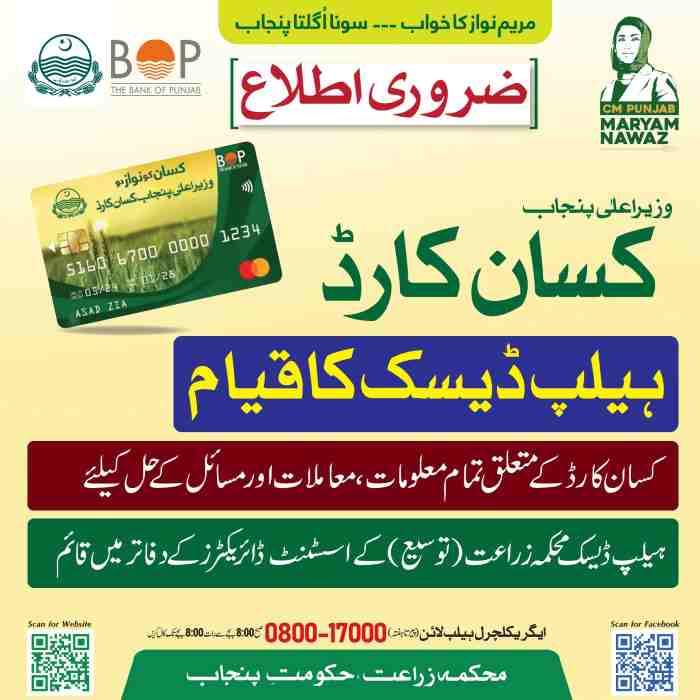
The interest-free loan facility operates on a per-season basis, covering the complete agricultural cycle from sowing to harvesting. Farmers receive the loan amount loaded onto their Kisan Card, which can only be used at registered agricultural input dealers.
- Loan Disbursement: The approved amount is loaded onto the Kisan Card electronically
- Transaction Limitation: Funds can only be used at Point-of-Sale machines at registered dealer locations
- Seasonal Renewal: After successful repayment, farmers can reapply for the next season’s loan
- Zero Interest Policy: No markup or interest is charged on any amount borrowed under this scheme
Validity Period and Grace Window Explained

The Kisan Card comes with a specific validity period designed to align with the agricultural season, followed by a grace period for repayment.
- Standard Validity: Each Kisan Card remains active for 6 months from the date of issuance
- Loan Usage Window: Farmers must purchase agricultural inputs within this 6-month period
- Grace Period Extension: A 1-month grace period is provided after the 6 months for debt repayment
- Card Expiry: After the grace period ends, the card becomes inactive until the next season’s renewal
Real-Time SMS Notifications for Complete Transaction Transparency
Every stage of the Kisan Card process is accompanied by automated SMS notifications, ensuring farmers stay informed without needing internet access.
- Registration Confirmation: An immediate SMS confirms receipt of your application
- Verification Updates: Separate SMS notifications for PLRA, NADRA, and PMD verification stages
- Card Ready Alert: Notification when your card is available for collection at Bank of Punjab
- Transaction Alerts: Real-time SMS for every purchase made using the card
- Balance Notifications: Monthly balance updates sent directly to registered mobile numbers
- Repayment Reminders: Automated reminders before the 6-month deadline approaches
Kisan Card Phase Statistics and Reach
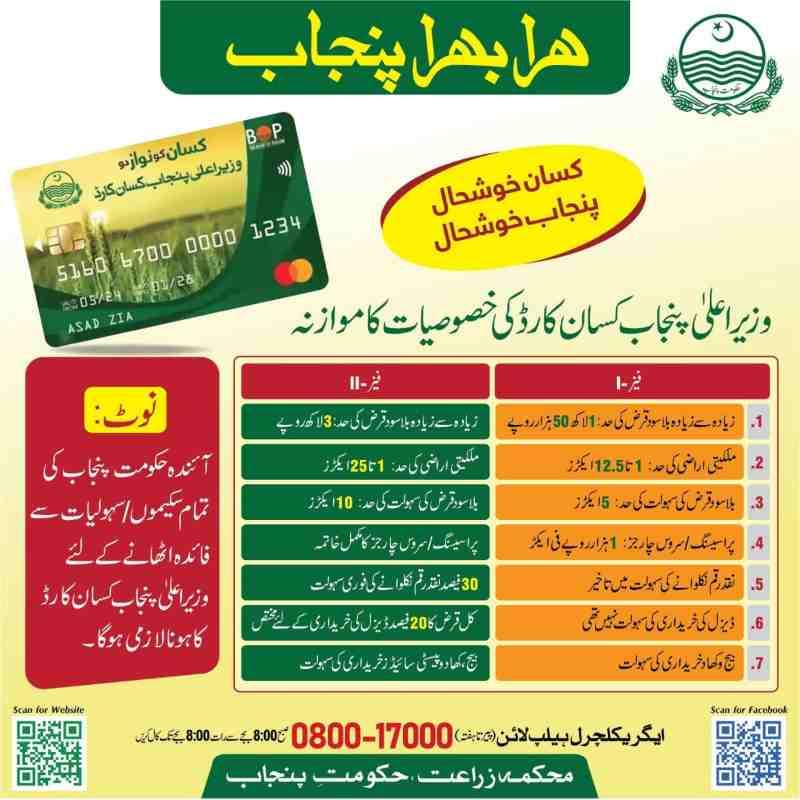
The program has achieved significant milestones in its rollout phases, demonstrating its impact on Punjab’s agricultural sector.
- Phase I Achievement: 484,229 Kisan Cards were successfully issued to eligible farmers
- Phase II Expansion: An additional 180,174 cards were activated, bringing more farmers into the system
- Total Beneficiaries: Over 800,000 farmers have registered for the scheme
- Financial Impact: The program represents an estimated Rs. 9.5 billion investment per agricultural season
- Dealer Network: More than 2,600 registered dealers across Punjab accept Kisan Card payments
Kisan Card Eligibility Punjab Farmers: The Complete Criteria

To be eligible for the Punjab Kisan Card, a farmer must own between 1 and 12.5 acres of land recorded in the PLRA system, be a permanent Punjab resident, have a mobile SIM registered in their own name via PMD verification, and not be a bank defaulter. These criteria ensure that the program reaches genuine small and medium farmers who need financial support for agricultural inputs.
Land Ownership Rules: Why 1 to 12.5 Acres is the Fixed Range
The land ownership range has been carefully selected to target farmers who typically lack access to traditional bank financing.
- Minimum Requirement: Farmers must own at least 1 acre of registered agricultural land
- Maximum Limit: Land ownership cannot exceed 12.5 acres (25 acres for Phase II in select districts)
- Land Type: Only agricultural land is eligible; commercial or residential property does not qualify
- Multiple Plots: Combined land across multiple locations is counted toward the total acreage
What Happens If You Own Less Than 1 Acre

Farmers with less than 1 acre of land are currently not eligible for the standard Kisan Card program. However, the government has announced special provisions for these marginal farmers through separate micro-finance initiatives.
- Current Exclusion: Land holdings below 1 acre do not qualify for the Rs. 30,000 per acre loan
- Alternative Programs: Small farmers can explore the Agriculture E-Credit Scheme for smaller loan amounts
- Future Expansion: Government announcements suggest potential inclusion of sub-1 acre farmers in future phases
- Joint Ownership Consideration: Multiple small holdings within a family might be consolidated for eligibility
Can I Apply If I Own More Than 12.5 Acres of Land
Farmers owning more than 12.5 acres are generally not eligible for the standard Kisan Card program. The program explicitly targets small to medium landowners who face the greatest difficulty accessing institutional credit.
- Standard Exclusion: Land exceeding 12.5 acres disqualifies applicants from Phase I benefits
- Phase II Expansion: Some districts have extended eligibility up to 25 acres in Phase II
- Commercial Farmer Status: Larger landowners are expected to access conventional agricultural loans
- District Variations: Check with your local Agriculture Department for phase-specific eligibility in your district
PLRA Land Record Verification: The Non-Negotiable Requirement
Your land record must be digitally available and verified through the Punjab Land Record Authority system. This is the single most critical eligibility requirement that cannot be bypassed.
- Digital Record Mandate: Land ownership must be recorded in the PLRA digital database
- Verification Process: The system automatically checks your CNIC against PLRA records
- Non-Computerized Land: Farmers with non-computerized land records must first update their records through PLRA
- Land Disputes: Land under active litigation may face verification delays or rejection
- Inheritance Issues: Unclear land titles due to inheritance disputes require resolution before application
Read More: Bike Petrol Subsidy App – Apply via SMS | Get 20L Fuel
PMD SIM Verification: Why Your Mobile Number Must Match Your CNIC

The mobile SIM used for registration and SMS communication must be registered against your own CNIC. This prevents fraudulent applications and ensures direct communication with the actual farmer.
- PMD Database Check: The system verifies SIM ownership through Pakistan Mobile Device Verification
- Family SIM Issue: SIMs registered under another family member’s name will cause verification failure
- Prepaid SIM Requirement: Both prepaid and postpaid SIMs are acceptable as long as ownership matches your CNIC
- Dual SIM Phones: Either SIM can be used, provided it is registered in your name
- Expired SIM: SIM cards with expired registration must be renewed before applying
How to Verify Your SIM Ownership Status
Before applying for the Kisan Card, confirm that your mobile SIM is properly registered in your name.
- USSD Code Method: Dial *668# from your mobile phone to check SIM ownership details
- Network Customer Service: Call your mobile operator’s helpline for ownership verification
- Retail Store Visit: Visit your network’s authorized service center for SIM ownership confirmation
- CNIC-SIM Link: The system checks that your CNIC matches the SIM’s registered owner
- Multiple SIMs: If you have multiple SIMs on your CNIC, you can use any one of them for registration
Punjab Residency and Domicile Requirements
Applicants must be permanent residents of Punjab province with valid domicile certificates.
- Domicile Proof: Your CNIC address must reflect a Punjab district
- Temporary Residents: Farmers living in Punjab but holding other province domiciles are not eligible
- District Variations: Some benefits may vary by district based on local agricultural priorities
- Urban Farmers: Farmers owning agricultural land within urban areas remain eligible
Bank Defaulter Clause: Can You Apply with Bad Credit History
Applicants with active bank default status are generally disqualified from the Kisan Card program. The government aims to extend credit only to farmers with clean financial records.
- eCIB Check: The system performs an electronic Credit Information Bureau check on every applicant
- Active Default: Farmers with outstanding loan defaults are automatically rejected
- Past Defaults: Historical defaults that have been settled may not disqualify applicants
- Agricultural Loan Default: Defaulting specifically on agricultural loans carries stricter penalties
- Repayment History: Farmers with timely repayment records receive priority processing
Age Limit for Farmers: Minimum and Maximum Requirements
The program establishes clear age boundaries to ensure loans are provided to actively farming individuals.
- Minimum Age: Applicants must be at least 18 years old at the time of application
- Maximum Age: The upper age limit is typically 60 years for new applicants
- Age Verification: NADRA records automatically verify applicant age during processing
- Senior Farmers: Existing cardholders may continue beyond 60 with good repayment history
- Legal Capacity: Applicants must have legal capacity to enter into a loan agreement
Eligibility for Female Farmers in Punjab
Female farmers are fully eligible for the Kisan Card under the same criteria as male applicants. The government has specifically encouraged women’s participation in the scheme.
- Equal Criteria: Women farmers face the same land ownership and SIM registration requirements
- Ownership Proof: Land must be registered in the woman’s name or jointly with family members
- Widow Benefits: Women inheriting agricultural land are fully eligible
- Joint Ownership: Women with joint land ownership can apply using their share of the property
- Special Outreach: Agriculture Department has designated female facilitation centers for women applicants
Eligibility for Tenant Farmers (Muzara) – Current Status
Tenant farmers and sharecroppers face additional verification steps and may have limited access under current program rules.
- Standard Exclusion: The primary program focuses on landowning farmers with PLRA records
- Leased Land Consideration: Farmers leasing land may qualify if their lease agreement is registered with PLRA
- Verification Challenge: Tenant farmers must provide documented lease agreements verified by PLRA
- Landowner Consent: Some districts require the landowner’s consent for tenant applications
- Future Inclusion: Government announcements indicate potential expansion to tenant farmers in later phases
Required Documents for Kisan Card Registration: The Complete Checklist
To apply for the Kisan Card, you only need your original CNIC, a mobile SIM registered in your name, and your PLRA-verified land record number. No physical documents are required upfront as the entire verification process is digital.
CNIC Requirements: NADRA Verification Explained
Your Computerized National Identity Card serves as the primary identifier throughout the application process.
- Valid CNIC: Your CNIC must be current and not expired
- CNIC Format: Use the 13-digit number without spaces or dashes (e.g., 3520123456789)
- NADRA Database Match: Your CNIC details must exactly match NADRA records
- Address Consistency: The address on your CNIC should reflect Punjab residency
- Fingerprint Biometric: Biometric verification at Bank of Punjab requires matching NADRA fingerprint records
PLRA Land Record Number: Where to Find It
The PLRA land record number uniquely identifies your agricultural land in the digital database.
- Land Record Certificate: Obtain your land record certificate from any PLRA service center
- Online PLRA Portal: Access the PLRA website to download your digital land record
- Property Number: Your specific property identification number within the PLRA system
- Khasra Numbers: Individual plot numbers that comprise your total agricultural holding
- Joint Land Record: For shared land, obtain a certified copy showing your ownership share
Mobile SIM Registration Certificate (PMD Verification Report)
Proof that your mobile SIM is registered in your name is essential for application acceptance.
- PMD Certificate: Request a SIM ownership certificate from your mobile network operator
- USSD Verification: Dial *668# and save the ownership confirmation screen
- Network App: Use your mobile operator’s app to generate SIM ownership proof
- Customer Service: Visit a network service center for an official ownership letter
- Family SIM Issue: If using a family member’s SIM, transfer ownership before applying
Passport-Size Photograph: When and Where Needed
Physical photographs are required only during the Bank of Punjab branch visit, not during the initial SMS application.
- Branch Requirement: Two recent passport-size photographs needed for card production
- Background Specification: White background with clear facial visibility
- Attire: Simple clothing without hats or sunglasses
- Digital Capture: Some BOP branches capture photographs digitally instead
- Validity: Photographs should be taken within the last 6 months
Joint Land Ownership: What Documents for Two Brothers
When multiple brothers or family members share agricultural land, specific documentation is required.
- Land Share Certificate: A certified document showing each owner’s percentage share
- Succession Certificate: Required if land ownership transferred through inheritance
- No Objection Certificate: Signed consent from all co-owners for the applicant to apply
- Separate Applications: Each eligible co-owner can apply individually for their share
- One Card Per Record: Only one Kisan Card can be issued per land record number
Digital Document Verification Process (No Physical Copies Needed)
The entire verification process is digital, eliminating the need to submit physical documents during application.
- NADRA Biometric: Fingerprint verification at Bank of Punjab matches digital records
- PLRA Interface: The system directly queries PLRA databases for land verification
- PMD Integration: Mobile SIM ownership is checked against PMD records automatically
- eCIB Check: Credit history verification occurs through digital banking systems
- SMS Confirmation: Each verification stage triggers automated SMS updates
What to Do If Your Land Record Has Errors
Land record errors are common and must be corrected before Kisan Card application.
- Visit PLRA Office: Go to your district’s PLRA service center with original ownership documents
- Correction Application: File a formal application for land record correction
- Supporting Documents: Provide original sale deeds, inheritance certificates, or court orders
- Processing Time: Land record corrections typically take 7-14 working days
- Verification After Correction: Wait 24 hours after correction before reapplying via SMS
- Appeal Process: Disputed records may require legal resolution before PLRA updates
How to Kisan Card Apply: Step-by-Step SMS and Online Process
To apply for the Kisan Card, type PKC space your CNIC number and send it to 8070 from your own SIM-registered mobile number. After receiving a confirmation SMS, the system automatically verifies your land records through PLRA and your identity through NADRA.
Method 1: SMS Registration to 8070 – The Primary Application Channel
The SMS method is the simplest and most reliable way to apply for the Kisan Card, requiring only a basic mobile phone.
- Step 1 – Open Message App: Open the text messaging application on your mobile phone
- Step 2 – Type Correct Format: Enter PKC (all capital letters) followed by a space, then your 13-digit CNIC number
- Step 3 – Send to 8070: Send the composed message to the shortcode 8070
- Step 4 – Wait for Response: An automated confirmation SMS arrives within 1-2 minutes
- Step 5 – Follow Up SMS: Subsequent messages will guide you through verification stages
Exact SMS Syntax Examples
Use these exact formats when sending your application SMS to avoid rejection.
- Correct Example:
PKC 3520123456789(space after PKC, then CNIC without spaces) - Incorrect Format 1:
pkc 3520123456789(lowercase letters not accepted) - Incorrect Format 2:
PKC3520123456789(missing space after PKC) - Incorrect Format 3:
PKC 35201-2345678-9(dashes in CNIC not allowed) - Incorrect Format 4:
PKC 35201 23456789(spaces within CNIC not allowed)
What the Confirmation SMS Looks Like
After sending your application, you will receive one of several possible response messages.
- Successful Submission: “Thank you for applying. Your application for CM Punjab Kisan Card has been received. Verification will begin shortly.”
- Invalid CNIC: “The CNIC number you provided is invalid. Please check and send again.”
- SIM Mismatch: “Your mobile SIM is not registered on this CNIC. Please use your own SIM-registered number.”
- Already Registered: “Your CNIC is already registered for Kisan Card. Your application is under process.”
- System Error: “Technical issue encountered. Please try again after some time.”
Common SMS Sending Errors and Fixes
Many farmers face issues when sending the initial application SMS. Here are the most common problems and solutions.
- Message Not Delivered: Check mobile network signal and balance; resend after 10 minutes
- No Response Received: The 8070 shortcode may be congested; try sending during off-peak hours (early morning)
- Wrong CNIC Format: Ensure no spaces, dashes, or extra characters in your CNIC number
- SIM Block Issue: Your SIM may be blocked for bulk SMS; contact your mobile operator
- International Roaming: SIMs on international roaming may not connect to 8070; use a local SIM
- Network Restriction: Some mobile networks may temporarily block shortcodes; try a different network’s SIM
Method 2: Punjab Kisan Card Online Apply Portal
For farmers with internet access, the online portal offers additional features and real-time application tracking.
- Official Portal Access: Visit the Punjab Agriculture Department’s official Kisan Card portal
- Registration Page: Click on the “Apply Online for Kisan Card” button on the homepage
- CNIC Entry: Enter your 13-digit CNIC number without dashes in the designated field
- Mobile Number: Provide the same mobile number that is registered on your CNIC
- OTP Verification: An OTP code is sent to your mobile; enter it on the portal
- Form Completion: Fill in additional details including land location and crop information
- Document Upload: Upload scanned copies of your CNIC and recent photograph (if required)
- Submission: Submit the form and note the tracking number provided
Method 3: Agriculture Department Facilitation Centers
Farmers without mobile phones or internet access can apply through government facilitation centers.
- District Centers: Each district Agriculture Department has designated facilitation counters
- Nayab Tehsil Centers: Rural service centers established in major agricultural tehsils
- Mobile Registration Vans: Government vans visit villages for on-the-spot registration
- Assistance Provided: Staff members help fill forms and send SMS applications
- Document Verification: Physical document verification available at these centers
What Happens After You Apply – The Complete Verification Pipeline
Once your application is submitted, it enters a multi-stage verification process across several government databases.
- Stage 1 – SMS Receipt: The system acknowledges receipt of your application
- Stage 2 – NADRA Verification: Your CNIC is checked against NADRA’s database for authenticity
- Stage 3 – PMD Verification: Mobile SIM ownership is confirmed through PMD records
- Stage 4 – PLRA Land Check: Your CNIC is cross-referenced with PLRA land ownership records
- Stage 5 – eCIB Credit Check: The system verifies you are not a bank defaulter
- Stage 6 – Bank of Punjab Processing: Approved applications are sent to BOP for card production
- Stage 7 – Card Dispatch: SMS notification sent when card is ready for collection
Kisan Card Online Apply 2026: Current Registration Window and Last Date
The registration window operates on a seasonal basis, with specific opening and closing dates for each agricultural season.
- Rabi Season Window: Registration typically opens in October for wheat and winter crops
- Kharif Season Window: Registration opens in March for rice, cotton, and summer crops
- First Come, First Serve: Applications are processed until the seasonal loan quota is exhausted
- Last Date Variation: Exact last date varies by district based on local sowing schedules
- Quota Exhaustion: The program closes early when the Rs. 9.5 billion seasonal budget is fully allocated
- Waiting List: Farmers who apply after quota exhaustion are placed on a waiting list for the next season
First Come, First Serve Basis: Why Timing Matters
The Kisan Card operates on a first-come, first-served basis, making early application crucial for securing benefits.
- Limited Seasonal Quota: Only 500,000 farmers can be served per season due to budget constraints
- High Demand: Over 800,000 farmers have registered, exceeding available capacity
- Early Application Advantage: Farmers applying in the first week have the highest approval rates
- District Quotas: Each district has a maximum number of cards it can issue per season
- Sowing Alignment: Approvals are timed to ensure farmers receive cards before sowing season begins
Post-Application: Kisan Card Registration Check and Status Tracking
You can check your Kisan Card registration status by sending your CNIC number to 8070 again, visiting the official PITB portal for Kisan Card check online by CNIC, or calling the Kisan Card helpline number. Regular status checks help you track your application through each verification stage.
Kisan Card Registration Check via SMS to 8070
The SMS method is the quickest way to check your application status without internet access.
- Status Check Format: Send your 13-digit CNIC number alone (without PKC) to 8070
- Alternative Format: Send
STATUS space CNIC numberto 8070 for detailed status - Response Time: Status SMS is usually returned within 1-2 minutes
- Information Provided: Current stage of verification, any errors encountered, and next steps
- Daily Limit: You can check status up to 3 times per day per CNIC
- No Charges: Status check SMS is free of cost for all mobile networks
Kisan Card Check Online by CNIC: Step-by-Step Portal Guide
The online portal provides more detailed status information including verification timestamps and officer assignments.
- Portal Navigation: Visit the official Punjab Agriculture Department Kisan Card portal
- Status Check Section: Locate and click on “Registration Status” or “Check Status”
- CNIC Entry: Enter your 13-digit CNIC number without dashes in the provided field
- Mobile Number: Enter the same mobile number used during registration
- CAPTCHA Verification: Complete the security verification to prevent automated queries
- Status Display: Your current status appears along with any pending verification steps
- Tracking Number: Note your application tracking number for future reference
What Different Status Messages Mean
Understanding your status message helps you know what action to take next.
- “Application Received”: Your SMS has been received and is queued for initial processing
- “NADRA Verification Pending”: Your CNIC is being checked against NADRA records
- “NADRA Verified”: Your identity has been confirmed; proceeding to PMD verification
- “PMD Verification Failed”: Your SIM is not registered in your name; correct this and reapply
- “PLRA Land Record Not Found”: Your land is not digitally recorded; update PLRA records
- “Land Exceeds Limit”: Your total land holding exceeds 12.5 acres; not eligible
- “Bank Defaulter Status Detected”: Outstanding loan default prevents approval
- “Verification Complete – Awaiting BOP Processing”: All checks passed; card production pending
- “Card Ready for Collection”: Your Kisan Card is available at your designated BOP branch
- “Application Rejected”: Final rejection with reason code; contact helpline for details
Kisan Card Registration Check by CNIC Without Internet
Farmers without internet access have multiple options for status checking.
- SMS Method: Send CNIC to 8070 as described above
- Helpline Call: Call 0800-17000 and provide your CNIC to the operator
- Agriculture Center Visit: Visit your nearest Agriculture Department facilitation center
- Bank of Punjab Inquiry: Any BOP branch can check status using your CNIC
- Nayab Center: Rural service centers offer status checking assistance
Why Your Application Might Be Rejected and How to Appeal
Understanding common rejection reasons helps you address issues before reapplying.
- SIM Registration Mismatch: Most common rejection; get your SIM registered in your name
- PLRA Record Missing: Second most common; visit PLRA office to digitize your land record
- Land Record Errors: Incorrect ownership details; request PLRA correction
- CNIC Expired: Renew your CNIC at any NADRA office and reapply
- Bank Default Status: Clear outstanding loans before reapplying
- Incomplete Information: Ensure your CNIC and mobile number are correctly entered
- Duplicate Application: Only one application per CNIC is allowed; wait for first to complete
Appeal Process for Rejected Applications
If your application is rejected, you have the right to appeal through official channels.
- Rejection SMS: Note the rejection reason code provided in the SMS
- Document Collection: Gather proof that contradicts the rejection reason
- District Agriculture Office: Submit a written appeal with supporting documents
- Online Appeal: Some districts accept online appeals through the Kisan Card portal
- Appeal Timeline: Appeals must be filed within 15 days of rejection
- Decision Timeline: Appeal decisions are typically provided within 7-10 working days
- Finality: The Agriculture Department’s appeal decision is final
Kisan Card Registration Punjab Pakistan Online Check – Official Portal
The official government portal is the only authoritative source for status checking.
- Official Domain: Look for URLs ending in .gop.pk for government portals
- Portal Features: Status checking, dealer lists, helpline numbers, and policy updates
- Security Warning: Avoid third-party websites asking for CNIC and mobile number
- Portal Languages: Available in both Urdu and English for accessibility
- Mobile Responsive: The portal works on smartphones and basic feature phones
- Update Frequency: Portal information is synchronized with SMS system every 24 hours
How Long Does It Take to Receive the Card After Approval
The time from application submission to card collection varies based on verification speed.
- Minimum Timeline: 7 working days for farmers with perfectly matching records
- Average Timeline: 14-21 working days for most successful applicants
- Maximum Timeline: Up to 30 working days during peak application periods
- Verification Bottlenecks: PLRA and PMD checks cause most delays
- Card Production: Bank of Punjab typically produces cards within 5-7 working days after verification
- Delivery to Branch: Cards are delivered to designated BOP branches within 3 working days of production
SMS Notifications During Each Verification Stage
Farmers receive automated SMS updates at every major milestone in the verification pipeline.
- Application Received: Immediate confirmation with tracking number
- NADRA Verification Complete: Notification that identity is confirmed
- PMD Verification Status: SMS indicating SIM ownership verification result
- PLRA Land Check Result: Message showing land verification status
- eCIB Clearance: Notification that credit check is complete
- BOP Processing Start: SMS indicating card production has begun
- Card Ready: Final SMS with branch location and collection instructions
- Repayment Reminder: Automated reminders before the 6-month deadline
Bank of Punjab Branch Visit: Biometric Verification and Card Activation
After digital verification, you must visit your nearest Bank of Punjab branch for biometric verification, after which the Kisan Card is issued instantly or delivered within 7 working days. The branch visit is mandatory and cannot be completed online.
Which Bank is Issuing the Kisan Card in Punjab
The Bank of Punjab is the exclusive issuing partner for the CM Punjab Kisan Card program.
- Exclusive Partnership: Only Bank of Punjab branches are authorized to issue Kisan Cards
- BOP Network: Over 400 BOP branches across Punjab handle Kisan Card services
- Rural Coverage: BOP has specifically expanded rural branch presence for this program
- Designated Branches: Not every BOP branch issues Kisan Cards; check your designated branch via SMS
- Branch Selection: You can select any BOP branch during registration or be assigned the nearest one
Do I Need to Visit BOP for Biometric Verification
Yes, biometric verification at a Bank of Punjab branch is mandatory and cannot be waived.
- Biometric Requirement: Your fingerprints must be matched against NADRA records
- In-Person Mandate: The verification must be done in person at a BOP branch
- No Online Alternative: Biometric cannot be completed through SMS or online portals
- Verification Purpose: Confirms that the person collecting the card is the actual applicant
- One-Time Visit: Only one branch visit is required for both verification and card collection
Documents to Bring to the Bank
Bring original documents to your BOP branch visit to avoid delays or rejection.
- Original CNIC: The same CNIC used during SMS application
- Application SMS: Save the confirmation SMS on your phone
- Passport Photographs: Two recent passport-size photographs
- PLRA Land Record: Optional but helpful if verification is pending
- SIM Ownership Proof: PMD certificate or network letter confirming SIM registration
- No Fee Required: The Kisan Card application and issuance are completely free
What to Expect During Your Branch Visit
Understanding the branch visit process helps you prepare and complete it efficiently.
- Token Collection: Take a token from the designated Kisan Card counter
- Document Verification: Bank officer checks your CNIC and application SMS
- Biometric Capture: Your fingerprints are scanned and matched with NADRA records
- Photograph Capture: Digital photograph taken or physical photos collected
- Signature Recording: Your signature is captured for card authentication
- Card Production: Some branches produce cards instantly; others dispatch within days
- Collection Timeline: You will be informed when to return for card collection
How to Activate Your Punjab Kisan Card at an ATM
Once you receive your physical Kisan Card, activation at an ATM is required before first use.
- First ATM Visit: Insert your Kisan Card into any Bank of Punjab ATM
- Language Selection: Choose Urdu or English for transaction instructions
- PIN Creation: The system will prompt you to create a 4-digit Personal Identification Number
- PIN Confirmation: Enter the same 4-digit PIN again to confirm
- Balance Check: Perform a balance inquiry to confirm activation
- Transaction Attempt: Make a small purchase at a registered dealer to verify full functionality
- ATM Receipt: Keep the receipt confirming successful activation
Setting Your PIN: First-Time ATM Transaction Steps
The PIN creation process is critical for card security and must be completed correctly.
- Default State: New cards have no PIN assigned until first ATM use
- PIN Length: Must be exactly 4 digits (no more, no less)
- Avoid Common PINs: Do not use 1234, 0000, or your birth year
- Memorize PIN: Do not write your PIN on the card or store it in your phone
- PIN Change: You can change your PIN at any BOP ATM after activation
- PIN Block: Three incorrect PIN attempts will block your card
How to Recover Your Kisan Card PIN If You Forget It
Forgotten PINs can be reset through official bank procedures.
- BOP Branch Visit: Visit any Bank of Punjab branch with your CNIC and Kisan Card
- PIN Reset Request: Fill out a PIN reset application form
- Biometric Verification: Your fingerprints will be verified again
- New PIN Creation: Create a new 4-digit PIN at the branch
- Processing Fee: PIN reset is typically free for first-time requests
- Processing Time: PIN reset is completed instantly at the branch
- ATM Activation: The new PIN must be activated at an ATM within 24 hours
Kisan Card Activation Without Visiting a Branch
Full activation requires a branch visit, but some functions are available online.
- Branch Requirement: Biometric verification and PIN creation require in-person visit
- Partial Online Access: You can check balance and view transactions online without branch visit
- No Exceptions: The initial activation cannot be completed remotely
- Family Assistance: A family member cannot activate the card on your behalf
- Special Cases: Homebound elderly farmers may request mobile banking vans in some districts
Kisan Card Loan Amount, Limits, and Per-Acre Calculation
The Kisan Card provides an interest-free loan of Rs. 30,000 per acre for up to 5 acres. A farmer with 5 acres receives Rs. 150,000 per season, while a farmer with 2 acres receives Rs. 60,000.
Maximum Loan Per Farmer Per Season
The absolute maximum loan amount per farmer per agricultural season is clearly defined.
- Absolute Maximum: Rs. 150,000 per farmer per season
- Coverage Limit: Maximum coverage is 5 acres regardless of total land ownership
- Seasonal Reset: The loan limit resets each season after successful repayment
- Multiple Crops: The loan covers all inputs for the season, not per crop
- Phase II Enhancement: Some districts offer up to Rs. 200,000 per farmer in Phase II
Per-Acre Loan Limit Explained
The per-acre calculation ensures fair distribution based on actual land holding.
- Standard Rate: Rs. 30,000 per acre for eligible land
- Calculation Method: Total loan = acres owned (up to 5) × Rs. 30,000
- Fractional Acres: Land holdings in decimals receive proportional amounts (e.g., 1.5 acres = Rs. 45,000)
- Phase II Variation: Some districts offer Rs. 40,000 per acre for specific crops
- No Negotiation: The per-acre rate is fixed and non-negotiable
What is the Maximum Loan Limit Per Acre Under This Scheme
The per-acre loan limit is designed to cover the complete input cost for one acre of cultivation.
- Standard Limit: Rs. 30,000 per acre covers seeds, fertilizers, and pesticides
- Crop Variation: High-input crops like rice may require more; farmers supplement with own funds
- Dealer Pricing: The loan amount must cover actual dealer prices, not government rates
- Unused Balance: Any unused balance remains on the card for future purchases within the season
- No Cash Withdrawal: The loan amount cannot be withdrawn as cash; only used for input purchases
How Much Interest-Free Loan Can I Get Through the Kisan Card
The interest-free nature of the loan represents a significant saving compared to traditional agricultural loans.
- Zero Interest: No markup, profit, or interest is charged on any amount
- Comparison to Bank Loans: Traditional agricultural loans charge 7-15% annual interest
- Seasonal Saving: A Rs. 150,000 loan saves approximately Rs. 10,000-20,000 in interest per season
- No Hidden Charges: No processing fees, documentation fees, or early repayment penalties
- Government Subsidy: The government bears the entire interest cost as a farmer subsidy
Loan Calculation Examples for Different Land Holdings
These examples illustrate how the per-acre calculation applies to various land ownership scenarios.
- 1 Acre Farmer: 1 acre × Rs. 30,000 = Rs. 30,000 total loan
- 2.5 Acre Farmer: 2.5 acres × Rs. 30,000 = Rs. 75,000 total loan
- 3 Acre Farmer: 3 acres × Rs. 30,000 = Rs. 90,000 total loan
- 4 Acre Farmer: 4 acres × Rs. 30,000 = Rs. 120,000 total loan
- 5 Acre Farmer: 5 acres × Rs. 30,000 = Rs. 150,000 total loan
- 12.5 Acre Farmer: Limited to 5 acres maximum = Rs. 150,000 (not Rs. 375,000)
Can Two Brothers with Shared Land Apply Separately
The rules for shared land ownership require careful understanding before multiple family members apply.
- One Card Per Land Record: Only one Kisan Card can be issued per PLRA land record number
- Joint Ownership Resolution: Co-owners must decide among themselves who will apply
- No Separate Applications: Two brothers cannot both apply using the same land record
- Land Partition: Brothers who formally partition land through PLRA can apply separately
- Succession Certificate: Legal division of inherited land qualifies each heir for separate cards
- Family Agreement: An internal family agreement is not sufficient; official PLRA partition required
Is the Loan Renewable Every Season
The Kisan Card is designed for seasonal renewal, subject to repayment of the previous loan.
- Seasonal Renewal: Farmers can apply for a new loan each agricultural season
- Repayment Prerequisite: Previous loan must be fully repaid before new loan is approved
- Automatic Renewal: Some farmers receive renewal offers without reapplying
- Card Reuse: The same physical card is reloaded with the new season’s loan amount
- Limit Reset: The loan limit resets each season regardless of previous usage
Loan Disbursement Method
Understanding how the loan is made available helps farmers plan their purchases.
- Card Loading: The approved amount is electronically loaded onto the Kisan Card
- No Cash Transfer: Funds are not transferred to any bank account; they reside on the card
- Dealer POS System: Purchases are deducted from the card balance at dealer Point-of-Sale machines
- Real-Time Deduction: The card balance updates instantly after each transaction
- Partial Usage: Farmers can make multiple purchases until the full loan amount is utilized
What Can You Buy with the Kisan Card? Approved Inputs and Registered Dealers
The Kisan Card can only be used to purchase approved agricultural inputs—specifically fertilizers, certified seeds, pesticides, and herbicides—from registered dealers empaneled with the Punjab Agriculture Department. The card cannot be used for cash withdrawal or non-agricultural purchases.
List of Approved Fertilizers
Fertilizers represent the largest permitted expense category under the Kisan Card program.
- Nitrogenous Fertilizers: Urea, Calcium Ammonium Nitrate (CAN), Ammonium Sulfate
- Phosphate Fertilizers: Diammonium Phosphate (DAP), Single Super Phosphate (SSP), Triple Super Phosphate (TSP)
- Potash Fertilizers: Muriate of Potash (MOP), Sulfate of Potash (SOP)
- Compound Fertilizers: NPK blends in various ratios (20-20-20, 15-15-15, 10-26-26)
- Micronutrients: Zinc sulfate, boron, iron, manganese, and copper formulations
- Organic Fertilizers: Approved organic compost and bio-fertilizer brands
List of Approved Seed Types
Only certified seeds from approved varieties can be purchased using the Kisan Card.
- Wheat Seeds: Approved varieties including Galaxy, Faisalabad, and Punjab-specific strains
- Rice Seeds: Super basmati, coarse rice varieties approved for Punjab conditions
- Cotton Seeds: Bt cotton and conventional varieties on the approved list
- Maize Seeds: Hybrid and open-pollinated varieties for grain and fodder
- Sugarcane: Approved setts and tissue-culture plants
- Pulses: Certified seeds for lentils, chickpeas, and mung beans
- Oilseeds: Sunflower, canola, and mustard certified seeds
Pesticides and Herbicides
Crop protection products are covered under the Kisan Card for pest and weed management.
- Insecticides: Broad-spectrum and targeted insecticides for major Punjab pests
- Fungicides: Products for control of rust, blight, and mildew diseases
- Herbicides: Pre-emergence and post-emergence weed control products
- Rodenticides: Rat and mouse control products for field application
- Plant Growth Regulators: Approved products for crop management
- Adjuvants: Surfactants and spreaders for pesticide effectiveness
Can I Use the Kisan Card to Buy a Tractor
The Kisan Card cannot be used to purchase tractors, machinery, or equipment. The program is strictly limited to consumable agricultural inputs.
- Explicit Exclusion: Tractors, harvesters, and tillage equipment are not covered
- Reason for Exclusion: The program focuses on seasonal inputs, not capital investments
- Separate Tractor Scheme: The Punjab Green Tractor Scheme covers tractor purchases separately
- Tractor Eligibility: Kisan Card holders receive preference in the Green Tractor Scheme
- Repair Parts: Tractor spare parts and repair services are also excluded
- Fuel Exception: Some phases allow diesel purchase for tractor operation
Where to Find the List of Registered Kisan Card Dealers
The complete list of registered dealers is available through multiple official channels.
- Official Portal: The Agriculture Department website maintains a searchable dealer directory
- District Office: Each district Agriculture Department office has printed dealer lists
- SMS Service: Send your district name to 8070 to receive dealer contact numbers
- Bank of Punjab: BOP branches have dealer lists for their operational area
- Dealer Stickers: Registered dealers display official Kisan Card acceptance stickers
- Mobile App: The official Kisan Card mobile app includes dealer locator functionality
How to Verify if a Dealer is Registered
Always verify dealer registration before making purchases to avoid fraud.
- Official Sticker: Registered dealers display a government-issued acceptance sticker
- POS Machine: Only registered dealers have the special Kisan Card POS machine
- Portal Verification: Search the dealer name on the official registered dealer portal
- SMS Verification: Send the dealer’s registration number to 8070 for confirmation
- Receipt Check: Authorized transactions generate special Kisan Card receipts
- Helpline Confirmation: Call 0800-17000 to verify a dealer’s registration status
What Happens If You Try to Withdraw Cash for Non-Inputs
The Kisan Card has strict controls preventing cash withdrawal or unauthorized purchases.
- POS Restriction: Only registered dealer POS machines can process Kisan Card transactions
- ATM Cash Withdrawal: Standard ATMs will reject Kisan Card cash withdrawal attempts
- Transaction Decline: Non-agricultural stores will show “Transaction Not Allowed”
- Fraud Detection: Unusual transaction patterns trigger card suspension
- Penalty for Misuse: Attempted misuse may result in card cancellation and loan recovery
- Exception – Diesel: Some phases allow diesel purchase as an approved input
Dealer Network Expansion
The registered dealer network continues to expand across Punjab for farmer convenience.
- Total Registered Dealers: Over 2,600 dealers are currently registered under the scheme
- Phase I Network: 2,160 dealers were initially registered at program launch
- Phase II Expansion: Additional 500+ dealers added in Phase II for rural coverage
- District Coverage: Every district has at least 50 registered dealers
- Tehsil Coverage: Major agricultural tehsils have multiple dealer options
- Future Target: The government aims to reach 5,000 registered dealers
Kisan Card Balance Check: All Methods
To check your Kisan Card balance, send your CNIC to 8070 with the keyword “BAL,” use the Kisan Card balance check app, call the helpline, or visit any Bank of Punjab ATM. Regular balance monitoring helps farmers track remaining loan amounts and plan purchases.
Kisan Card Balance Check by SMS to 8070
The SMS method is the most accessible balance check option for farmers without smartphones.
- Balance Request Format: Send
BAL space your CNIC numberto 8070 - Alternative Format: Simply send your CNIC number alone to receive balance information
- Response Time: Balance information is returned within 30 seconds
- Information Provided: Current available balance, total loan amount, and season expiry date
- No Charges: Balance check SMS is completely free for all mobile networks
- Daily Limit: You can check balance up to 10 times per day without restriction
Kisan Card Balance Check Online by CNIC via Portal
The online portal provides detailed transaction history alongside current balance.
- Portal Navigation: Visit the official Punjab Agriculture Department Kisan Card portal
- Balance Check Section: Click on “Check Balance” or “Card Status”
- CNIC Entry: Enter your 13-digit CNIC number without dashes
- Mobile Number: Enter the mobile number registered during application
- OTP Verification: A one-time password is sent to your mobile for security
- Balance Display: Current available balance appears on screen
- Transaction History: Option to view recent purchases with dates and amounts
- Print Statement: Facility to print or download your transaction statement
Punjab Kisan Card Balance Check Online – Step-by-Step
Follow these detailed steps for a successful online balance check.
- Step 1 – Open Browser: Use Chrome, Firefox, or any mobile browser
- Step 2 – Enter Portal URL: Type the official Agriculture Department portal address
- Step 3 – Locate Balance Section: Find the “Kisan Card Balance Check” option on the homepage
- Step 4 – Enter CNIC: Type your 13-digit CNIC number without spaces or dashes
- Step 5 – Enter Mobile Number: Provide the SIM-registered mobile number
- Step 6 – Complete CAPTCHA: Enter the security code displayed on screen
- Step 7 – Submit Request: Click the “Check Balance” button
- Step 8 – View Balance: Your available balance appears on the next screen
- Step 9 – Logout: Always log out after checking balance on shared devices
Kisan Card Balance Check App
The official Kisan Card mobile app offers convenient balance checking and additional features.
- App Availability: Download from Google Play Store for Android devices
- iOS Version: iPhone users can access via mobile web portal
- Registration: Register using your CNIC and registered mobile number
- Biometric Login: Fingerprint login option for quick access
- Balance Display: Real-time balance on the app home screen
- Transaction Alerts: Push notifications for every card transaction
- Dealer Locator: Find nearby registered dealers within the app
- Language Options: Available in both Urdu and English
Kisan Card Balance Check Number
The helpline provides balance information for farmers without smartphone access.
- Primary Helpline: Call 0800-17000 from any mobile or landline
- Operating Hours: 8:00 AM to 8:00 PM daily, including weekends
- Language Support: Operators available in Urdu, Punjabi, and English
- Information Required: Have your CNIC number ready before calling
- Balance Information: Operators can provide current balance after verification
- Call Charges: Standard network charges apply; helpline itself is toll-free
- Peak Times: Avoid calling between 10 AM-12 PM and 4 PM-6 PM for faster service
Kisan Card Balance Check for Sindh vs Punjab
Farmers should note that different provinces operate separate Kisan Card programs.
- Punjab System: Uses 8070 shortcode for all Kisan Card services
- Sindh System: Different shortcode and portal for Sindh Kisan Card
- No Cross-Province Use: Punjab Kisan Card cannot be used in Sindh or vice versa
- Balance Check Difference: Sindh farmers use their provincial helpline and portal
- Registration Difference: Each province has independent eligibility criteria
- Verification: Ensure you are checking the correct provincial system for your card
ATM Balance Inquiry Method
Bank of Punjab ATMs provide another convenient balance check option.
- Card Insertion: Insert your Kisan Card into any Bank of Punjab ATM
- PIN Entry: Enter your 4-digit PIN when prompted
- Menu Selection: Select “Balance Inquiry” from the main menu
- Display: Current available balance appears on screen
- Receipt Option: Choose to print a receipt or view on screen
- No Fee: Balance inquiry at BOP ATMs is free
- Other Bank ATMs: Non-BOP ATMs may charge a fee or reject Kisan Card
What to Do If Balance Check Fails or Shows Incorrect Amount
Balance check failures require specific troubleshooting steps.
- No SMS Response: Network congestion; try again after 10 minutes
- “Invalid CNIC” Error: Check that you entered the correct 13-digit number without spaces
- Wrong Balance Display: Transaction may not have settled; wait 24 hours and check again
- Zero Balance Unexpected: Check if your 6-month validity period has expired
- Card Blocked: Three incorrect PIN attempts may block the card; visit BOP branch
- Portal Not Loading: Try during off-peak hours (early morning or late evening)
- Helpline Not Answering: Try calling during non-peak hours (after 7 PM)
Repayment of the Interest-Free Kisan Card Loan
The Kisan Card loan must be repaid within 6 months from the date of issuance, followed by a 1-month grace period. Repayment is made by depositing the amount back into the linked Bank of Punjab account or via designated agricultural centers.
How Do I Repay the Interest-Free Loan Taken Via Kisan Card
Repayment is straightforward and can be completed through multiple channels.
- Total Amount Due: The full loan amount used must be repaid; no interest is added
- Partial Repayment: Partial repayments are accepted before the full amount is due
- Early Repayment: No penalty or fee for repaying before the 6-month deadline
- No Interest Accrual: Even if repaid late (within grace period), no interest is charged
- Repayment Confirmation: An SMS confirmation is sent after successful repayment
Repayment Methods
Multiple repayment options are available for farmer convenience.
- BOP Deposit Slip: Visit any Bank of Punjab branch, fill deposit slip with your CNIC, and pay cash
- Online Transfer: Transfer from any bank account to the Kisan Card linked BOP account
- Over-the-Counter: Pay at any BOP branch counter without needing an account
- Agriculture Center: Some designated agriculture centers accept Kisan Card repayments
- Mobile Banking: Use BOP mobile app to transfer repayment amount
- JazzCash/Easypaisa: Some phases allow repayment through mobile wallets
- Collection Agent: Government-authorized collection agents in some districts
What Happens If You Miss the 6-Month Deadline
The program provides a grace period before penalties apply.
- 1-Month Grace Period: Farmers have an additional 30 days after the 6-month deadline
- No Penalty During Grace: No late fees or interest charged during the grace period
- Card Suspension: The card is temporarily suspended during the grace period
- New Loan Blocked: You cannot receive a new loan until the previous one is repaid
- Reminder Notifications: Automated SMS reminders are sent at 5 months, 5.5 months, and 6 months
- Extension Requests: Special circumstances may qualify for extension beyond grace period
Penalties for Late Repayment
Repayment after the grace period incurs specific penalties.
- Card Cancellation: The Kisan Card is permanently cancelled if repayment is not made
- Future Disqualification: Late repayment may disqualify you from future seasons
- Credit Bureau Reporting: Default is reported to eCIB, affecting all future loans
- Recovery Proceedings: The government may initiate recovery proceedings for defaulted amounts
- Legal Action: Persistent default may result in legal recovery actions
- No Criminal Case: Loan default is a civil matter, not a criminal offense
Can You Reapply for a New Loan After Repayment
Successful repayment opens the door for future season loans.
- Automatic Eligibility: Full repayment makes you eligible for the next season’s loan
- No Waiting Period: You can apply as soon as the next season registration opens
- Same Card Reuse: The same physical card is reloaded with the new loan amount
- Increased Limit Potential: Consistent repayment may lead to higher limits in future phases
- Priority Processing: Farmers with repayment history receive priority over new applicants
Rollover Policy
The standard Kisan Card does not offer automatic loan rollover.
- No Auto-Rollover: Each loan must be repaid before a new loan is issued
- Seasonal Reset: The loan cycle resets each season with a fresh application
- Continuous Card: The physical card remains valid, but the loan must be renewed each season
- Balance Reset: Any unused balance does not carry over to the next season
- New Verification: Each new season requires fresh verification of eligibility
Consequences of Defaulting on the Kisan Card Loan
Defaulting on the Kisan Card loan has serious consequences beyond the immediate loan.
- Immediate Card Block: The card is blocked immediately after the grace period ends
- Loan Recovery: The government can recover the amount through district administration
- Crop Attachment: In extreme cases, the upcoming crop may be attached for recovery
- Property Impact: Default is recorded against the land record, affecting future transactions
- Family Disqualification: Default may disqualify all family members from government schemes
- Restitution: Repayment after default may restore eligibility after 2-3 seasons
- Write-Off Policy: No general write-off policy exists for Kisan Card loans
Special Cases and Edge Conditions
The Kisan Card program accommodates various special circumstances through additional verification steps. Currently, the program primarily benefits landowning farmers with PLRA records, but tenant farmers and women farmers have specific pathways.
Can a Tenant Farmer (Muzara) Apply for a Kisan Card
Tenant farmers face additional verification steps under the current program rules.
- Landowner Consent: Tenant farmers must provide a registered lease agreement with landowner signature
- PLRA Lease Record: The lease must be recorded in PLRA’s digital database
- Limited Availability: Tenant applications are accepted only in specific districts as pilot programs
- Reduced Loan Limits: Tenant farmers may receive reduced loan amounts (typically 50% of landowner limits)
- Landowner Guarantee: Some districts require the landowner to act as a guarantor
- Future Expansion: The government has announced plans to fully include tenant farmers in future phases
Can Female Farmers Apply for the Punjab Kisan Card
Female farmers have equal access to the Kisan Card under the same eligibility criteria.
- Equal Application Rights: Women can apply using the same SMS process (PKC CNIC to 8070)
- Land Ownership Required: The land must be registered in the woman’s name with PLRA
- Joint Ownership Acceptance: Women with joint land ownership can apply for their share
- Widow Benefits: Inherited land qualifies for full Kisan Card benefits
- Female Facilitation Centers: Designated centers with female staff for comfortable processing
- Special Quota: Some districts maintain a minimum 15% quota for women applicants
- Success Stories: Over 80,000 women farmers have already received Kisan Cards
What If I Own Multiple Small Plots Across Different Districts
Farmers with land in multiple districts must consolidate their records before applying.
- Total Acreage Calculation: Land from all districts is combined for the 12.5-acre limit calculation
- Primary District Selection: Choose one district as your primary application location
- PLRA Consolidation: Request PLRA to consolidate land records from multiple districts
- Verification Challenge: Multiple district land records require extended verification time
- Single Card Limitation: Only one Kisan Card can be issued regardless of land locations
- Dealer Access: The card works at registered dealers in any district, not just the primary one
Can a Farmer with 12.5 Acres Exactly Apply
The 12.5-acre limit is inclusive, meaning farmers with exactly 12.5 acres are eligible.
- Inclusive Limit: 12.5 acres is accepted as the maximum allowed
- Verification Precision: PLRA records must show exactly 12.5 acres or less
- Fractional Precision: Land records showing 12.49 acres or 12.51 acres are treated accordingly
- No Exceptions: Farmers with 12.51 acres or higher are not eligible
- Land Transfer Option: Farmers slightly above the limit may consider transferring excess land to family members
What If My Land Is Under Litigation
Land under active court dispute faces additional verification hurdles.
- Automatic Rejection: PLRA records showing litigation status cause automatic rejection
- Court Order Required: A court order confirming your right to use the land during litigation
- Stay Order Effect: A stay order from court may allow temporary eligibility
- Land Share Calculation: Only the uncontested portion of land is considered for eligibility
- Legal Advice: Consult a lawyer before applying if land is under litigation
- Resolution First: Best to resolve disputes before applying for the Kisan Card
What Happens If I Am a Bank Defaulter
Bank defaulters are generally disqualified from the Kisan Card program.
- eCIB Check: The system automatically checks your credit history
- Active Default: Any outstanding default leads to automatic rejection
- Settled Defaults: Past defaults that have been fully paid may not disqualify
- Written-Off Loans: Loans written off by banks still show as defaults
- Co-Signer Default: Being a co-signer on a defaulted loan also disqualifies you
- Clearance Certificate: Obtain a No Default Certificate from your bank before applying
Troubleshooting Common Kisan Card Problems
Most Kisan Card application failures occur due to SIM not being registered in your name, land not being in PLRA, or incorrect CNIC syntax when sending SMS to 8070. Most issues can be resolved by addressing these root causes.
What Should I Do If My SMS to 8070 Is Not Going Through
SMS delivery failures require systematic troubleshooting.
- Network Signal Check: Ensure you have active mobile network signal
- Balance Confirmation: Verify your SIM has sufficient balance for SMS (though 8070 is typically free)
- SIM Block Check: Contact your mobile operator to confirm SIM is not blocked for outgoing SMS
- Shortcode Block: Some operators may block shortcodes; request unblocking for 8070
- Message Format: Confirm you are using exactly
PKC space CNICwithout any extra characters - Try Different Time: Network congestion may cause failures; try early morning or late night
- Alternative Phone: Try sending from a different mobile phone using the same SIM
- Network Change: If available, try a SIM from a different mobile network
What If I Get “SIM Not Registered in Your Name” Error
This is the most common error and requires SIM ownership correction.
- Error Meaning: The PMD database shows your SIM is registered to a different CNIC
- Family SIM Issue: Most common when using a SIM registered to a family member
- Correction Method 1: Visit your mobile network’s service center with CNIC to transfer ownership
- Correction Method 2: Purchase a new SIM registered in your own name
- Verification Time: After SIM transfer, wait 24 hours for PMD database update
- Reapplication: Send a fresh SMS after the 24-hour waiting period
- Permanent Solution: Always use SIMs registered in your own name for government schemes
How to Fix PMD SIM Verification
The PMD verification process has specific requirements for successful completion.
- PMD Database Update: SIM ownership changes take 24 hours to reflect in PMD records
- Multiple SIMs on One CNIC: Having multiple SIMs on your CNIC is acceptable
- Prepaid vs Postpaid: Both types work equally well for verification
- SIM Expiry Check: Expired SIM cards fail verification; recharge or renew first
- Network Cooperation: Some networks update PMD faster than others
- Verification Retry: Send a fresh SMS after ensuring SIM is correctly registered
- PMD Certificate: Request a SIM ownership certificate from your network as proof
What If PLRA Land Record Verification Fails
PLRA verification failures require direct engagement with the land record authority.
- Error Meaning: Your CNIC is not linked to any agricultural land in PLRA database
- Common Cause: Land ownership is not digitized in PLRA system
- Solution Step 1: Visit your district PLRA service center with original ownership documents
- Solution Step 2: Request digitization of your land record in PLRA database
- Processing Time: Digitization typically takes 7-14 working days
- Verification After Update: Wait 24 hours after digitization before reapplying
- Documentation Required: Original sale deed, inheritance certificate, or land registration documents
How to Update Non-Computerized Land Record
Farmers with non-computerized land records must first complete the digitization process.
- PLRA Service Center: Visit the PLRA office in your district headquarters
- Original Documents: Bring the original land ownership documents (Fard, Registry)
- Application Form: Complete the land record digitization application form
- Verification Process: PLRA verifies documents against physical records
- Digital Entry: Your land details are entered into the PLRA digital database
- Certificate Issuance: Receive a digitally verified land record certificate
- Cost: Digitization is currently free for agricultural land
- Timeline: Complete digitization typically takes 7-14 working days
How Do I Register My Mobile Number with the Agriculture Department
Your mobile number is automatically registered when you send the first application SMS.
- No Separate Registration: The initial SMS to 8070 serves as mobile number registration
- Number Linking: Your CNIC and mobile number become linked in the system
- Number Change: To change your registered mobile number, visit your district Agriculture Department
- Number Portability: Mobile number portability does not affect registration
- Dual SIM Usage: Only the SIM used for initial registration receives updates
- Number Deactivation: If your number is deactivated, you must re-register with a new SIM
Error: “CNIC Already Registered for Another Farmer”
This error indicates your CNIC is already associated with an existing application.
- Duplicate Application: Only one application per CNIC is allowed at any time
- Previous Season: If you applied in a previous season, your CNIC remains in the system
- Family Misuse: Someone else may have used your CNIC without permission
- Solution: Wait for the existing application to complete or contact helpline
- Fraud Alert: If you did not authorize the existing application, report it immediately
- Resolution Timeline: Helpline can resolve duplicate registration within 3-5 working days
Error: “Land Exceeds 12.5 Acres”
This error appears when PLRA records show land holdings above the eligibility limit.
- Total Calculation: The system adds all land registered under your CNIC across all districts
- Joint Ownership Impact: Your share of jointly owned land is counted toward the total
- Verification Check: Confirm PLRA records accurately reflect your actual ownership
- Correction Option 1: Transfer excess land to family members through legal partition
- Correction Option 2: Apply for land record correction if PLRA records are wrong
- No Appeal: There is no appeal against the 12.5-acre limit itself
What If I Lose My Kisan Card
Lost cards require immediate action to prevent unauthorized use.
- Immediate Report: Call the BOP helpline (042-111-333-267) immediately to block the card
- SMS Block: Send
BLOCK space CNICto 8070 to temporarily block the card - Police Report: File a lost card report at your local police station
- Branch Visit: Visit your nearest Bank of Punjab branch with CNIC and police report
- Replacement Fee: A nominal fee may be charged for replacement card
- Replacement Timeline: Replacement cards typically take 5-7 working days
- Balance Transfer: Any remaining balance is transferred to the replacement card
- PIN Reset: A new PIN must be created for the replacement card
What If My Kisan Card Is Damaged or Demagnetized
Damaged cards can be replaced through the same process as lost cards.
- Damage Assessment: Visible cracks, broken chip, or demagnetized strip
- Branch Inspection: Take the damaged card to any Bank of Punjab branch
- Replacement Request: Fill out a card replacement application form
- Damage Verification: Bank officer will inspect and verify the damage
- Free Replacement: Damaged cards may be replaced free of charge if within warranty
- User Damage: Cards damaged by user negligence may incur a replacement fee
- Processing Time: Replacement cards typically take 3-5 working days
What If My PIN Is Blocked After 3 Wrong Attempts
PIN blocks require a branch visit to reset.
- Block Reason: Three consecutive incorrect PIN entries trigger automatic block
- No Auto-Reset: The block cannot be removed automatically or via helpline
- Branch Requirement: Visit any Bank of Punjab branch with your CNIC and Kisan Card
- Verification Process: Biometric fingerprint verification is required
- PIN Reset Form: Complete a PIN reset application at the branch
- New PIN Creation: Create a new 4-digit PIN at the branch counter
- Processing Time: PIN reset is completed instantly
- Fee Status: First PIN reset is typically free; subsequent resets may incur a fee
- Prevention Tip: Write a hint instead of the actual PIN to avoid forgetting
Kisan Card Helpline and Official Support Channels
For Kisan Card support, farmers can call the official helpline number, send an SMS to 8070 with the keyword “HELP,” visit the nearest Agriculture Department facilitation center, or contact the Bank of Punjab customer service. Multiple support channels ensure farmers can get help regardless of their location or technical ability.
Kisan Card Helpline Number Punjab Pakistan
The primary helpline provides comprehensive support for all Kisan Card issues.
- Primary Helpline: 0800-17000 (toll-free from all networks)
- Operating Hours: 8:00 AM to 8:00 PM daily (including Sundays and public holidays)
- Language Support: Urdu, Punjabi, and English speaking operators available
- Services Available: Application status, eligibility questions, dealer verification, complaint registration
- Peak Call Times: 10:00 AM to 12:00 PM and 4:00 PM to 6:00 PM have longest wait times
- Best Call Times: Early morning (8:00-9:00 AM) or late evening (7:00-8:00 PM)
- Information Required: Have your CNIC number ready before calling
- Call Recording: Calls may be recorded for quality and training purposes
Bank of Punjab Helpline for Card-Specific Issues
For issues related to the physical card, PIN, or transactions, contact BOP directly.
- BOP Helpline: 042-111-333-267
- 24/7 Availability: BOP helpline operates 24 hours a day, 7 days a week
- Card Blocking: Immediate card blocking service available through this number
- Transaction Disputes: Report unauthorized transactions through BOP helpline
- PIN Issues: Guidance on PIN reset and blocked PIN resolution
- ATM Problems: Report ATM malfunctions and failed transactions
- Card Delivery: Check card delivery status at your designated BOP branch
Agriculture Department Helpline for Scheme-Related Questions
For questions about eligibility, policy, and scheme rules, contact the Agriculture Department.
- Agriculture Helpline: 0800-17000 (shared with general helpline)
- Dedicated Extension: Press 2 after connection for agriculture-specific queries
- Technical Staff: Agriculture department experts answer scheme-related questions
- Dealer Verification: Confirm dealer registration status through this line
- Input Approval: Verify whether specific products are approved for purchase
- Policy Clarification: Get official clarification on eligibility and rules
- Complaint Registration: Register complaints about dealers or input quality
PITB Technical Support for Online Portal Issues
For technical issues with the online portal or mobile app, contact PITB support.
- Portal Technical Issues: Website not loading, form submission errors, OTP not received
- Mobile App Support: App installation, login issues, and functionality problems
- SMS Gateway Issues: Problems with sending or receiving SMS to 8070
- Data Synchronization: Issues with balance display or transaction history
- Security Concerns: Report suspicious activity or potential data breaches
- Accessibility Support: Assistance for farmers with disabilities using the portal
District Agriculture Department Facilitation Centers
In-person support is available at agriculture department offices across Punjab.
- District Headquarters: Each district has a main Agriculture Department office
- Tehsil Offices: Most tehsils have designated agriculture facilitation centers
- Mobile Service Vans: Government vans visit villages on scheduled dates
- Services Available: Application assistance, status checking, document verification
- Documents to Bring: CNIC, land record documents, mobile phone
- No Fees: All facilitation center services are completely free
- Appointment Recommended: Call ahead to confirm officer availability
- Female Staff: Designated counters with female staff for women farmers
Who Should I Contact If My SMS to 8070 Is Not Going Through
Specific issues require contacting the appropriate authority.
- Network Issues: Contact your mobile network operator’s customer service
- Shortcode Block: Request your network operator to unblock shortcode 8070
- SIM Registration: Visit your mobile operator’s service center for SIM ownership issues
- Technical Problems: Call 0800-17000 and report the issue to PITB support
- Wrong Format: No helpline needed; simply correct the SMS format and resend
- Balance Issue: Check your SIM balance; some networks charge for shortcode messages
Email Support and Complaint Escalation Matrix
Email support provides a written record of your complaint or query.
- Primary Email: support@kisancard.punjab.gov.pk (for general queries)
- Complaint Email: complaints@kisancard.punjab.gov.pk (for formal complaints)
- Technical Email: techsupport@pitb.gov.pk (for portal and app issues)
- Response Time: 24-48 hours for initial response
- Information to Include: CNIC number, mobile number, detailed description of issue
- Attachments: Screenshots of error messages if applicable
- Escalation: If no response in 5 days, call helpline and reference your email
- Final Escalation: Write to the Secretary Agriculture, Punjab for unresolved complaints
Social Media Channels (Official Only)
Official social media channels provide updates and limited support.
- Official Facebook: Punjab Agriculture Department verified page
- Official Twitter: @AgriculturePunjab (verified account)
- WhatsApp Channel: Official broadcast channel for scheme updates
- Information Only: Social media channels provide information, not individual support
- Avoid Fakes: Many fake pages exist; only trust verified government accounts
- Update Notifications: Follow for last date announcements and policy changes
- No CNIC Sharing: Never share CNIC or personal information on social media
- Phishing Warning: Government will never ask for PIN or password on social media
Timeline, Last Date, and Season-Wise Application Windows
The Kisan Card application is open on a first-come, first-served basis. While there is a fixed last date for each season, applications are accepted until the seasonal loan quota of Rs. 9.5 billion is exhausted.
What is the Last Date to Apply for the Punjab Kisan Card
The last date varies by season and district based on local agricultural calendars.
- Seasonal Variation: Each crop season has its own application deadline
- District Variation: Different districts may have different deadlines based on sowing patterns
- Quota Exhaustion: The effective last date is when the district quota is filled
- Announcement Method: Last dates are announced via SMS, newspapers, and official portal
- No Extension: Deadlines are strictly enforced with rare exceptions
- Early Application: Applying early in the window maximizes approval chances
- Real-Time Updates: The official portal shows remaining quota and expected closing date
Kharif vs. Rabi Season Application Windows
Pakistan’s two main agricultural seasons have distinct application periods.
- Rabi Season (Winter Crops): Wheat, gram, lentils, mustard
- Rabi Registration Opens: Typically October 15
- Rabi Registration Closes: Typically November 30
- Rabi Sowing Period: October to December
- Kharif Season (Summer Crops): Rice, cotton, maize, sugarcane
- Kharif Registration Opens: Typically March 15
- Kharif Registration Closes: Typically May 15
- Kharif Sowing Period: April to June
- Exact Dates: Check official portal for current season’s exact dates
How Long Does It Take to Receive the Kisan Card After Applying
The processing time varies based on verification speed and application volume.
- Minimum Processing: 7 days for perfectly matched records
- Average Processing: 14-21 days for most successful applicants
- Peak Season Processing: Up to 30 days during high-volume periods
- Verification Delays: PLRA and PMD checks cause most delays
- Card Production: 5-7 days after verification is complete
- Branch Delivery: 2-3 days for card transport to designated branch
- Collection SMS: You will receive an SMS when the card is ready
- No Expedited Service: All applications are processed in order of receipt
Is the Kisan Card Valid All Over Pakistan or Only in Punjab
The Kisan Card is valid only within the province of Punjab.
- Geographic Limitation: The card works only at registered dealers in Punjab province
- No Cross-Province Use: Cannot be used in Sindh, Khyber Pakhtunkhwa, Balochistan, or Islamabad
- Dealer Network: Registered dealers exist only within Punjab boundaries
- Bank of Punjab ATMs: Card works at BOP ATMs throughout Pakistan for balance checking
- Purchase Restriction: Agricultural input purchases are only allowed within Punjab
- Loan Repayment: Repayment can be made from anywhere via online transfer
- Card Block Abroad: Using the card outside Pakistan will trigger immediate block
Can You Apply After the Last Date
Applications submitted after the last date are not accepted for the current season.
- No Late Applications: The system automatically rejects applications after the deadline
- Waiting List: Some districts maintain a waiting list for the next season
- Seasonal Reset: Unsuccessful applicants must reapply when the next season opens
- No Retroactive Approval: Applications cannot be backdated under any circumstances
- Next Season Priority: Farmers who applied late may receive priority in the next season
- Document Preparation: Use the off-season to correct any document issues
Seasonal Loan Quota
Understanding the quota system helps farmers plan their application timing.
- Total Budget: Rs. 9.5 billion allocated per agricultural season
- Farmer Capacity: Approximately 500,000 farmers can be served per season
- District Quotas: Each district receives a fixed allocation based on agricultural area
- First Come Basis: Applications are approved until the district quota is exhausted
- Quota Monitoring: The official portal shows remaining quota in real-time
- Quota Transfer: Unused quota from one district may be transferred to high-demand districts
- Quota Increase: The government may increase quota mid-season if funds are available
Benefits of the Kisan Card for Small Farmers
The Kisan Card benefits small farmers by eliminating predatory lending, providing timely access to quality inputs, digitizing land records, and building a credit history for future agricultural loans. These benefits combine to create a transformative impact on small farm economics.
What Are the Benefits of the Kisan Card for Small Farmers
The comprehensive benefits package addresses multiple challenges faced by small farmers.
- Interest-Free Credit: Zero markup on loans up to Rs. 150,000 per season
- Timely Input Access: Funds available before sowing season when needed most
- Quality Assurance: Registered dealers sell only approved, quality inputs
- Digital Record Keeping: Automated transaction records for financial tracking
- No Collateral Required: The land record serves as the only security
- Quick Processing: 7-21 day approval timeline compared to months for bank loans
- No Hidden Fees: No processing charges, documentation fees, or early repayment penalties
- ATM Accessibility: Easy balance checking at any Bank of Punjab ATM
How the Kisan Card Reduces Dependency on Middlemen
The card directly addresses the exploitative lending practices common in rural areas.
- Eliminating Local Moneylenders: Farmers no longer need high-interest loans from local lenders
- Removing Commission Agents: Direct dealer purchases cut out intermediary commissions
- Market Rate Access: Registered dealers charge competitive market rates
- Transparent Pricing: Digital receipts show exact prices paid
- No Forced Sales: Farmers are not forced to sell crops to specific buyers
- Price Comparison: Farmers can check prices at multiple registered dealers
- Empowerment Effect: Reduced dependency increases farmer bargaining power
Interest-Free Loan
The zero-interest feature provides substantial financial relief to small farmers.
- Typical Interest Rates: Local moneylenders charge 24-60% annual interest
- Bank Interest Rates: Conventional agricultural loans charge 7-15% annual interest
- Seasonal Saving: Rs. 150,000 loan saves Rs. 10,000-20,000 in interest per season
- Two Seasons Per Year: Annual savings of Rs. 20,000-40,000 per farmer
- Compound Effect: Savings compound over multiple seasons
- Reinvestment Opportunity: Saved interest can be reinvested in farm improvements
- Debt Cycle Breaking: Interest-free loans help break the cycle of perpetual debt
Timely Access to Inputs Before Sowing Season
The timing of loan disbursement is critical for agricultural success.
- Pre-Sowing Disbursement: Loans are approved before sowing season begins
- Early Purchase Advantage: Farmers can buy inputs when prices are lower
- No Waiting for Harvest: Farmers don’t need to wait for crop sale to purchase inputs
- Weather Alignment: Inputs are available exactly when agronomic practices require them
- Labor Coordination: Farmers can schedule planting without financial constraints
- Crop Establishment: Timely inputs lead to better crop establishment and higher yields
- Competitive Advantage: Early planting often results in better market prices
Digital Transaction Record
The digital trail creates formal financial documentation for farmers.
- Purchase History: Complete record of all input purchases by date and amount
- Price Documentation: Prices paid are recorded for future reference
- Crop Input Mapping: Farmers can track inputs used per crop for yield analysis
- Financial Institution Record: Transaction history serves as proof of creditworthiness
- Tax Documentation: Formal receipts for agricultural expense documentation
- Dispute Resolution: Digital records help resolve disputes with dealers
- Subsidy Claim: Transaction records support subsidy claims from other programs
Future Credit Score Building
Using the Kisan Card builds a formal credit history for farmers.
- eCIB Reporting: Kisan Card transactions are reported to the Credit Information Bureau
- Positive Credit History: Timely repayments build a strong credit profile
- Larger Loan Access: Good credit history enables access to larger conventional loans
- Lower Interest Rates: Farmers with credit history qualify for lower bank interest rates
- Diverse Credit Products: Good credit opens access to tractor loans, dairy loans, and other products
- Family Benefit: Credit history benefits the entire family’s future borrowing capacity
- Formal Financial Inclusion: The Kisan Card is often a farmer’s first formal credit product
Subsidy Integration Potential
The Kisan Card platform can integrate various agricultural subsidies.
- Fertilizer Subsidy: Direct fertilizer subsidy can be loaded onto the card
- Seed Subsidy: Certified seed subsidy amounts can be added to card balance
- Diesel Subsidy: Fuel subsidy for agricultural operations
- Electricity Bill Support: Tube well electricity bill subsidies
- Insurance Premiums: Crop insurance premium payments through the card
- Single Window: One card for all agricultural support programs
- Reduced Leakage: Direct subsidies reduce middlemen and corruption
Impact on Crop Yield and Productivity
The Kisan Card has measurable impacts on agricultural productivity.
- Input Quality Improvement: Access to certified inputs improves yield potential
- Timely Application: Inputs applied at correct crop stages maximize effectiveness
- Complete Input Packages: Farmers can afford complete input packages, not partial applications
- Technology Adoption: Access to credit enables adoption of better seeds and practices
- Yield Increase: Early data suggests 15-25% yield increase for cardholders
- Income Growth: Higher yields directly translate to increased farm income
- Poverty Reduction: Improved farm economics contribute to rural poverty reduction
Official Resources and Information Sources
All official Kisan Card resources, including application forms, dealer lists, and policy documents, can be accessed through the Punjab Agriculture Department’s official channels. Farmers should rely only on government sources for accurate information.
Official Portal Access
The official portal is the primary source for all Kisan Card information.
- Portal Address: The official Punjab Agriculture Department website
- Portal Features: Online application, status checking, dealer lists, helpline numbers
- Language Options: Available in both Urdu and English
- Mobile Responsive: Works on smartphones and basic feature phones
- Secure Connection: Look for government domain extensions (.gop.pk)
- No Fees: All portal services are completely free
- Regular Updates: Policy changes and deadline announcements posted here first
- Fake Portal Warning: Verify the URL before entering personal information
Downloadable Application Form
The application form can be downloaded for reference or offline submission.
- PDF Format: Application form available as downloadable PDF
- Urdu Version: Urdu language form for farmer convenience
- English Version: English version for official reference
- Form Fields: CNIC, mobile number, land details, crop information
- Offline Submission: Some districts accept printed and filled forms
- Form Assistance: Facilitation centers help fill out the form
- No Form Fee: Download and printing are completely free
- Multiple Copies: Download as many copies as needed
List of Registered Dealers by District
The complete dealer directory is available for download and reference.
- District-Wise Lists: Separate lists for each Punjab district
- Dealer Information: Name, location, contact number, and registration number
- Product Categories: Dealers categorized by products offered (seeds, fertilizer, pesticides)
- PDF Download: Complete directory available as downloadable PDF
- Search Function: Online portal allows searching by dealer name or location
- Regular Updates: Dealer lists are updated monthly
- Verification Feature: Verify any dealer’s registration status online
- Complaint Mechanism: Report unregistered dealers through the portal
List of Approved Agricultural Inputs
The complete list of approved inputs is maintained for farmer reference.
- Fertilizer List: All approved fertilizer brands and formulations
- Seed List: Certified seed varieties by crop type
- Pesticide List: Approved insecticides, fungicides, and herbicides
- Product Specifications: Detailed specifications including active ingredients
- Brand Information: Approved brands and manufacturers
- Banned Products: List of products not approved for Kisan Card purchase
- Regular Updates: Input lists updated as new products are approved
- PDF Download: Complete input directory available for offline reference
Sample CNIC Format for SMS
Official documentation includes correct CNIC formatting guidelines.
- 13-Digit Format: CNIC must be entered as 13 digits without spaces
- No Dashes: Dashes or hyphens are not accepted
- No Prefixes: Do not add PKC or any other text before the CNIC
- Example Display: Official materials show correct and incorrect examples
- Visual Guide: Images showing exactly how the SMS should look
- Common Mistakes: Documentation lists frequent formatting errors
- Practice Section: Sample space to practice correct formatting
- Verification Tip: Double-check your CNIC before sending
Official Press Release and Government Notification
All policy changes are announced through official government notifications.
- Government Gazette: Official notifications published in the Punjab Gazette
- Press Releases: Media announcements for major policy changes
- Departmental Orders: Internal orders governing Kisan Card operations
- Archive Access: Historical notifications available for reference
- Policy Document: Complete scheme document available for download
- Amendment Tracking: Track changes and amendments to original policy
- Legal Basis: Legal framework documents supporting the scheme
- Transparency Portal: All notifications accessible through the transparency portal
PLRA Land Record Access Portal
Farmers can access their land records through the PLRA portal.
- PLRA Portal: Official Punjab Land Record Authority website
- Land Record Search: Search land records by CNIC or property number
- Digital Fard: Download digital land record certificate
- Record Correction: Online application for land record correction
- Status Tracking: Track land record correction applications
- Fee Structure: Current fees for land record services
- Service Centers: Find nearest PLRA service center
- Helpline Number: PLRA-specific helpline for land record issues
Frequently Asked Questions (FAQ)
Q1: How can I apply for a Kisan Card in Punjab online?
Send PKC space your CNIC number to 8070 from your own SIM-registered mobile number. You will receive a confirmation SMS and further instructions for verification.
Q2: What is the SMS code to register for the Punjab Kisan Card?
The SMS code is 8070. Type PKC, then a space, then your 13-digit CNIC number, and send to 8070.
Q3: What are the eligibility criteria for the CM Punjab Kisan Card?
You must own 1 to 12.5 acres of PLRA-verified agricultural land, be a Punjab resident, have a SIM registered in your name, and not be a bank defaulter.
Q4: How much interest-free loan can I get through the Kisan Card?
You can get Rs. 30,000 per acre, up to a maximum of Rs. 150,000 per season for up to 5 acres.
Q5: Which bank is issuing the Kisan Card in Punjab?
The Bank of Punjab is the exclusive issuing partner for the Kisan Card program.
Q6: Can a tenant farmer apply for a Kisan Card?
Tenant farmers have limited access and require a registered PLRA lease agreement with landowner consent. Full inclusion is planned for future phases.
Q7: What documents are required for Kisan Card registration?
You only need your original CNIC and a mobile SIM registered in your name. Land records are verified digitally through PLRA.
Q8: How do I check my Kisan Card application status?
Send your CNIC number to 8070, check online via the official portal using your CNIC, or call 0800-17000.
Q9: Is there an age limit for farmers to apply for the card?
Yes, applicants must be between 18 and 60 years of age.
Q10: Can I apply if I own more than 12.5 acres of land?
No, the standard program limits eligibility to 12.5 acres or less. Phase II may extend to 25 acres in some districts.
Q11: How do I verify my land record for the Kisan Card?
Visit the PLRA portal or a PLRA service center to confirm your land is digitally recorded. If not, request digitization.
Q12: How long does it take to receive the Kisan Card after applying?
Typically 7 to 21 working days, depending on verification speed and application volume.
Q13: Can I use the Kisan Card to buy a tractor?
No, the Kisan Card can only be used for fertilizers, seeds, pesticides, and approved agricultural inputs.
Q14: What should I do if my SIM is not registered in my name?
Visit your mobile network operator’s service center to transfer SIM ownership to your CNIC, then wait 24 hours before reapplying.
Q15: How do I activate my Punjab Kisan Card at an ATM?
Insert your card at any Bank of Punjab ATM, select language, and follow prompts to create a 4-digit PIN.

Add a Comment