
The Islamabad Number Plate Check system is a digital verification service operated by the ICT Excise and Taxation Department that allows citizens to retrieve vehicle ownership details, registration status, and tax compliance information using either a vehicle’s registration number or the owner’s CNIC. This guide covers every official method—online portals, mobile apps, SMS, and physical verification—to help you verify vehicle ownership, check token tax, track smart cards, and complete biometric transfers from home.
What you will learn from this guide:
- Step-by-step instructions for CNIC-based verification on MTMIS, City Islamabad app, and Pak ID app
- How to check token tax, smart card status, and blacklist records using your CNIC
- SMS verification process (8521) and physical verification fees at Islamabad Police center
- Troubleshooting common errors and protecting your data during online searches
Key Takeaways
- CNIC is the master key: Your CNIC links to all vehicles registered under your name in Islamabad, enabling verification, tax payments, and transfers.
- Biometric verification from home: The Pak ID app now allows complete biometric verification for vehicle transfers without visiting the Excise office.
- Multiple verification layers: Always cross-check using at least two methods (online + SMS + physical) before buying a used vehicle to avoid fraud.
- Token tax is CNIC-linked: You can pay token tax online using only your CNIC and vehicle number through the City Islamabad app.
- Read More: Vehicle Registration Check Islamabad (Check By CNIC)
- Read More: Online Vehicle Verification In Punjab (Check By CNIC)
- Read More: Excise and Taxation Punjab Online Verification – Smart Card Status Check
Islamabad Number Plate Check (Check By CNIC)
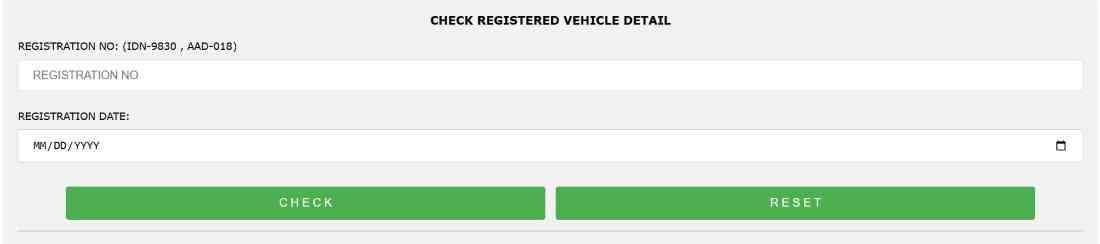
Table Of Contents
Understanding the Islamabad Number Plate Check System
The Islamabad Number Plate Check system is the official digital infrastructure maintained by the ICT Excise and Taxation Department that links every registered vehicle to the owner’s CNIC, allowing instant retrieval of ownership details, registration status, tax compliance, and legal standing. This system operates on the Motor Transport Management Information System (MTMIS), a centralized database that records all vehicle transactions within the Islamabad Capital Territory.
What is Islamabad Number Plate Check and why do you need it?
Islamabad Number Plate Check is the process of entering a vehicle’s registration number or the owner’s CNIC into an official verification portal to obtain ownership and vehicle details. You need this service to verify a used car before purchase, confirm your own vehicle’s tax status, check if a vehicle is blacklisted or stolen, and complete ownership transfers legally.
What is the legal basis for CNIC-based vehicle verification in Islamabad?
The legal framework for CNIC-based verification originates from the Motor Vehicles Ordinance, which mandates that every registered vehicle must have a verified owner linked to a valid CNIC. The Excise and Taxation Department enforces this by requiring CNIC copies and biometric verification for all registration and transfer applications.
Who can perform a Islamabad Number Plate Check by CNIC?
Any citizen can perform a verification using a vehicle’s registration number, but full CNIC-based search to retrieve a list of all vehicles under a specific CNIC is typically restricted to the CNIC holder themselves or authorized government officials. The Pak ID app, however, allows registered owners to see all vehicles linked to their own CNIC after authentication.
How does CNIC-based verification differ from registration number verification?
Registration number verification is publicly available and only reveals vehicle details (make, model, engine, chassis, token tax status). CNIC-based verification goes deeper—it reveals all vehicles registered under that CNIC, the owner’s verified name, and transfer history. This is why CNIC searches are restricted to the owner or require explicit consent.
Is CNIC-based vehicle searching available for the general public in Islamabad?
Public access to CNIC-based searches is limited. You cannot legally enter someone else’s CNIC into a public portal to see their vehicles. However, you can ask a seller to show you their vehicle list via their own Pak ID app account, or you can verify a single vehicle using its registration number without needing the owner’s CNIC.
What types of vehicles can be verified through the Islamabad Number Plate Check system?
The system covers all registered motor vehicles within ICT, including:
- Motorcycles and scooters: Complete with engine and chassis verification
- Private cars (local and imported): Including token tax and smart card status
- Commercial vehicles: Taxis, ride-hailing vehicles, and goods transport
- Government and diplomatic vehicles: Basic verification available, ownership may be masked
Bike registration check by CNIC in Islamabad: Motorcycle owners can verify their bike’s registration status, token tax, and smart card issuance using their CNIC through the Pak ID app or MTMIS.
Car registration check by CNIC in Islamabad: Car owners can retrieve full vehicle details, ownership history, and tax compliance status by entering their CNIC into authenticated portals like Pak ID.
Commercial vehicle verification by CNIC: Businesses can verify their fleet’s registration status and tax payments using the registered owner’s CNIC, typically through the Excise office portal.
What information is displayed when you perform an Islamabad Number Plate Check?
A standard verification displays:
- Owner’s full name as per CNIC
- Vehicle make, model, year of manufacture
- Engine number and chassis number (partially masked in public views)
- Registration date and expiry
- Token tax paid status and last payment date
- Smart card issuance status (issued, processing, or dispatched)
- Any blacklist or legal hold flags
What is MTMIS Islamabad and how does it work?
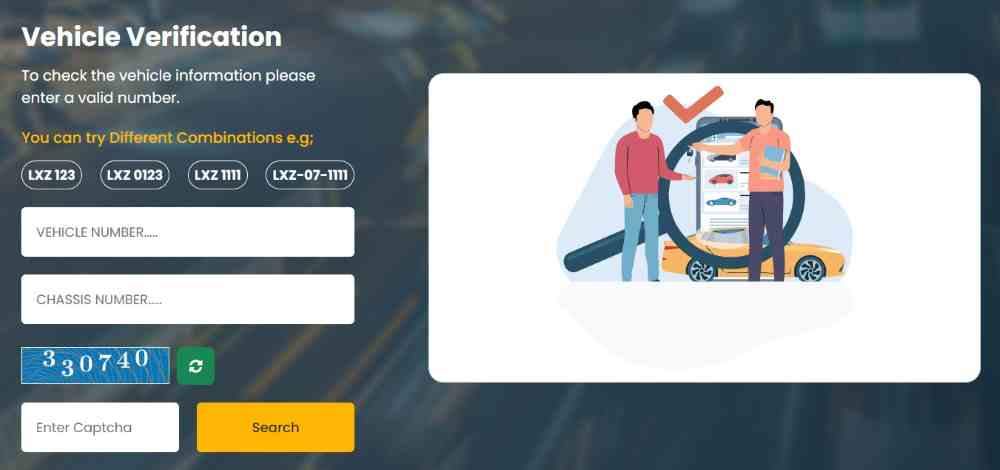
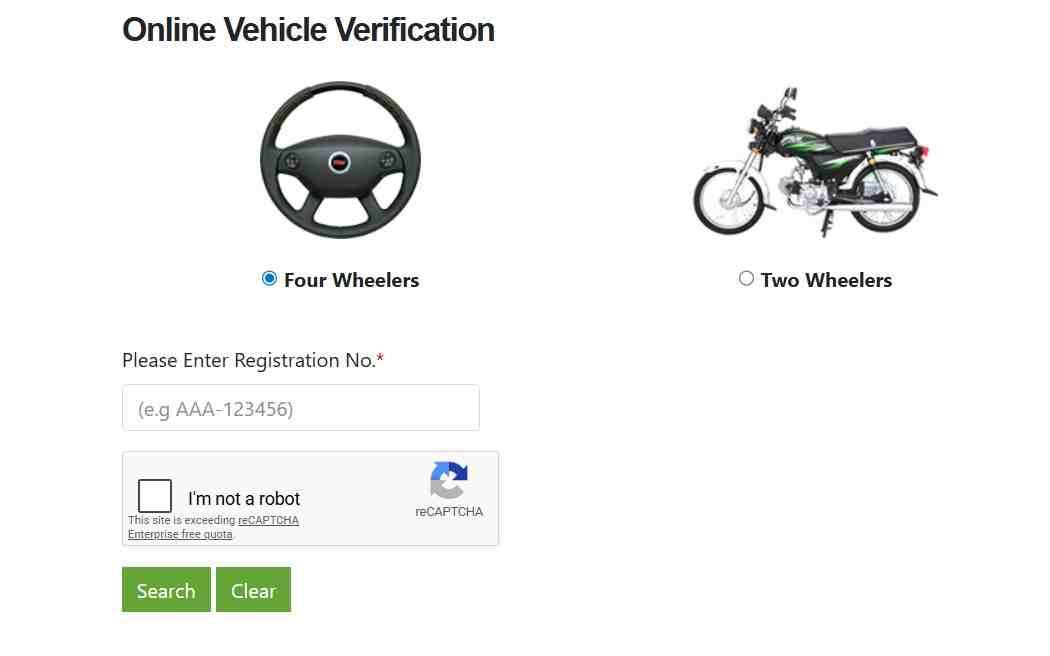
MTMIS Islamabad is the Motor Transport Management Information System portal hosted at mtmis.excise.punjab.gov.pk that serves as the central online verification tool for vehicles registered in Islamabad. The system allows users to enter a vehicle registration number and captcha to instantly retrieve registration details, ownership name, engine and chassis numbers, token tax status, and smart card information.
How does the Islamabad Excise department manage vehicle data?
The Excise and Taxation Department collects data at the point of registration—CNIC copy, proof of purchase, and biometric verification—and enters it into the MTMIS database. Each transaction (transfer, token tax payment, smart card issuance) updates this central record, which is then reflected across all verification portals (MTMIS, Pak ID, SMS, City Islamabad app).
Why is the CNIC the primary key for vehicle ownership records in Islamabad?
The CNIC serves as the unique national identifier that links an individual to all government records—vehicle registration, property ownership, tax filings, and NADRA biometric data. Using CNIC as the primary key ensures that no two individuals share the same identifier, preventing duplicate registrations and enabling cross-department verification.
What are the security measures protecting CNIC-based vehicle searches?
Security measures include:
- Authentication requirements: The Pak ID app requires fingerprint or facial ID login
- Rate limiting: Public portals restrict the number of searches per IP address
- Data masking: Public views partially hide engine and chassis numbers
- Audit trails: Every search is logged with timestamp and IP address
- GDPR-style consent: CNIC-based searches for third-party vehicles are not publicly available
Can I check my Islamabad bike registration status using my CNIC?
Yes. Open the Pak ID app, navigate to “Apply Digital Cards” > “ICT vehicles,” and a list of all vehicles (including motorcycles) registered under your CNIC will appear. You can then select each bike to view its registration status, token tax, and smart card details.
What is the difference between online verification and forensic verification?
Online verification provides digital records from the Excise database—owner name, registration details, tax status. Forensic verification is a physical inspection conducted by Islamabad Police that confirms the engine and chassis numbers match the registration documents and that the vehicle has not been tampered with, cloned, or reported stolen.
How accurate is the data in the Islamabad vehicle verification system?
The data is as accurate as the information provided at registration. If an owner updated their address or transferred ownership but did not complete biometric verification, the database may show outdated information. For critical transactions, always cross-check online verification with physical inspection and the Pak ID app’s owner list.
Official Methods to Perform Islamabad Number Plate Check by CNIC
The official methods to perform an Islamabad Number Plate Check by CNIC include the MTMIS online portal (when CNIC input is supported), the City Islamabad mobile app for linked owner searches, the Pak ID app for vehicle list retrieval, the SMS service (8521) for limited owner information, and physical visits to the Excise & Taxation Office in G-6, Islamabad. Each method serves a different use case—from quick public verification to authenticated owner-only access.
How to check vehicle ownership in Islamabad by CNIC online?
To check vehicle ownership by CNIC, use the Pak ID app. Download the app, register with your CNIC and mobile number, complete biometric verification (fingerprint or facial ID), then navigate to “Apply Digital Cards” > “ICT vehicles.” The app will display every vehicle registered under your CNIC along with the owner name as recorded in the Excise database.
Can I see all vehicles registered under my CNIC in Islamabad?
Yes, exclusively through the Pak ID app. After logging in with your CNIC credentials and completing biometric verification, the app retrieves the complete list of vehicles registered under your name from the Excise database. This feature is not available on the public MTMIS portal for privacy reasons.
What is the step-by-step process for MTMIS Islamabad CNIC check?
The MTMIS portal primarily accepts vehicle registration numbers rather than CNIC numbers. To perform a CNIC-linked check indirectly:
- Obtain the vehicle registration number you want to verify
- Visit
mtmis.excise.punjab.gov.pk - Enter the registration number (format: ABC-123)
- Solve the captcha
- Click search to view the registered owner’s name and vehicle details
How to use the ICT Excise portal for CNIC-based verification?
The official ICT Excise portal at islamabadexcise.gov.pk provides services for new registration, transfer of ownership, and tax payments. For CNIC-based verification, you must log in using your CNIC credentials to access your own vehicle records. The portal does not allow public CNIC searches for third-party vehicles.
What is the City Islamabad app and how does it show vehicle details by CNIC?
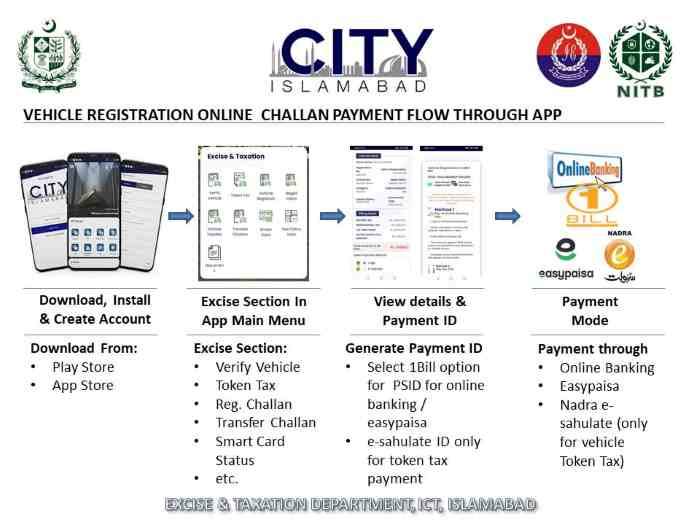
The City Islamabad app is the official ICT mobile application that bridges citizens with government services including token tax payment, vehicle registration, and verification. After logging in with your CNIC, the app displays your registered vehicles and allows you to pay token tax, view smart card status, and access emergency services.
Can I get a list of my registered vehicles from the Islamabad Excise office using my CNIC?
Yes. Visit the Excise & Taxation Office in G-6, Islamabad, with your original CNIC and a photocopy. Submit a written application requesting a list of all vehicles registered under your CNIC. The office will issue an official extract from their records, typically within 1-2 working days.
How does the Pak ID app enable CNIC-based vehicle verification in Islamabad?
The Pak ID app, developed by NADRA, integrates directly with the ICT Excise database. When you log in with your CNIC and complete biometric verification, the app authenticates your identity against NADRA records, then securely queries the Excise database to retrieve all vehicles linked to that CNIC. This two-layer authentication ensures that only the legitimate owner can access the full vehicle list.
Is there an SMS service to check Islamabad vehicle owner name by CNIC?
No. The SMS service (8521) only accepts vehicle registration numbers or chassis numbers. It does not accept CNIC numbers as input. To check owner details, you must know the vehicle’s registration number. The SMS reply includes the owner’s name, engine and chassis numbers, make, model, and token tax status.
How to verify a seller’s CNIC against Islamabad excise records?
Ask the seller to open their Pak ID app on their phone while you watch. After they log in and navigate to “ICT vehicles,” the app will display every vehicle registered under their CNIC. Match the vehicle you intend to buy against this list. If the vehicle appears, the seller is the registered owner. If not, request an explanation or walk away.
Does the City Islamabad app require CNIC registration for vehicle verification?
Yes. The City Islamabad app requires CNIC-based registration to access vehicle services. Download the app, enter your CNIC and mobile number, verify via OTP, and complete the profile setup. Once registered, you can access token tax payments, vehicle verification, and smart card status under your CNIC.
What are the step-by-step instructions for CNIC-based vehicle verification?
- Method 1 (Pak ID app): Download Pak ID → Register with CNIC → Complete biometric verification → Tap “Apply Digital Cards” → Select “ICT vehicles” → View all vehicles under your CNIC
- Method 2 (City Islamabad app): Download City Islamabad → Register with CNIC → Log in → Navigate to “Vehicle Registration” section → Enter vehicle number to verify ownership against your CNIC
- Method 3 (Excise office): Visit G-6 office → Submit CNIC copy and application → Receive official vehicle list
How to troubleshoot common issues during online verification?
- “Invalid CNIC format” error: Enter 13 digits without dashes or spaces
- “No records found”: Your CNIC may not be linked to the vehicle (buying used car where transfer incomplete) or the vehicle is registered in another province
- Biometric verification fails: Ensure good lighting for facial ID or clean fingerprint sensor; retry up to three times before visiting NADRA e-Sahulat center
- App crashes: Clear cache, update to latest version, or reinstall the app
What is the success rate of CNIC-based verification in Islamabad?
The Pak ID app successfully retrieves vehicle records for over 95% of registered owners when biometric verification is completed correctly. Failure cases typically involve outdated CNIC records (address changes not updated in Excise database) or vehicles registered before the biometric linking requirement (pre-2018) where the CNIC was not digitally verified.
Can a non-Islamabad CNIC holder register a car in Islamabad?
Yes. A non-Islamabad CNIC holder can register a vehicle in Islamabad provided they have valid proof of residence in the capital territory, such as a domicile certificate, registered property deed, or rental agreement with utility bill. The registration application requires CNIC copy, proof of purchase, and biometric verification.
How long does it take to complete an online CNIC verification?
Instant. Once you log into the Pak ID app or MTMIS portal, verification results appear within 3–5 seconds. SMS responses take 20 seconds to arrive. Physical verification at the Excise office takes 1–2 working days for the official list to be prepared.
Online Portal Verification: Islamabad Number Plate Check via MTMIS
The MTMIS (Motor Transport Management Information System) portal for Islamabad provides online vehicle verification services, but for CNIC-based checks, you typically need to enter your vehicle registration number; however, some integrated services allow you to retrieve your registered vehicle list using your CNIC after authentication. MTMIS remains the fastest public-facing verification tool for single vehicle checks.
What is the official MTMIS website for Islamabad vehicle verification?
The official MTMIS website for Islamabad vehicle verification is hosted at mtmis.excise.punjab.gov.pk. Despite the Punjab domain, this portal serves both Punjab and Islamabad Capital Territory vehicle records. An alternative portal at mtmis.com.pk provides similar functionality but is an independent information platform.
How to perform online vehicle verification Islamabad Excise using MTMIS?
To verify a vehicle online:
- Open your browser and go to
mtmis.excise.punjab.gov.pk - Locate the vehicle verification search box
- Enter the vehicle registration number exactly as it appears on the plate (example: ABC-123)
- Enter the chassis number (optional for basic search, required for detailed view)
- Solve the captcha
- Click the search button
- View the results: owner name, make, model, engine number, chassis number, token tax status, registration date
How to check Islamabad vehicle registration details with registration number?
Enter the registration number in the MTMIS search field. The system returns a page showing:
- Owner information: Full name as recorded in Excise database
- Vehicle specifications: Make, model, color, year of manufacture, fuel type
- Identification numbers: Engine number (partially masked) and chassis number (partially masked)
- Registration details: Issue date, expiry date, registration authority
- Tax status: Token tax paid status, last payment date, next due date
- Smart card status: Issued, processing, dispatched, or not applied
Can you search MTMIS Islamabad by CNIC number directly?
No. The public MTMIS portal does not accept CNIC numbers as a search parameter. This restriction is intentional to protect privacy and prevent unauthorized individuals from accessing vehicle lists tied to specific CNICs. Only the Pak ID app and Excise office internal systems allow CNIC-based searches.
What vehicle details are visible on MTMIS after verification?
After successful verification, MTMIS displays:
- Registered owner’s name (complete, not masked)
- Vehicle make, model, and year of assembly/manufacture
- Color, fuel type, engine capacity (CC)
- Engine number and chassis number (typically masked for public searches)
- Registration number, date of first registration, and registration authority
- Token tax paid status with last payment date
- Vehicle fitness certificate expiry (for commercial vehicles)
How to use MTMIS Islamabad for token tax status check?
Enter the vehicle registration number into MTMIS, and the token tax status appears in the results section. The system shows:
- Token tax status: Paid or Unpaid
- Last payment date: The date of the most recent token tax payment
- Payment period covered: Annual period for which tax was paid
- Next due date: The date by which the next token tax must be paid to avoid penalties
What is the difference between MTMIS Islamabad and MTMIS Punjab?
MTMIS Islamabad and MTMIS Punjab share the same underlying technology and portal URL (mtmis.excise.punjab.gov.pk), but they pull from different databases. Islamabad vehicles are tagged with “ICT” registration prefixes (e.g., ABC-123) while Punjab vehicles have prefixes like “LEJ,” “RWP,” “LHR.” The portal automatically routes your query to the correct database based on the registration number format.
How to verify engine and chassis numbers through MTMIS?
Enter the vehicle registration number and optionally the chassis number. If you enter the chassis number, the system performs a deeper verification and returns a match confirmation. This is particularly useful for used car buyers—enter the chassis number printed on the vehicle’s body and compare it against the MTMIS record to detect tampering or cloning.
Is MTMIS available as a mobile application?
MTMIS does not have an official standalone mobile application. However, third-party apps on Google Play (e.g., “Vehicle Verification Pakistan”) provide a simplified interface that queries the official MTMIS website. Use these with caution—always verify that the app uses the official government portal as its data source.
What to do if MTMIS shows “no record found” for your vehicle?
Possible causes and solutions:
- Incorrect registration number entered: Re-enter exactly as on the plate, including dashes if required
- Vehicle registered in another province: Check the relevant province’s MTMIS portal (Sindh, KPK, Balochistan)
- New registration not yet updated: Allow 7–10 working days for the Excise department to upload new registrations
- Vehicle impounded or deregistered: Visit the Excise office to investigate further
- Typographical error in registration: Visit the Excise office to correct the record
How to check the registration date of a vehicle on MTMIS?
Enter the registration number, and the results page shows the “First Registration Date” or “Registration Date” field. This is the date when the vehicle was originally registered in Islamabad. For imported vehicles, this date reflects the first registration in Pakistan, not the manufacturing date.
Can MTMIS show previous ownership history of a vehicle?
No. MTMIS only displays the current registered owner. Previous ownership history is not publicly accessible through MTMIS. To obtain full transfer history, you must submit a formal request to the Excise and Taxation Department with the owner’s consent or a court order.
How to verify a vehicle’s smart card status on MTMIS?
Enter the vehicle registration number into MTMIS. The smart card status appears as:
- Smart Card Status: Not Issued / Under Process / Printed / Dispatched / Ready for Collection
- QR Code Available: If issued, a QR code is printed on the smart card for instant verification
Is MTMIS verification accepted for legal and banking purposes?
Yes. Printouts of MTMIS verification results are accepted by banks for vehicle financing applications and by courts as preliminary evidence of ownership. For high-value transactions or legal disputes, banks and courts may require an official Excise department certificate with a stamp and signature, not just a MTMIS printout.
What are the limitations of MTMIS for CNIC-based searches?
The primary limitation is that MTMIS does not accept CNIC as a search parameter. You must already know the vehicle’s registration number to perform a verification. Additionally, MTMIS does not show the complete engine and chassis numbers (they are partially masked) and does not display transfer history or lien information.
Mobile App Solutions for Islamabad Number Plate Check by CNIC
The primary mobile apps for Islamabad Number Plate Check by CNIC are the City Islamabad App (official ICT app for token tax and basic services) and the Pak ID app by NADRA (which now allows registered owners to view all vehicles under their CNIC and complete biometric verification for transfers). These apps provide the most comprehensive CNIC-based access to vehicle records.
What is the City Islamabad App and how to download it?
The City Islamabad App is the official mobile application of the Islamabad Capital Territory Administration, developed to bridge citizens with government services including Excise and Taxation, token tax payment, vehicle registration, and utility services. Download it from Google Play (Android) or the App Store (iOS) by searching “City Islamabad.”
How to use the City Islamabad app for vehicle verification by CNIC?
After downloading and registering with your CNIC:
- Open the City Islamabad app and log in using your CNIC and password
- Navigate to the “Excise and Taxation” section
- Select “Vehicle Registration” or “Vehicle Verification”
- Enter the vehicle registration number you wish to verify
- The app displays the owner name and vehicle details if the CNIC matches the registered owner
- For token tax payment, the app automatically calculates the amount based on your filer status
How to pay Islamabad car token tax online using just your CNIC via the app?
Open the City Islamabad app → Log in with CNIC → Navigate to “Token Tax Payment” → The app displays all vehicles registered under your CNIC → Select the vehicle → The app calculates token tax amount based on engine capacity and filer status → Choose payment method (credit/debit card, mobile wallet, or bank transfer) → Complete payment → Download the payment receipt as PDF.
What is the Pak ID app and how does it enable CNIC-based vehicle searches?
The Pak ID app is NADRA’s digital identity platform that stores your verified CNIC information and allows you to access government services including vehicle registration, arms licenses, and digital documents. For vehicle searches, the app directly queries the ICT Excise database using your authenticated CNIC and returns the complete list of vehicles registered under your name.
How to see all vehicles registered under your CNIC in the Pak ID app?
Step-by-step process:
- Download Pak ID from Google Play or App Store
- Register using your CNIC number and registered mobile number
- Complete biometric verification (fingerprint scan or facial recognition)
- After successful login, tap “Apply Digital Cards” on the home screen
- Select “ICT vehicles” from the available options
- A complete list of all vehicles registered under your CNIC appears, each with registration number, make, model, and token tax status
How to complete biometric verification for vehicle transfer using Pak ID?
For vehicle transfer, both seller and buyer must complete biometric verification through Pak ID:
- Both parties download Pak ID and register with their CNICs
- The seller initiates the transfer request within the app
- The buyer receives a notification to approve
- Both complete fingerprint or facial ID verification
- The verified biometric data is sent to the Excise database
- The remaining transfer formalities are completed at the Excise office (physical documents)
Can the Pak ID app show vehicle smart card status?
Yes. After you view the list of vehicles under your CNIC, select any vehicle. The detailed view includes the smart card status (Not Issued / Under Process / Printed / Dispatched) and, if issued, a QR code that links to the digital version of the smart card.
What are the system requirements for running these apps?
- Operating system: Android 8.0 or higher / iOS 13 or higher
- RAM: Minimum 2GB (4GB recommended for smooth performance)
- Storage: 100MB free space for app installation plus cache
- Camera: Required for facial biometric verification and QR code scanning
- Internet: Active mobile data or WiFi connection
- Biometric sensor: Fingerprint scanner (for Android) or Face ID (for iOS)
How to register on the City Islamabad app with your CNIC?
- Download and install the City Islamabad app
- Tap “Register” or “Sign Up”
- Enter your CNIC number (13 digits without dashes)
- Enter your mobile number registered with CNIC (for OTP verification)
- Create a password
- Verify OTP sent to your mobile
- Complete profile setup (name, address, email optional)
- Login to access vehicle services
What services are available in the Excise and Taxation section of the City app?
- Token tax payment: Pay annual token tax for all vehicles under your CNIC
- Vehicle verification: Verify ownership by entering registration number
- Smart card status: Check if your vehicle’s smart card is ready
- Registration renewal: Renew expired vehicle registration
- Tax calculator: Calculate token tax based on vehicle engine capacity and filer status
- Payment history: View past token tax payment receipts
How to troubleshoot login issues with the City Islamabad app?
- “Invalid CNIC or password”: Reset password using the “Forgot Password” option; OTP sent to registered mobile
- “Account not found”: You must register first; tap “Register” before attempting login
- OTP not received: Check mobile network; wait 60 seconds; request resend; ensure the number is correctly entered
- App crashes on login: Clear app cache in phone settings; update to latest version; reinstall if issue persists
Is the Pak ID app available for overseas Pakistanis with NICOP?
Yes. Overseas Pakistanis holding a NICOP (National Identity Card for Overseas Pakistanis) can download Pak ID, register using their NICOP number, and complete biometric verification using facial ID (fingerprint may not work remotely). They can then view vehicles registered under their NICOP and complete digital transfers without physical presence in Pakistan.
How to update your CNIC address in the Islamabad vehicle database via app?
Address updates cannot be completed entirely through the app. You must first update your CNIC address at any NADRA office (or via Pak ID for address change request). Then visit the Excise office in G-6 with your updated CNIC and vehicle registration documents to request the address update in the vehicle database.
Can you download official vehicle documents from these apps?
Yes. The Pak ID app allows you to download digital versions of your vehicle registration card (smart card) and token tax payment receipts. The City Islamabad app allows download of token tax payment receipts but not the full smart card. Digital documents are legally valid for traffic police verification.
What are the future developments planned for Islamabad’s vehicle apps?
Future developments include full digital transfer of ownership without any physical visit to the Excise office, integration of e-challan payment within the City app, automated token tax reminders via push notifications, and QR code-based instant verification for ride-hailing vehicles and taxis.
SMS-Based Islamabad Number Plate Check: Quick Verification on Mobile
The SMS service for Islamabad Number Plate Check operates by sending the vehicle’s registration number in the format “RNO ABC123” to 8521, and within 20 seconds, you receive a reply containing the owner’s name, engine number, chassis number, make, model, token tax status, and registration date for a nominal fee of 50 paisa. This method works without internet access and is ideal for quick on-the-spot checks.
What is the SMS number for Islamabad vehicle verification?
The dedicated SMS number for Islamabad vehicle verification is 8521. This code is managed by NADRA in coordination with the ICT Excise department. For Punjab province, the code is 8785. Do not use the Punjab code for Islamabad vehicles.
How to send an SMS for Islamabad vehicle verification?
Open your phone’s messaging app, create a new SMS, type the registration number in the required format, and send it to 8521. No additional text, spaces, or special characters are needed beyond the format specification.
What is the correct format for sending a vehicle number to 8521?
Send the vehicle registration number in one of these two formats:
- Format 1 (with RNO prefix):
RNO ABC123(where ABC123 is the registration number without dashes) - Format 2 (chassis number):
CNO 123456789012345(where the number is the vehicle’s chassis number)
Example: If your vehicle plate reads “LEJ-1234,” send “RNO LEJ1234” to 8521.
How to check car registration on mobile in Islamabad?
Type the registration number in the format RNO ABC123 and send it to 8521. Within 20 seconds, you will receive a reply SMS containing:
- Owner’s full name
- Vehicle make and model
- Engine number
- Chassis number
- Color
- Registration date
- Token tax paid status
What information do you receive in the SMS reply?
The reply SMS contains a concise summary:
text
Owner: Muhammad Ali
Make: Toyota Corolla
Model: 2020
Engine: 2ZZ-123456
Chassis: JTDBE123456789012
Color: Silver
Reg Date: 15-01-2020
Token Tax: Paid upto 31-12-2025
Is there a fee for the SMS verification service?
Yes. A nominal fee of 50 paisa (0.50 PKR) per SMS is charged by your mobile network operator. This fee is deducted from your prepaid balance or added to your postpaid bill. The government does not charge any additional service fee.
Can you check a motorcycle via the same SMS number?
Yes. Send the motorcycle’s registration number in the format RNO ABC123 to 8521. The reply includes the same information: owner name, make (e.g., Honda CD70), engine number, chassis number, color, registration date, and token tax status.
How to check Islamabad vehicle owner name by CNIC via SMS?
The SMS service does NOT accept CNIC numbers. You must know the vehicle’s registration number or chassis number to use the SMS service. If you only have a CNIC, use the Pak ID app (which requires biometric verification) or visit the Excise office.
Can you check how many vehicles are registered on your CNIC via SMS?
No. The SMS service only verifies individual vehicles using their registration numbers. To see the complete list of vehicles under your CNIC, use the Pak ID app or visit the Excise office.
What is the difference between 8521 (Islamabad) and 8785 (Punjab) codes?
8521 is the dedicated code for Islamabad Capital Territory vehicle verification. 8785 is for Punjab province vehicles (excluding Islamabad). Using the wrong code returns “No record found” or a response from the incorrect database. Always confirm the vehicle’s registration jurisdiction before sending.
How reliable is the SMS verification service?
The SMS service queries the same official Excise database as MTMIS, making it highly reliable for basic ownership and tax status checks. However, due to SMS character limits, the response contains less detail than the MTMIS web portal. For detailed records (e.g., complete engine number), use MTMIS or the apps.
Can you verify a vehicle’s stolen status through SMS?
Yes. The 8521 SMS service is integrated with the Stolen Vehicle Identification System. If the vehicle has been reported stolen, the reply SMS includes a warning: “STOLEN VEHICLE – Report to Police.” This feature helps used car buyers avoid purchasing stolen vehicles.
What to do if you don’t receive a reply to your SMS?
- Check balance: Ensure you have at least 50 paisa credit
- Verify format: Re-send using exact format “RNO ABC123”
- Wait 60 seconds: Network delays can occur
- Check block list: Ensure 8521 is not blocked
- Try different operator: Some networks have intermittent issues; use a different SIM if available
Is the SMS service available 24/7?
Yes. The SMS verification service operates 24 hours a day, 7 days a week. However, the database is updated during business hours only (Monday–Friday, 9 AM–5 PM). New registrations or recent transfers may not appear in SMS replies until the next database sync.
How to check e-challan status via SMS in Islamabad?
E-challan status is not available via the 8521 SMS service. Use the Islamabad Traffic Police website or the City Islamabad app to check e-challans by entering your vehicle registration number and CNIC.
Physical and Forensic Verification in Islamabad
Physical verification for vehicles in Islamabad is conducted at the Islamabad Police Vehicle Verification Center, where applicants must bring the original registration book, their original CNIC, a copy of the CNIC, a copy of the registration book, and printed pictures of the engine and chassis numbers, with fees of Rs. 1,500 for motor cars and Rs. 1,000 for motorcycles, and Rs. 3,500 for forensic verification. This method is mandatory for vehicle transfers, financing applications, and resolving ownership disputes.
Where is the Islamabad Police Vehicle Verification Center located?
The primary Vehicle Verification Center is located within the Islamabad Police headquarters in Sector H-11. A secondary center operates at the Traffic Police Headquarters in Sector I-9. For specific location details and working hours, contact the Islamabad Police helpline.
What documents are required for physical vehicle verification at Islamabad Police?
Required documents:
- Original vehicle registration book (smart card)
- Original CNIC of the applicant (owner or authorized representative)
- Photocopy of CNIC (one copy)
- Photocopy of registration book (one copy)
- Printed color pictures of the vehicle showing:
- Front view with visible number plate
- Rear view with visible number plate
- Engine number (close-up)
- Chassis number (close-up)
- Application form (available at the verification center)
How much is the Islamabad Police forensic verification fee for cars?
The current fee structure is:
- Motor car (standard verification): Rs. 1,500
- Motor car (forensic verification): Rs. 3,500
- Motorcycle (standard verification): Rs. 1,000
- Motorcycle (forensic verification): Rs. 2,500 (where applicable)
- Police general verification (character certificate): Rs. 1,000
Fees are payable in cash or via bank draft at the verification center.
What is the difference between standard and forensic vehicle verification?
Standard verification: The police officer visually inspects the vehicle, matches engine and chassis numbers against registration documents, and issues a verification certificate. This is sufficient for most transfers and financing applications.
Forensic verification: A detailed scientific examination is conducted, including lifting engine and chassis numbers for chemical analysis to detect tampering, grinding, or re-stamping. This is required for vehicles with suspicious histories, imported vehicles with unclear documentation, or court-ordered verifications.
How long does physical verification take?
Standard verification is completed within 1–2 hours on the same day, provided all documents are in order and the queue is short. Forensic verification takes 3–5 working days as the vehicle must be sent to the forensic lab for analysis.
Can the police verify my vehicle ownership through my CNIC on the spot?
Yes. During a traffic stop or checkpoint, police officers can radio the Excise database with your CNIC or vehicle registration number and receive instant ownership confirmation. This is the same database used for online verification.
How to get a vehicle verification certificate from Islamabad Police?
Step-by-step process:
- Gather all required documents (registration book, CNIC copies, pictures)
- Visit the Vehicle Verification Center in H-11 or I-9
- Fill out the application form
- Pay the applicable fee (Rs. 1,500 for car, Rs. 1,000 for motorcycle)
- Present the vehicle for physical inspection
- The Verification Officer inspects the engine and chassis numbers
- After successful inspection, the officer stamps and signs the documents
- Collect your stamped verification certificate (same day for standard verification)
What is the process for motorcycle verification in Islamabad?
Motorcycle verification follows the same process as cars but with lower fees (Rs. 1,000). Bring the motorcycle to the verification center, present the registration book, CNIC, and pictures showing the engine and chassis numbers. The officer inspects the motorcycle, matches the numbers, and issues the verification certificate.
Do you need to bring the vehicle itself for physical verification?
Yes. Physical verification requires the actual vehicle to be present for inspection. The verification officer must visually confirm that the engine and chassis numbers on the vehicle match the registration documents. Without the vehicle, verification cannot be completed.
How to schedule an appointment for vehicle verification?
Appointments are typically not required for standard verification; walk-ins are accepted. For forensic verification or large volume requests (e.g., fleet verification for rental companies), contact the Vehicle Verification Center in advance to schedule a dedicated time slot.
What is the role of the Khidmat Markaz in vehicle verification?
Khidmat Markaz (service centers) in Islamabad offer limited vehicle verification services as part of their one-window operation. They can verify documents and issue certificates for basic transfers but do not conduct physical vehicle inspections. For physical inspection, you must visit the Police Vehicle Verification Center.
How to verify a vehicle’s engine and chassis numbers during inspection?
The verification officer uses a flashlight and inspection mirror to locate the engine number (stamped on the engine block) and chassis number (stamped on the vehicle frame). They compare these numbers against the registration book. If the numbers match and show no signs of tampering (grinding, restamping, welding), the verification is approved.
What happens if the physical verification reveals discrepancies?
If the engine or chassis numbers do not match the registration book or show signs of tampering:
- The verification is rejected
- The vehicle is flagged in the Excise database
- A police report may be filed for suspected tampering or cloning
- The owner must explain the discrepancy to the Excise department
- In severe cases, the vehicle may be impounded for forensic investigation
Can third parties perform verification on behalf of the owner?
Yes. An authorized representative can submit the vehicle for physical verification with a written authorization letter from the registered owner, a copy of the owner’s CNIC, and the representative’s original CNIC. The verification officer may call the owner to confirm authorization.
How to appeal a failed physical verification?
If physical verification fails due to an error (e.g., incorrect reading by the officer), you can:
- Request a re-inspection by a senior officer at the same center
- Submit a written appeal to the Deputy Inspector General (DIG) of Police, Islamabad
- Provide additional evidence (original purchase invoice, customs clearance for imports)
- If the appeal is accepted, a new verification appointment is scheduled
Checking Vehicle Token Tax and Financial Status by CNIC
You can check Islamabad vehicle token tax status online by visiting the ICT Excise portal, navigating to the token tax payment section, entering your vehicle registration number and owner’s CNIC, and viewing the tax status, payment history, and generating challans for upcoming payments. Token tax is an annual tax levied on motor vehicles based on engine capacity and owner’s filer status.
How to check Islamabad vehicle token tax status by CNIC?
Use the City Islamabad app or Pak ID app:
- Log in with your CNIC
- Navigate to “Token Tax Payment” or “Vehicle Tax Status”
- The app displays all vehicles under your CNIC
- Select the vehicle to view token tax status: Paid, Unpaid, or Partially Paid
- View last payment date, amount paid, and next due date
Can I pay my Islamabad car token tax online using just my CNIC?
Yes. Through the City Islamabad app:
- Log in with your CNIC
- Select “Token Tax Payment”
- Choose the vehicle from your registered list
- The app calculates the tax amount based on:
- Engine capacity (in CC)
- Filer status (filer vs non-filer; lower rates for filers)
- Vehicle age (older vehicles may have reduced rates)
- Complete payment via credit/debit card, mobile wallet, or bank transfer
- Download the payment receipt as PDF
How to generate a token tax challan online using CNIC?
In the City Islamabad app, after selecting the vehicle, tap “Generate Challan.” The app creates a payment challan with a unique 20-digit reference number. You can print this challan and pay at any National Bank of Pakistan branch or use the reference number for online bank transfer.
What is the token tax calculation based on filer vs non-filer status?
- Filer (registered income tax filer): Lower token tax rates (approximately 30–40% less than non-filer rates)
- Non-filer: Higher token tax rates
- How it works: The app queries the FBR database using your CNIC to determine your filer status automatically
- Example (approximate): 1300cc car – Filer pays Rs. 3,000; Non-filer pays Rs. 4,500
How to check token tax payment history for a vehicle?
Open the City Islamabad app → Token Tax Payment → Select vehicle → Tap “Payment History.” The app displays a list of all past payments with dates, amounts, and receipt numbers. You can download each receipt as a PDF.
What happens if token tax is not paid on time?
- Late payment penalty: 10–25% of the annual tax amount depending on delay duration
- Surcharge: Additional daily or monthly surcharge for extended delays
- Verification failure: The vehicle will show “Token Tax: Unpaid” in all verification checks
- Legal consequences: Repeated non-payment may lead to registration suspension and vehicle impoundment
Can you pay token tax for multiple vehicles under one CNIC?
Yes. In the City Islamabad app, after logging in with your CNIC, all your vehicles are listed. Select each vehicle individually, calculate the tax, and pay. You can pay for all vehicles in separate transactions or combine payments if the app supports bulk payment (check for updates).
How to download token tax payment receipts online?
After successful payment, the City Islamabad app immediately displays a payment confirmation screen. Tap “Download Receipt” or “Save as PDF.” The receipt is stored in your phone’s Downloads folder. You can also access past receipts from the Payment History section.
Is token tax payment integrated with the vehicle smart card system?
Yes. The smart card’s embedded chip contains the token tax payment status. When a traffic police officer scans your smart card’s QR code, they instantly see whether token tax is paid up to date. Unpaid token tax may result in a fine even if you possess the smart card.
How to verify if a vehicle’s token tax is paid before purchase?
Ask the seller to log into their City Islamabad app or Pak ID app in your presence and show the token tax status for that vehicle. Alternatively, perform a MTMIS verification using the vehicle’s registration number; the results include token tax status. Do not rely on paper receipts alone, as they can be forged.
What is the deadline for annual token tax payment in Islamabad?
The token tax payment deadline is June 30th of each calendar year for the upcoming fiscal year (July–June). Payments made after June 30th incur late penalties. For new registrations, token tax is paid at the time of registration and is valid until the next June 30th.
How to check token tax status via SMS?
Send the vehicle registration number in the format RNO ABC123 to 8521. The reply SMS includes the line “Token Tax: Paid upto DD-MM-YYYY” or “Token Tax: Unpaid.” This is the quickest way to check token tax without internet access.
Can token tax be paid through JazzCash or Easypaisa?
As of the latest updates, the City Islamabad app integrates with 1Link’s payment gateway, which supports most major bank cards. JazzCash and Easypaisa are not directly integrated, but you can use a JazzCash or Easypaisa debit card (if issued) to pay through the card payment option.
How to check token tax for commercial vehicles?
Commercial vehicles (taxis, buses, trucks, ride-hailing vehicles) follow the same verification process. Enter the registration number into MTMIS or SMS to 8521. Commercial vehicles typically have higher token tax rates and may also require a fitness certificate, which is also displayed in the verification results.
What are the penalties for late token tax payment?
Penalties are calculated as:
- 1–30 days late: 10% of annual tax amount
- 31–60 days late: 15% of annual tax amount
- 61–90 days late: 20% of annual tax amount
- Over 90 days late: 25% of annual tax amount plus possible registration suspension
- Example: Annual tax Rs. 5,000 paid 45 days late = Rs. 5,000 + Rs. 750 penalty = Rs. 5,750 total
Vehicle Smart Card Status and Tracking by CNIC
You can check your Islamabad vehicle smart card status online by using the QR code on your application receipt, through the City Islamabad app, or via the MTMIS portal by entering your CNIC and vehicle registration number, which will show whether the smart card is ready for collection, under processing, or has been dispatched for delivery. The smart card replaces the traditional paper registration book and contains an embedded chip with encrypted vehicle data.
How to check Islamabad vehicle smart card status online?
Three methods:
- Pak ID app: Login → Apply Digital Cards → ICT vehicles → Select vehicle → Smart card status displayed
- City Islamabad app: Login → Vehicle Registration → Smart Card Status → Enter registration number
- MTMIS portal: Enter registration number → Results page includes smart card status field
What is the vehicle smart card and why is it important?
The vehicle smart card is a credit-card-sized PVC card with an embedded chip and QR code that replaces the paper registration book. It contains:
- Vehicle registration number
- Owner’s name and CNIC
- Make, model, color, engine and chassis numbers
- Token tax payment status
- QR code for instant police verification
- Embedded chip with encrypted data (tamper-proof)
The smart card is important because it cannot be easily forged, allows instant QR code verification, and is required for vehicle transfers, financing, and police verification.
How to track the status of my Islamabad vehicle smart card via CNIC?
In the Pak ID app, after viewing the list of vehicles under your CNIC, tap on any vehicle. The detailed view shows a status indicator:
- Not Issued: Smart card has not been applied for
- Under Process: Application submitted, being printed
- Printed: Card printed, awaiting dispatch
- Dispatched: Card sent to courier or Excise office
- Ready for Collection: Card available at designated Excise office
How to use QR codes to check smart card status?
Every smart card application receipt includes a unique QR code. Scan this QR code using any smartphone camera or a QR scanner app. The scanner redirects to the Excise verification portal, automatically entering the application number and showing the current status. No manual data entry required.
What does each smart card status mean (processing, printed, dispatched)?
- Processing (1–3 days): Your application has been received and verified; the card is being personalized with your vehicle data.
- Printed (4–7 days): The card has been printed at the NADRA printing facility; quality check pending.
- Dispatched (8–10 days): Card handed over to courier or sent to the Excise office collection point.
- Ready for Collection (11–14 days): Card arrived at the Excise office; you can collect it in person.
- Delivered: Courier delivered the card to your registered address (if home delivery was selected).
How long does it take to receive a vehicle smart card after application?
The complete process from application to delivery takes 14–21 working days:
- Application processing: 2–3 days
- Card printing: 5–7 days
- Dispatch: 2–3 days
- Courier delivery: 2–5 days depending on location
- Expedited processing (if available): 7–10 working days for additional fee
Can you download a digital version of the smart card?
Yes. Through the Pak ID app, after your smart card is issued, you can download a digital PDF version of the card. This digital version contains the same information as the physical card and is legally acceptable for traffic police verification. To download: Pak ID → Apply Digital Cards → ICT vehicles → Select vehicle → Download Digital Card.
How to update your address on the vehicle smart card?
First update your CNIC address at any NADRA office or via Pak ID. Then visit the Excise office in G-6 with your updated CNIC, original smart card, and vehicle registration documents. Submit an application for address update. A new smart card will be issued with the updated address (fee applies for duplicate card if address is the only change).
What to do if your smart card is lost or stolen?
- File a police report (FIR) at the nearest police station
- Visit the Excise office in G-6 with:
- Copy of FIR
- Original CNIC
- Vehicle registration number
- Submit an application for duplicate smart card
- Pay the duplicate card fee (approximately Rs. 500–1,000)
- New card issued within 14–21 working days
How to check smart card status for motorcycles?
Motorcycle smart cards follow the same process as cars. Use the Pak ID app or MTMIS portal with the motorcycle’s registration number. The status indicators (Under Process, Printed, Ready for Collection) are identical.
Is the smart card mandatory for vehicle transfers?
Yes. As of recent policy updates, vehicle transfers in Islamabad cannot be processed without the smart card. The paper registration book is no longer accepted for transfers. Both buyer and seller must possess smart cards linked to their CNICs to complete the transfer process.
How to link your smart card to the Pak ID app?
When you log into Pak ID with your CNIC, the app automatically queries the Excise database and displays all smart cards issued under your CNIC. No manual linking is required. If a smart card is missing from the list, contact the Excise office to ensure your CNIC is correctly linked to the vehicle record.
What is the fee for a duplicate smart card?
The duplicate smart card fee is approximately Rs. 500 for motorcycles and Rs. 1,000 for cars. These fees are subject to change; confirm current rates at the Excise office or City Islamabad app before applying.
Can you check smart card status via SMS?
No. SMS to 8521 returns basic vehicle information but does not include the smart card issuance status. Use the Pak ID app, City Islamabad app, or MTMIS portal for smart card status.
How to collect your smart card from the Excise office?
When the status shows “Ready for Collection”:
- Go to the Excise & Taxation Office in G-6, Islamabad
- Visit the smart card collection counter
- Present your original CNIC and the application receipt (or QR code printout)
- The officer verifies your identity and hands over the smart card
- Sign the collection register to confirm receipt
Checking Vehicle Blacklist and Legal Status by CNIC
You can check if a vehicle is blacklisted in Islamabad by using the owner’s CNIC through the ICT Excise online verification portal, which will indicate any legal holds, stolen vehicle reports, outstanding challans, or court orders attached to the vehicle registration. A blacklisted vehicle cannot be transferred, sold, or renewed until the issue is resolved.
Can I check if a vehicle is blacklisted in Islamabad using the owner’s CNIC?
Yes, but only the owner can perform this check through their Pak ID app. After logging in with your CNIC and viewing your vehicle list, the app displays a “Status” column. If any vehicle is blacklisted, it shows “Blacklisted – Action Required.” Public users cannot check blacklist status using a CNIC that is not their own.
What does it mean when a vehicle is blacklisted?
A blacklisted vehicle has a legal restriction placed on its registration. Common reasons:
- Stolen vehicle reported by owner
- Outstanding court order (e.g., attachment order for unpaid debts)
- Involvement in a criminal case as evidence
- Unpaid token tax for multiple years (extreme cases)
- Fake or tampered engine/chassis numbers detected
- Import duty evasion discovered
Blacklisting prevents transfers, renewals, and may lead to impoundment.
How to check if a vehicle is stolen using CNIC?
Use the SMS service: Send the registration number (format RNO ABC123) to 8521. If the vehicle is reported stolen, the reply includes “STOLEN VEHICLE – Report to Police.” The MTMIS portal also shows a stolen flag in the results page. For a vehicle under your CNIC, the Pak ID app shows the stolen status.
How to report a stolen Islamabad vehicle using my CNIC?
- File a FIR at the nearest police station (provide your CNIC and vehicle documents)
- Obtain a copy of the FIR
- Visit the Excise office in G-6 with the FIR and your CNIC
- Submit an application to blacklist the vehicle in the database
- The Excise department updates the status to “Stolen – Blacklisted”
- If recovered, provide police clearance to remove the blacklist
What is the process to remove a vehicle from the blacklist?
The process depends on the reason for blacklisting:
- Stolen vehicle recovered: Submit police clearance certificate and court order (if any) to Excise office
- Unpaid taxes: Pay all outstanding token tax plus penalties; obtain clearance receipt
- Court order resolved: Submit court order vacating the attachment
- Fake numbers: Provide proof of legitimate ownership (original purchase invoice, customs clearance); undergo forensic verification
After submitting required documents, the Excise department removes the blacklist within 7–10 working days.
How to verify a vehicle’s legal status before purchase?
Use the MTMIS portal (enter registration number) or SMS 8521. If the vehicle is blacklisted or stolen, the results will clearly indicate “Blacklisted” or “Stolen.” If the results show no flags, the vehicle is legally clear. For high-value purchases, also request the seller to show their Pak ID app vehicle list and cross-check the registration number.
Can outstanding court cases affect vehicle verification?
Yes. If a court has issued an attachment order against a vehicle (e.g., for unpaid debts), the Excise database flags the vehicle as “Court Attachment – Blacklisted.” The verification results will show this flag. The vehicle cannot be transferred or sold until the court order is vacated.
How to check if a vehicle has been involved in an accident?
The Excise database does not track accident history. For accident history, you must:
- Check the vehicle physically for signs of repair (welding, paint mismatch, panel gaps)
- Request the seller to disclose accident history
- Use third-party vehicle history services (not officially affiliated with government)
Accident history does not affect verification status unless the vehicle was declared total loss and deregistered.
What is the role of the Safe City project in vehicle blacklisting?
The Safe City project’s network of ANPR (Automatic Number Plate Recognition) cameras across Islamabad scans every passing vehicle. If a blacklisted vehicle is detected, the system alerts nearby police patrols for interception. This makes driving a blacklisted vehicle extremely risky.
How to check for outstanding fines or impound orders?
Outstanding fines (e-challans) are displayed when you enter the vehicle registration number into the Islamabad Traffic Police e-challan portal or the City Islamabad app. Impound orders appear as “Impounded – Blacklisted” in MTMIS results. Pay fines online or visit the Traffic Police office to clear impound orders.
Can a blacklisted vehicle be transferred to a new owner?
No. The Excise system blocks any transfer application for a blacklisted vehicle. The blacklist must be cleared first. Attempting to sell a blacklisted vehicle without disclosure is fraud and can lead to legal action against the seller.
How to check vehicle blacklist status via SMS?
Send the registration number to 8521. If the vehicle is blacklisted, the reply includes “BLACKLISTED – Do Not Buy” or “STOLEN – Report to Police.” If no blacklist exists, the reply shows normal vehicle details without any warning.
What documents are needed to clear a blacklisted vehicle?
Required documents depend on the blacklist reason:
- Stolen: Police FIR (for reporting) or court clearance (for recovery)
- Tax default: Tax payment receipts covering all due periods
- Court attachment: Certified copy of court order vacating attachment
- Tampered numbers: Forensic verification certificate confirming authenticity
All documents must be submitted in original (for verification) with photocopies to the Excise office.
How long does it take to clear a blacklisted status?
- Stolen (recovered): 5–7 working days after submitting clearance
- Tax default: 2–3 working days after payment
- Court order resolved: 7–10 working days after submitting court order
- Tampered numbers cleared: 10–14 working days after forensic verification
Where to file a complaint if your vehicle is wrongly blacklisted?
- Visit the Excise & Taxation Office in G-6 with your CNIC and registration documents
- Submit a written complaint explaining why the blacklist is incorrect
- Request a database audit to verify the error
- If not resolved, escalate to the Director, Excise & Taxation, ICT
- Final appeal: Islamabad High Court
Vehicle Transfer and Ownership History by CNIC
You can check the transfer history of an Islamabad car using a CNIC through the Pak ID app, which shows all vehicles currently registered under your CNIC, and through physical records at the Excise office, though complete historical transfer records may require an official request. The transfer history is not publicly accessible for privacy reasons.
How to check the transfer history of an Islamabad car using a CNIC?
Only the current owner can access transfer history through the Excise office. Submit a written request with your CNIC and vehicle registration number. The office provides a certified extract showing:
- Original registration date and owner
- All subsequent transfer dates and new owner names
- Number of transfers
- Current owner details
This service requires a formal application and may take 3–5 working days.
What is the process for transferring vehicle ownership in Islamabad?
Complete process:
- Seller obtains physical verification: Visit Police Vehicle Verification Center, pay fee (Rs. 1,500 for car), get verification certificate
- Seller initiates biometric verification: Use Pak ID app to complete biometric verification
- Both parties visit Excise office: Seller and buyer go to G-6 Excise office together
- Submit documents: Transfer application, CNIC copies of both parties, verification certificate, original smart card
- Pay transfer fee: Based on vehicle value and engine capacity
- Buyer provides biometrics: Fingerprint verification at Excise office
- Receive new smart card: Issued in buyer’s name within 14–21 days
What documents are required for Islamabad vehicle transfer besides CNIC?
Required documents:
- Original vehicle smart card (registration book)
- Physical verification certificate from Islamabad Police
- Biometric verification receipt from Pak ID app (for seller)
- Transfer application form (available at Excise office)
- Proof of residence for buyer (utility bill, rental agreement, or domicile)
- Proof of sale (invoice or sale agreement)
- Tax payment receipt (latest token tax)
Do I need the previous owner’s CNIC to check tax dues in Islamabad?
No. You can check tax dues using the vehicle’s registration number alone through MTMIS or SMS 8521. The previous owner’s CNIC is not required for tax checks. However, for transfer, you need the previous owner’s CNIC copy and biometric verification.
How to verify biometric verification status for Islamabad vehicles by CNIC?
In the Pak ID app, after logging in with your CNIC, navigate to “Apply Digital Cards” > “ICT vehicles.” The app shows which vehicles have completed biometric verification (status: “Biometric Verified”) and which have not. For transfers, the seller’s biometric verification status must be “Complete.”
How to verify the biometric receipt of an Islamabad car using a CNIC?
After completing biometric verification through Pak ID, the app generates a receipt with a unique transaction ID. To verify this receipt, ask the seller to open their Pak ID app and show the receipt. You can also enter the transaction ID into the Excise portal (if available) to confirm authenticity.
What is the biometric verification requirement for vehicle transfers?
Both seller and buyer must complete biometric verification for a transfer to be processed. The seller verifies that they are the legitimate owner consenting to the sale. The buyer verifies their identity for the new registration. Biometric verification replaces the old system of physical thumbprints on paper forms.
How to complete biometric verification for vehicle transfer from home?
Through the Pak ID app:
- Seller downloads Pak ID, registers with CNIC, completes biometric verification (fingerprint or facial ID)
- Seller navigates to “Apply Digital Cards” > “ICT vehicles” > selects the vehicle to transfer
- Seller initiates transfer request, entering buyer’s CNIC
- Buyer receives notification on their Pak ID app
- Buyer completes biometric verification
- Both parties receive digital receipts
- They visit Excise office only for document submission (no biometrics needed on site)
Can vehicle transfer be done entirely online in Islamabad?
Partially online. Biometric verification can be completed from home via Pak ID. However, physical submission of documents (CNIC copies, verification certificate, smart card) and payment of transfer fee still require a visit to the Excise office. Full online transfer is expected in future updates.
What is the role of the seller’s CNIC in the transfer process?
The seller’s CNIC is the primary identifier linking them to the vehicle in the Excise database. Without the seller’s CNIC and their biometric verification, the transfer cannot proceed. The Excise system uses the seller’s CNIC to confirm ownership before allowing any change of ownership.
How to verify if a vehicle has outstanding loans or liens?
The Excise database does not directly show loans or liens. To verify:
- Ask the seller for a clearance certificate from their bank (if vehicle was financed)
- Check the registration book: if the vehicle was financed, the bank’s name appears as lien holder
- Contact the Excise office with the vehicle registration number; they can check for any registered liens
What is the fee structure for vehicle transfer in Islamabad?
Transfer fees vary based on vehicle engine capacity and age:
- Motorcycles: Approx. Rs. 500–1,000
- Cars up to 1000cc: Approx. Rs. 2,000–3,000
- Cars 1001cc–1800cc: Approx. Rs. 4,000–6,000
- Cars above 1800cc: Approx. Rs. 8,000–12,000
- Additional charges: Token tax pro-rated for the remaining fiscal year, smart card issuance fee
Exact fees are calculated at the Excise office based on current government schedules.
How to check the status of a transfer application using CNIC?
After submitting transfer documents at the Excise office, you receive an acknowledgment receipt. Use the Pak ID app (buyer’s login) to check status. The vehicle will appear in the buyer’s vehicle list only after the transfer is fully processed. If it does not appear after 21 days, follow up at the Excise office.
Can a vehicle be transferred without the physical presence of both parties?
Yes, if both parties complete biometric verification remotely via Pak ID. The seller can authorize a representative to submit documents on their behalf, provided the representative carries a notarized power of attorney, seller’s CNIC copy, and the biometric verification receipt. The buyer must still visit the Excise office for final document submission.
What happens to the CNIC record after a vehicle is transferred?
After transfer, the seller’s CNIC is automatically delinked from the vehicle in the Excise database. The vehicle no longer appears in the seller’s Pak ID vehicle list. The buyer’s CNIC becomes the new linked owner record. The transfer history is preserved in the database but not publicly visible.
E-Challan and Traffic Violation Checks by CNIC and Plate Number
You can check Islamabad traffic police e-challans by visiting the Islamabad Traffic Police website or the e-challan portal, then entering your vehicle registration number and owner’s CNIC to view all pending challans, violation types, dates, times, fine amounts, and even violation photographs. E-challans are linked to the vehicle’s registration number, not directly to the CNIC, but CNIC is required for verification to prevent unauthorized access.
How to check for Islamabad traffic police e-challans using a CNIC and plate number?
- Visit the official Islamabad Traffic Police e-challan portal
- Select “Check E-Challan” option
- Enter the vehicle registration number
- Enter the owner’s CNIC (for authentication)
- Solve the captcha
- View all pending challans with:
- Violation date and time
- Violation type (speeding, signal jump, wrong turn, no seatbelt, etc.)
- Fine amount
- Location of violation
- Photograph of the violation (if available)
What is the official website for Islamabad e-challan checking?
The official e-challan verification is available through the Islamabad Police website. Alternatively, the City Islamabad app includes an e-challan section under “Traffic Services.” The app provides the same information as the website with a mobile-optimized interface.
How to view violation photos for an e-challan?
On the e-challan portal, after entering the vehicle number and CNIC, the results page includes a camera icon next to each violation. Click the icon to view the violation photograph captured by the automated traffic camera system. These photos are stored for a limited period (typically 30–90 days).
Can you pay e-challans online using CNIC?
Yes. After viewing the e-challan list, select the challans you wish to pay and choose the online payment option. You can pay via credit/debit card, mobile wallet, or bank transfer. The payment is immediately reflected in the system, and you receive a payment confirmation receipt.
What happens if an e-challan is not paid on time?
- Late fee: Additional surcharge added after 30 days
- Vehicle verification flag: The vehicle shows “Outstanding Challans” in MTMIS results
- Transfer block: Vehicle cannot be transferred until all e-challans are cleared
- Renewal block: Registration renewal may be denied
- Police interception: ANPR cameras can detect vehicles with outstanding challans
How to dispute an incorrect e-challan in Islamabad?
- Visit the Islamabad Traffic Police headquarters in Sector I-9
- Submit a written dispute application with:
- Vehicle registration number
- Challan number
- Evidence (photographs, witness statements, GPS data)
- Traffic police review the dispute within 7–10 working days
- If accepted, the challan is canceled
- If rejected, you may appeal to the relevant court
What is plate cloning and how to report it?
Plate cloning occurs when someone uses a duplicate number plate matching your vehicle’s registration on a different vehicle to avoid fines or commit crimes. If you receive e-challans for violations you did not commit, your plate may be cloned. Report immediately:
- File a police report (FIR) at the nearest station
- Provide evidence (your vehicle’s location at the violation time)
- Visit Excise office to flag your registration number
- Request a new registration number to stop further cloning
How to check e-challan for a motorcycle?
The process is identical to cars. Enter the motorcycle’s registration number and the owner’s CNIC into the e-challan portal. Motorcycle violations typically include: no helmet, signal jump, wrong way, and no number plate.
Can you check e-challan via SMS?
No. The 8521 SMS service returns vehicle ownership and token tax status only, not e-challans. Use the website or City Islamabad app for e-challan checks.
What are the common traffic violations and their fines in Islamabad?
- Red light violation: Rs. 1,000–2,000
- Speeding (exceeding limit): Rs. 500–2,000 depending on excess
- No helmet (motorcycle): Rs. 500
- No seatbelt: Rs. 500
- Using mobile phone while driving: Rs. 1,000
- Wrong-way driving: Rs. 1,500
- No number plate: Rs. 1,000
- Overloading (commercial): Rs. 2,000 plus impoundment
Fines are subject to change; verify current rates on the official portal.
How to check e-challan using only CNIC without the plate number?
The e-challan system requires the vehicle registration number as the primary key. If you do not know the registration number, use the Pak ID app to view all vehicles under your CNIC, then use each registration number to check e-challans individually.
Is there a discount for early payment of e-challans?
Some traffic authorities offer a 10–20% discount if e-challans are paid within 7 days of issuance. Check the e-challan portal for any active discount offers. Discounts are applied automatically at payment if available.
How to get an e-challan clearance certificate?
After paying all outstanding e-challans, visit the Islamabad Traffic Police headquarters or use the e-challan portal to generate a clearance certificate. This certificate is often required for vehicle transfers, renewals, or when selling the vehicle. The portal allows PDF download of the clearance certificate.
What is the link between e-challan and vehicle renewal?
If a vehicle has outstanding e-challans exceeding a certain threshold (typically Rs. 5,000 or more), the Excise system may block the token tax payment or renewal process. You must clear all e-challans before completing any renewal or transfer transaction.
How to check e-challan history for a specific time period?
On the e-challan portal, after entering the vehicle number and CNIC, the system displays all pending and paid challans with dates. To filter by time period, use the “Filter” or “Search by Date” option (if available). Print or download the list for record-keeping.
New Registration, Renewal, and Excise Services by CNIC
To register a new vehicle in Islamabad, you need to submit an application to the Excise & Taxation Officer, provide a photocopy of your CNIC, proof of purchase, and complete biometric verification; the CNIC is the primary identifier linking you to all future excise services including renewal, tax payments, and transfers. All services are now integrated with the CNIC-based digital system.
What is the process for new vehicle registration in Islamabad?
Complete process:
- Purchase vehicle: Obtain invoice and customs clearance (for imports)
- Biometric verification: Complete through Pak ID app or at Excise office
- Gather documents: CNIC photocopy, proof of purchase, proof of residence (for non-Islamabad CNIC holders)
- Submit application: Visit Excise office in G-6 with documents and vehicle
- Physical inspection: Excise Inspector inspects engine and chassis numbers
- Pay registration fee: Based on engine capacity and vehicle value
- Receive smart card: Issued within 14–21 days
How to check motor vehicle new registration cost using CNIC?
Use the City Islamabad app’s “New Registration Cost Calculator” feature. Enter your CNIC (to determine filer status), vehicle engine capacity (CC), vehicle type (car/motorcycle/commercial), and year of manufacture. The app calculates:
- Registration fee
- Token tax (pro-rated)
- Smart card issuance fee
- Total cost
How to renew vehicle registration using CNIC?
Vehicle registration renewal is typically not required for private vehicles in Islamabad; registration is valid for the life of the vehicle unless the vehicle is deregistered. For commercial vehicles, renewal is required annually. Use the City Islamabad app → Vehicle Registration → Renewal → Enter CNIC and vehicle number → Pay renewal fee.
What is the Excise and Taxation Punjab online verification system?
The Excise and Taxation Punjab system is separate from Islamabad’s system. It operates on MTMIS Punjab at the same URL but serves vehicles with Punjab registration prefixes (LHR, RWP, etc.). Islamabad vehicles (ICT prefix) are not in the Punjab database. Use the correct portal based on the vehicle’s registration jurisdiction.
How to update your CNIC address in the Islamabad vehicle database?
- Update your CNIC address at any NADRA office or via Pak ID
- Obtain the updated CNIC with new address
- Visit the Excise office in G-6 with:
- Updated CNIC (original and photocopy)
- Vehicle smart card
- Registration documents
- Submit application for address update
- Pay update fee (if applicable)
- New smart card with updated address issued (14–21 days)
What is e-card Excise online and how to use it?
E-card Excise online refers to the digital vehicle smart card available through the Pak ID app. After your smart card is issued, you can download a digital PDF version (e-card) within the app. This e-card contains a QR code and all vehicle details. It is legally valid for traffic police verification and can be stored on your phone.
How to check vehicle registration certificate status online?
Use the Pak ID app: Login → Apply Digital Cards → ICT vehicles → Select vehicle. The status shows:
- Registration Certificate: Active / Expired / Suspended
- Registration Date: Date of first registration
- Validity: Permanent (for private vehicles) or Expiry Date (for commercial)
Can you register a vehicle in Islamabad with a non-Islamabad CNIC?
Yes, provided you have valid proof of residence in Islamabad (domicile certificate, property deed, rental agreement with utility bill). The Excise department requires this proof to prevent fraudulent registrations by non-residents. Without proof of residence, registration may be rejected.
What is the role of the Excise Inspector in vehicle registration?
The Excise Inspector performs the critical physical inspection step:
- Verifies engine number against the invoice/customs document
- Verifies chassis number against documents
- Confirms no tampering or cloning
- Approves the vehicle for registration
- Signs the inspection report
Without the Excise Inspector’s approval, registration cannot proceed.
How to get a duplicate registration book using CNIC?
If you have a paper registration book (older vehicles) and need a duplicate:
- Visit the Excise office in G-6 with your CNIC
- File a police report if the original was lost or stolen
- Submit application for duplicate registration book
- Pay duplicate fee (approx. Rs. 500–1,000)
- Receive duplicate book (or be issued a new smart card if converting from paper)
What is the difference between smart card and registration book?
- Registration book (paper): Older format; easy to forge; no chip or QR code; being phased out
- Smart card (PVC): New format; embedded chip and QR code; tamper-proof; required for all new registrations and transfers
How to check the status of a registration application using CNIC?
After submitting a new registration application, you receive an acknowledgment receipt. Use the Pak ID app or City Islamabad app, login with your CNIC, and check under “My Applications.” The status will show “Under Process,” “Approved,” “Ready for Collection,” or “Rejected.”
What are the fees for various excise services in Islamabad?
Typical fees (subject to change):
- New registration (car): Rs. 2,000–10,000 depending on engine capacity
- New registration (motorcycle): Rs. 500–1,000
- Transfer fee (car): Rs. 2,000–12,000 depending on engine capacity
- Transfer fee (motorcycle): Rs. 500–1,000
- Duplicate smart card: Rs. 500–1,000
- Address update: Rs. 200–500
- Physical verification (Police): Rs. 1,500 (car), Rs. 1,000 (motorcycle)
- Forensic verification: Rs. 3,500 (car)
How to contact the Islamabad Excise and Taxation Department?
- Office location: Excise & Taxation Department, G-6/4, Islamabad (near G-6 Markaz)
- Official website: islamabadexcise.gov.pk
- Helpline: Available through the City Islamabad app’s “Contact Us” section
- Email: Listed on the official website
What are the operating hours of the Excise office in G-6?
- Monday–Thursday: 8:00 AM – 3:00 PM (without break)
- Friday: 8:00 AM – 12:30 PM (Friday prayers break)
- Saturday–Sunday: Closed
- Document submission deadline: 2:00 PM (to allow processing time)
Special Topics and Advanced CNIC-Based Queries
Special topics in Islamabad Number Plate Check by CNIC include using the Pak ID app for biometric verification from home, checking vehicle details for overseas Pakistanis via NICOP, performing forensic verification for high-value transactions, and understanding privacy limitations when searching by CNIC without owner consent. These advanced topics help users navigate edge cases and complex scenarios.
Is a physical visit to the G-6 Excise office required for CNIC verification?
For basic CNIC verification (checking your own vehicle list), no physical visit is required—use the Pak ID app. For transfers, duplicate cards, address updates, or resolving database errors, a physical visit may still be required. The trend is toward digital services, reducing the need for visits.
How can I find the engine and chassis number of an Islamabad vehicle by CNIC?
If the vehicle is registered under your CNIC, use the Pak ID app: Login → ICT vehicles → Select vehicle → View engine and chassis numbers (fully displayed for the owner). For public searches, MTMIS partially masks these numbers. To get the full numbers, the owner must provide them directly.
How does NADRA’s digital service for Islamabad vehicle transfers work?
NADRA’s Pak ID app acts as the biometric verification bridge between citizens and the Excise department:
- Citizen authenticates with CNIC and biometrics
- Pak ID queries NADRA’s database to confirm identity
- Verified identity is shared with Excise database
- Excise department processes the transfer based on verified data
- No physical biometrics needed at Excise office
What is the role of the Pak ID mobile app in CNIC-based vehicle verification?
Pak ID serves as the official digital identity wallet. It stores your verified CNIC, biometrics, and digital certificates. For vehicles, it:
- Authenticates you as the legitimate owner
- Retrieves your vehicle list from Excise database
- Enables biometric verification for transfers
- Stores digital smart cards
- Provides QR code verification for traffic police
How to do biometric verification for vehicle transfer from home – complete guide
Complete step-by-step:
- Seller downloads Pak ID: Available on Google Play and App Store
- Seller registers: Enter CNIC and mobile number; verify via OTP
- Seller completes biometrics: Scan fingerprints or use facial ID (follow in-app instructions)
- Seller logs in: After verification, tap “Apply Digital Cards” > “ICT vehicles”
- Seller selects vehicle: Tap the vehicle to transfer
- Seller initiates transfer: Enter buyer’s CNIC and confirm
- Buyer receives notification: On their Pak ID app (must be registered)
- Buyer completes biometrics: Scan fingerprints or facial ID
- Both receive receipts: Digital receipts confirming biometric verification
- Visit Excise office: Only for document submission (no biometrics needed on site)
What is the process for biometric verification using fingerprint or facial ID?
- Fingerprint: Place finger on phone’s fingerprint sensor; the app matches against NADRA database
- Facial ID: Position face within the on-screen frame; the app uses liveness detection (blink, turn head) to prevent photo spoofing
- Success rate: Fingerprint: 95%+ (clean sensor); Facial ID: 90%+ (good lighting)
- Retries: 3 attempts allowed; after failure, visit NADRA e-Sahulat center
How to apply for digital vehicle registration as an overseas Pakistani?
Overseas Pakistanis with NICOP can:
- Download Pak ID app
- Register with NICOP number
- Complete facial biometric verification (fingerprint not available remotely)
- Navigate to “Apply Digital Cards” > “ICT vehicles”
- Apply for digital smart card (PDF version)
- Physical card can be collected by a representative in Pakistan with authorization letter
What is the process for biometric verification using fingerprint or facial ID?
- Fingerprint: Place finger on phone’s fingerprint sensor; the app matches against NADRA database
- Facial ID: Position face within the on-screen frame; the app uses liveness detection (blink, turn head) to prevent photo spoofing
- Success rate: Fingerprint: 95%+ (clean sensor); Facial ID: 90%+ (good lighting)
- Retries: 3 attempts allowed; after failure, visit NADRA e-Sahulat center
How to check vehicle details using NICOP for overseas Pakistanis?
Overseas Pakistanis with NICOP can use the Pak ID app exactly like CNIC holders. Register with NICOP number instead of CNIC. The app retrieves vehicle records linked to the NICOP from the Excise database. All verification and transfer features are available.
What are the privacy concerns with CNIC-based vehicle searches?
- Unauthorized access: If someone obtains your CNIC, they cannot see your vehicle list without your biometrics (Pak ID requires biometric login)
- Data retention: Excise database retains search logs; audits are conducted
- Third-party apps: Some unofficial apps claim to offer CNIC search; avoid them as they may misuse your data
- Public exposure: Never share your CNIC openly on social media or with untrusted parties
How to ensure your CNIC data is protected during online verification?
- Use official apps only: Pak ID, City Islamabad app, MTMIS portal
- Enable two-factor authentication: Where available (Pak ID uses biometrics as second factor)
- Monitor your vehicle list: Regularly check Pak ID to ensure no unauthorized vehicles are added under your CNIC
- Report suspicious activity: If you see an unknown vehicle under your CNIC, report immediately to Excise office
Can you check vehicle details by entering someone else’s CNIC without permission?
No. Public portals (MTMIS, SMS) do not accept CNIC as a search parameter. The Pak ID app requires biometric authentication, which only the CNIC holder can provide. Attempting to access someone else’s CNIC data is illegal and may result in criminal charges under the Prevention of Electronic Crimes Act.
What is the difference between CNIC verification and biometric verification?
- CNIC verification: The system checks that the CNIC number exists and is valid (basic check)
- Biometric verification: The system matches your live fingerprint or facial ID against NADRA’s database to confirm you are the actual CNIC holder (advanced check)
Biometric verification is required for transfers and high-value transactions.
How to verify a vehicle’s engine number matches the CNIC record?
Use the Pak ID app (owner only) or MTMIS portal (public). Enter the registration number; MTMIS displays the engine number (partially masked). For full matching, the owner must show the vehicle’s engine number physically, or a mechanic can read it. Compare the physical number against the MTMIS record.
What to do if your CNIC is not showing any records on the Islamabad MTMIS?
Possible reasons:
- No vehicle is registered under your CNIC (check with Excise office if you believe you have a registered vehicle)
- The vehicle is registered under a different CNIC (previous owner never transferred ownership)
- Database mismatch: Your CNIC format in the Excise database may have an error
- Solution: Visit the Excise office with your CNIC and vehicle documents to reconcile the records
Troubleshooting Common Issues with Islamabad Number Plate Check
Common issues with Islamabad Number Plate Check by CNIC include “CNIC not showing any records” due to database mismatches, “invalid CNIC format” errors from incorrect input (13 digits without dashes), “verification failed” due to biometric mismatches, and “no vehicle found” when the vehicle is registered in another province or the CNIC is not the registered owner. Most issues can be resolved by following the troubleshooting steps below.
Why is my CNIC not showing any records on the Islamabad MTMIS?
MTMIS does not accept CNIC as a search parameter, so it will never “show records” for a CNIC. Use the Pak ID app for CNIC-based searches. If the Pak ID app shows no records:
- No vehicle is registered under your CNIC
- Your CNIC is not correctly linked to the vehicle (common in used cars where transfer was incomplete)
- The vehicle is registered in another province
What does “invalid CNIC format” mean and how to fix it?
This error appears when you enter spaces, dashes, or fewer than 13 digits. Fix:
- Remove all spaces and dashes
- Enter exactly 13 digits (e.g., 1234567890123)
- Do not include the word “CNIC” or any other text
- For Pak ID app, the app auto-formats; ensure you are entering correctly
Why does the portal say “verification failed” when I enter my CNIC?
“Verification failed” typically means:
- The CNIC number is incorrect or does not exist in NADRA’s database
- The name associated with the CNIC does not match the name in the Excise database
- The vehicle registration number entered does not match the CNIC’s linked vehicle
Solution: Double-check the CNIC and registration number. If correct, visit the Excise office.
What to do if the SMS service does not return any information?
- Ensure you have at least 50 paisa credit
- Use the exact format: RNO ABC123 (no spaces after RNO? Actually the format is “RNO ABC123” with a space)
- Wait 60 seconds; network delays can occur
- Try sending from a different mobile network
- If persistent, use MTMIS or Pak ID app instead
Why can’t I find a vehicle that I know is registered in Islamabad?
Possible causes:
- The registration number was entered incorrectly (check plate carefully)
- The vehicle is registered under a different number plate (e.g., old plate format vs new format)
- The vehicle’s registration has expired and been archived
- The vehicle is blacklisted and hidden from public search
- Solution: Visit the Excise office with the vehicle’s original documents
How to handle biometric verification failures on the Pak ID app?
- Fingerprint failure: Clean the sensor and your finger; try a different finger; ensure phone’s fingerprint sensor is working
- Facial ID failure: Ensure good lighting; remove glasses if possible; follow the app’s instructions (blink, turn head)
- After 3 failures: The app locks biometric verification for 24 hours
- Final recourse: Visit any NADRA e-Sahulat center to complete biometric verification physically
What to do if the City Islamabad app says your CNIC is already registered?
This means an account already exists for your CNIC. Try:
- Reset password using “Forgot Password” option
- If you cannot reset, contact City Islamabad app support via email listed on Google Play store
- Do not create a new account; duplicate accounts for the same CNIC are not allowed
How to recover a forgotten password for the City Islamabad app?
- Open the City Islamabad app
- Tap “Forgot Password” or “Reset Password”
- Enter your CNIC
- Enter your registered mobile number
- Receive OTP via SMS
- Enter OTP
- Create a new password
- Login with new password
Why is the Pak ID app not showing all my registered vehicles?
Possible reasons:
- Some vehicles are registered under an older CNIC format (e.g., without dashes vs with dashes)
- The vehicles were registered before the biometric linking requirement and the CNIC was never verified against NADRA
- The vehicles are registered under a different CNIC (previous owner never transferred)
- Solution: Visit the Excise office with your CNIC and vehicle documents to link all vehicles properly
How to update outdated information linked to your CNIC?
- Name or CNIC number error: Visit the Excise office with your original CNIC and vehicle documents; request a database correction
- Address error: Update CNIC address at NADRA first, then visit Excise office with updated CNIC
- Vehicle make/model error: Provide proof of purchase (invoice, customs clearance) to Excise office for correction
What to do if the portal shows a different owner’s name for your CNIC?
This indicates a database error where your CNIC is incorrectly linked to someone else’s vehicle. Immediately visit the Excise office with your CNIC and proof that you do not own that vehicle. The Excise department will investigate and delink the incorrect record. Failure to correct could cause legal issues.
How to report incorrect data in the Islamabad vehicle database?
- Visit the Excise & Taxation Office in G-6
- Bring original CNIC and vehicle documents (registration book, purchase invoice)
- Submit a written application detailing the incorrect data
- Provide evidence (photographs, invoices, NADRA record)
- The Excise department investigates and corrects within 10–14 working days
- Request a corrected smart card if the error was on the card
Who to contact for technical support with online verification?
- Pak ID app support: NADRA helpline (listed on their official website) or in-app support
- City Islamabad app support: Email contact@icta.gov.pk (listed in app store)
- MTMIS portal issues: No dedicated support; visit Excise office for database-related issues
- SMS 8521 issues: Contact your mobile network operator for delivery issues
What are the common captcha issues and how to solve them?
- Captcha not loading: Refresh the page; disable ad-blocker; use a different browser
- Captcha incorrect: Enter exactly as shown (case-sensitive); if unclear, refresh for a new captcha
- Captcha expired: Reload the page and enter a new captcha
- Repeated failures: Clear browser cache; try a different device
How to escalate unresolved verification issues to higher authorities?
If the Excise office does not resolve your issue:
- Submit a written complaint to the Director, Excise & Taxation, ICT
- If unresolved, file a complaint with the Islamabad Capital Territory Administration
- Contact the Federal Ombudsman (Wafaqi Mohtasib) for administrative grievances
- As a final resort, file a writ petition in the Islamabad High Court
Frequently Asked Questions (FAQs) About Islamabad Number Plate Check
1. Can I check Islamabad number plate details using only the owner’s CNIC without their consent?
No. Public portals (MTMIS, SMS) do not accept CNIC as a search parameter. The Pak ID app requires biometric authentication (fingerprint or facial ID), which only the CNIC holder can provide. Accessing someone else’s CNIC data without permission is illegal under the Prevention of Electronic Crimes Act.
2. Is Islamabad Number Plate Check by CNIC free of charge?
Online verification via MTMIS is free. SMS verification costs 50 paisa per message. The Pak ID app and City Islamabad app are free to download and use for basic verification. Physical verification at the police center costs Rs. 1,500 for cars and Rs. 1,000 for motorcycles. Forensic verification costs Rs. 3,500.
3. How long does it take to complete an online CNIC verification?
Online verification via MTMIS, Pak ID, or City Islamabad app returns results within 3–5 seconds. SMS verification takes approximately 20 seconds. Physical verification at the police center takes 1–2 hours for standard checks. Forensic verification takes 3–5 working days.
4. Can I verify a vehicle without the owner’s consent?
Yes, using the vehicle’s registration number. MTMIS and SMS 8521 accept registration numbers without requiring owner consent. This is how used car buyers verify vehicles before purchase. You cannot, however, use the owner’s CNIC without their consent.
5. What is the difference between Excise verification and Police verification?
Excise verification (online, SMS, apps) confirms registration details, ownership, token tax status, and smart card status from the Excise database. Police verification is a physical inspection of the vehicle to confirm engine and chassis numbers match the documents, required for transfers and financing.
6. Can I use my driving license instead of CNIC for vehicle verification?
No. The Excise database is linked to CNIC, not driving licenses. You must use your CNIC for all vehicle-related verifications, registrations, and transfers. A driving license is only for verifying driving privileges, not vehicle ownership.
7. How to get a vehicle verification certificate for bank financing?
Visit the Islamabad Police Vehicle Verification Center with the vehicle, original registration book, CNIC, and pictures of engine and chassis numbers. Pay the verification fee (Rs. 1,500 for cars). The police issue a stamped verification certificate. Submit this certificate to your bank along with other financing documents.
Disclaimer
The information provided in this guide is for general informational purposes only. Verification methods, fees, and procedures are subject to change by the ICT Excise and Taxation Department and Islamabad Police. Always refer to official government portals and confirm current requirements before completing any vehicle transaction.

Add a Comment